

On Roblox, your birthday is more than a cosmetic field. It decides whether you can use voice chat, access 17+ experiences, or manage your own privacy settings. That makes a wrong date of birth one of the most frustrating mistakes you can make on the platform.
Roblox now lets many players fix that mistake themselves, but there are still hard limits for younger accounts and extra checks for big changes.
What age you need to create and manage a Roblox account
Roblox only offers birthday options for children aged five and older when you sign up. Accounts younger than that can’t be created at all. From there, the platform splits users into age bands, with key thresholds at under 13, 13+, and 17+.
Those breakpoints control things like:
- Chat and privacy — Under‑13 accounts get the strictest filtering and limited communication controls.
- Voice chat and some social features — These require being at least 13 and usually passing ID or facial age checks.
- 17+ experiences — These require both being old enough and having content settings and parental controls configured to allow them.
Because of child‑safety rules and regulations in multiple countries, Roblox has historically locked down any attempt to “age up” an under‑13 account. The newer system still respects those rules but introduces controlled ways to correct obviously wrong dates.
How Roblox lets you change your birthday now
Most users are expected to keep their birthday accurate at sign‑up. If you picked the wrong date, Roblox encourages correcting it directly in account settings, but the process is not the same for every age.
There are two main approval paths:
- ID verification for users 13 and older, which uses a government‑issued photo ID.
- Parental consent for children, which is granted from a parent or guardian’s Roblox account with parent privileges.
Some regions may add their own legal requirements on top of this. In all cases, Roblox is trying to ensure that only the real account holder (or their parent) can make meaningful age changes, and that no one can quietly turn a child account into a teen or adult account without oversight.
How to edit your birthday in Roblox settings
Roblox exposes birthday editing through the standard account settings page. The exact steps are similar on browser and mobile, but the icons differ.
Step 1: Log in to your Roblox account in a web browser or the mobile app.
Step 2: Open the settings page. On a browser, click the gear icon in the upper‑right corner and choose the account settings option. In the mobile apps, tap the three‑dots “More” menu and then open settings.
Step 3: Go to the Account Info tab. This is where your username, email, and birthday live.
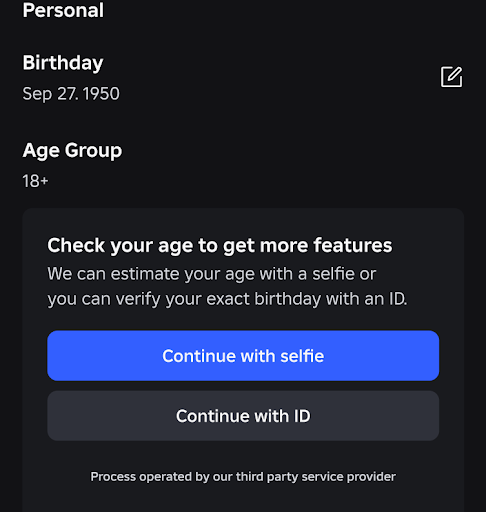
Step 4: Find the birthday field and click or tap the pencil icon next to it. This opens the edit interface.
Step 5: Enter your correct date of birth and confirm. Follow any prompts that appear after you submit the new date.
At this point, Roblox decides whether your requested change can go through immediately, needs a parent to approve it once, or requires ID verification. You’ll see on‑screen instructions for whichever path applies to your account.
To reach this settings page quickly in a browser, you can go directly to the account info settings at https://www.roblox.com/my/account#!/info.
When changing your age triggers extra checks
Not every birthday edit is equal. Roblox treats some scenarios as routine fixes and others as potential abuse.
- Small corrections around your current age — For example, fixing the day or month while keeping the same birth year may be allowed with minimal friction, especially for older users.
- Big jumps to an adult age — If an under‑13 account tries to change its birthday to something like 19 years old, Roblox requires ID verification before the new age can take effect.
- Children’s accounts and parents — A linked parent account can approve certain changes, but Roblox limits this. Parents can only modify their child’s birthday one time.
Once a parent has used that one‑time correction, subsequent birthday changes are typically blocked. That design is meant to allow a single honest fix, not ongoing age manipulation to bypass safety controls.
How ID verification works for age changes
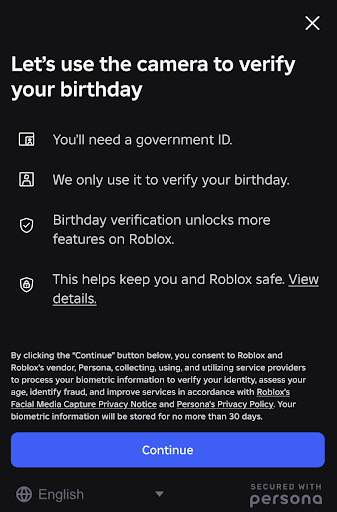
ID verification on Roblox is built for users 13 and older. The flow asks you to scan a government‑issued photo ID such as a driver’s license or passport and usually a selfie so the system can match you to that document.
When a birthday change would move an account into an older age band, Roblox can require this process as proof that the person behind the account is actually that age. The platform’s age verification overview is available at https://en.help.roblox.com/hc/en-us/articles/4407282410644.
Once verified, your account is marked with an age‑verified status, which is also reused for things like voice chat and some 17+ experiences. In cases where your existing birthday was obviously too young, that verification can be used to bring the account’s date of birth in line with reality.
How parental consent and controls fit into age changes
For children, Roblox uses parental accounts to gate sensitive actions, including birthday updates. A parent or guardian can create their own Roblox account, verify their age, and then link it to the child’s account using parental controls.
Once linked, the parent can:
- Approve a one‑time correction of the child’s birthday.
- Configure content maturity levels and what types of experiences the child can access.
- Control chat, friend connections, screen time, and spending limits.
Parental management is centralized under Settings > Parental Controls on the parent’s account. Roblox outlines the parental linking and control flow at https://corp.roblox.com/parental-controls.
Note: Parents can only adjust their child’s birthday once. If that single correction is used on the wrong date, Roblox may not offer another direct change.
Why under‑13 accounts are still hard to “age up”
Roblox has long taken a conservative approach to under‑13 accounts. Many players who set their birth year to the year they signed up — or even something like 2019 or 2020 by mistake — discover that they’re effectively stuck as a very young child on the platform for years.
Historically, support responses to these cases have repeated a few themes:
- The system relies on the date of birth entered during signup.
- Regulatory rules prevent increasing the age on accounts that were created as under 13.
- Support agents cannot manually override chat settings or age bands in those scenarios.
The updated birthday editing and ID checks change this somewhat. Some older players have successfully corrected obviously wrong under‑13 dates by going through age verification or persistent support conversations. Others report still being told to wait until the account naturally turns 13 by the calendar.
The pattern is clear: Roblox is more willing to fix clearly impossible dates for teens and adults than to let children, or adults claiming to be children, rapidly age their accounts without verification.
What to try if your birthday edit is blocked
If you reach the birthday field and can’t change it at all, or the system keeps rejecting your new date, there are only a few legitimate paths forward within Roblox’s rules.
Step 1: Make sure you’re logged into the correct account and have access to its email and any linked parent account. If you’re a child, talk to your parent or guardian first.
Step 2: Attempt the normal edit in Account Info and carefully read any error text or prompts. If the system asks for a parent’s approval, that’s the next step. If it asks you to verify with ID and you are 13 or older, follow that flow.
Step 3: If the interface refuses changes with no clear path (for example, you’re locked as under 13 but are now an adult), contact Roblox support from the official support page at https://www.roblox.com/support. Use the account and privacy categories that best match “incorrect age” or “account info” issues.
Step 4: In your support request, describe the problem clearly, including how the birthday ended up wrong and how old you actually are now. If you are an adult, state that you are willing to verify your identity with a government‑issued ID and selfie if needed.
Step 5: Watch your email for follow‑up. Some users report that different support teams or escalations are more flexible than the initial response, especially when the current birthdate would make it impossible to have legitimately created the account at that time.
Nothing in Roblox’s public documentation guarantees that support will override a locked under‑13 age, even with ID. But the combination of the settings‑page pencil icon, parental consent, and ID verification are now the only official ways accounts are supposed to move between age bands.
How age ties into 17+ experiences and chat
Age changes do not exist in a vacuum. Once your birthday and verification status are correct, several other controls determine what you can actually do on the platform.
- Content Maturity — Under Settings > Privacy & content restrictions, the content maturity slider decides which experience labels you can access. “Restricted” is the highest level and is typically required for 17+ experiences.
- Parental Controls — If parental controls are on, they can override your own maturity settings. To access 17+ content, a parent may need to explicitly allow 17+ experiences in their controls and enter their PIN.
- Voice and chat — Even with the right age, you may have to complete facial age checks or ID verification and then enable features like voice chat in the privacy section.
That means fixing your birthday is often just the first step. If you still see prompts to verify your age for 17+ experiences after a successful edit and verification, check both content maturity and any parent‑level settings that might still be holding the account at a 13+ level.
The safest way to avoid all of this is simple: set your real birthday when you create your Roblox account, and keep parents involved for younger players. Once an under‑13 account is locked into a wrong age, options are limited and heavily constrained by child‑safety rules. For teens and adults with obviously incorrect dates, the newer mix of birthday editing, ID checks, and parental controls at least gives you a structured path to bring your account back in line with reality.