

ARC Raiders arrives with the full modern NVIDIA stack: DLSS 4 with Multi Frame Generation, DLSS Super Resolution, NVIDIA Reflex, ray tracing, and RTXGI global illumination. On GeForce RTX 50 Series GPUs this is not a small quality-of-life upgrade; it is the difference between “high-end” and “absurdly fast” at 4K with path-traced style lighting.
DLSS 4 in Arc Raiders (RTX 50 Series baseline)
Arc Raiders ships with DLSS 4 using Multi Frame Generation alongside DLSS Super Resolution. In NVIDIA’s own testing, at 4K with max settings and ray tracing enabled, this combination multiplies performance by roughly 3.6× on average on GeForce RTX 50 Series desktop GPUs. That uplift is enough to push Arc Raiders into very high frame rate territory even when fully maxed:
| GPU | Resolution / settings | DLSS mode | Indicative frame rate |
|---|---|---|---|
| GeForce RTX 5090 | 4K, max, ray tracing on | DLSS 4 + Super Resolution | Up to ~420 FPS |
| GeForce RTX 5080 | 4K, max, ray tracing on | DLSS 4 + Super Resolution | Over 300 FPS |
| GeForce RTX 5070 Ti | 4K, max, ray tracing on | DLSS 4 + Super Resolution | Over 260 FPS |
| GeForce RTX 5070 | 4K, max, ray tracing on | DLSS 4 + Super Resolution | Over 220 FPS |
On RTX 50 Series laptop GPUs the picture is similar. At 2560×1600 with max settings and ray tracing, DLSS 4 with Multi Frame Generation and DLSS Super Resolution increases frame rates by about 3.2× on average, reaching up to around 320 FPS on a GeForce RTX 5090 Laptop GPU. At 1920×1080 with max settings and ray tracing, the uplift is about 3.1×, with all tested RTX 50 laptops holding at least 240 FPS and the RTX 5090 Laptop GPU peaking near 420 FPS.
Those numbers all assume a recent Game Ready Driver that includes explicit Arc Raiders support. If you are not seeing the DLSS or Frame Generation options in the in‑game menu on an RTX 50 card, installing the current Game Ready package is the first thing to check.
DLSS 4.5 Super Resolution and the transformer model
DLSS 4 establishes the baseline for Arc Raiders on RTX 50 hardware. DLSS 4.5 refines that baseline for all RTX owners by swapping in a second‑generation transformer model for Super Resolution.
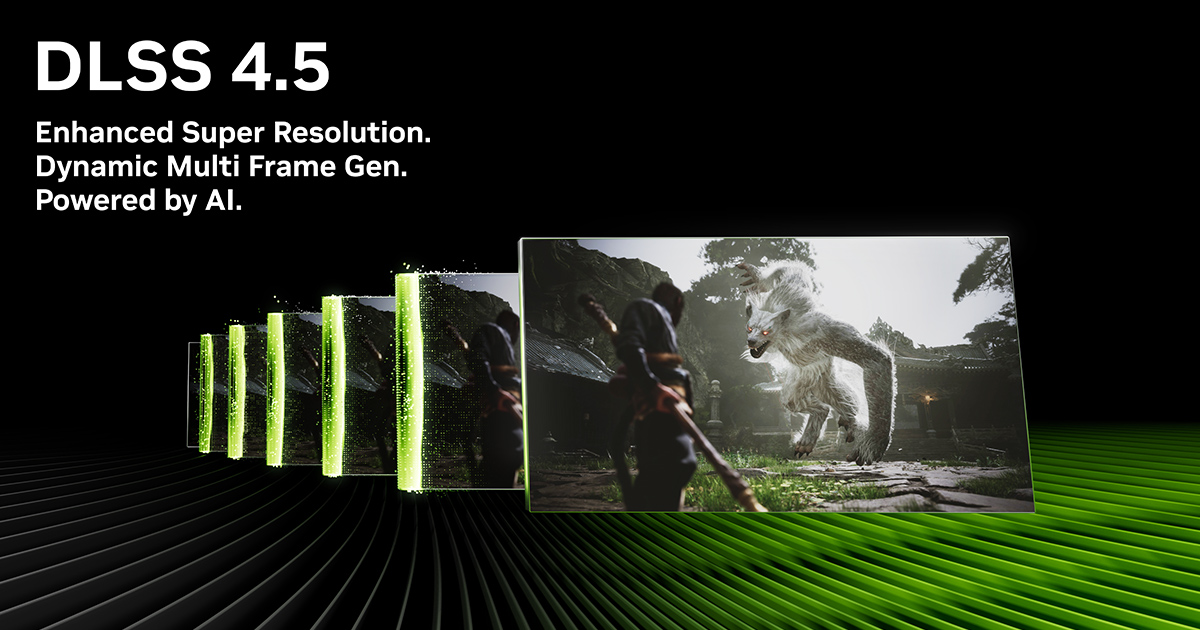
With DLSS 4.5, the upscaler uses a “vision transformer” architecture instead of the older convolutional (CNN) model. In practice that brings several changes that are immediately visible in motion:
- Sharper motion detail on moving objects and camera pans, with much less temporal smear and ghosting compared to older DLSS versions.
- Cleaner fine detail such as thin geometry, foliage, distant structures, and specular highlights, especially at 1440p and 4K where older DLSS builds could look slightly soft.
- More stable sub‑pixel elements like thin wires, signage, and particle effects, which are often present in Arc Raiders’ mechanical enemies and dense spaceport structures.
The transformer model does cost some additional GPU compute. Across recent RTX cards, testing in transformer‑enabled games shows a performance drop typically in the low single digits versus the old CNN model when both are rendering at the same input resolution and quality setting. On a 4080‑class GPU that tends to land in the 3–5 percent range; on lower‑end RTX 30 cards the impact can be a little higher but still modest. In exchange, DLSS Balanced or even Performance often looks closer to the old DLSS Quality output, which can more than compensate for the added overhead.
DLSS 4.5 Super Resolution is not limited to Arc Raiders or to RTX 50 hardware. Every GeForce RTX card can use the transformer model via the NVIDIA App’s override feature, which exposes a “DLSS Override feature – Model Presets” control. Setting that preset to “Latest” at a global or per‑game level tells DLSS‑capable titles to use the newest transformer model that ships with the driver rather than the older CNN network the game originally integrated.
DLSS 4.5 also introduces a new generation of Multi Frame Generation that targets up to 6× effective frame rates on RTX 50 Series GPUs. That is a separate feature from the Super Resolution transformer model and remains exclusive to RTX 50 hardware. For Arc Raiders players on RTX 20, 30, and 40 Series cards, the relevant part of DLSS 4.5 is the Super Resolution upgrade.
How DLSS 4.5 changes Arc Raiders’ image quality
Arc Raiders is visually busy. Its spaceports, skyboxes, and enemy machines pack in thin silhouettes, cables, and reflective surfaces. Older DLSS versions could handle these scenes adequately, but they were prone to:
- Softness around fine detail compared to native rendering.
- Ghosting trails on fast‑moving characters and drones, especially against high‑contrast skies.
- Shimmering in the distance when the camera panned quickly across complex geometry.
With the DLSS 4.5 transformer model, those weaknesses are largely cleaned up. Feedback from early Arc Raiders testing with model “M” at native 4K points to very good clarity and controlled ghosting, although some players describe the default output as a little oversharpened or “overprocessed.” That is consistent with what the transformer model does in other games: it pushes edge definition harder and resolves sub‑pixel features more aggressively, which can emphasize sharpening halos in certain combinations of in‑game and driver‑level sharpening.
If Arc Raiders looks too crisp or artificial with DLSS 4.5 active, the usual fix is to lower any extra sharpening you have applied. That includes:
- Reducing the in‑game sharpening slider if the graphics menu exposes one.
- Turning down or disabling driver‑level sharpening in the NVIDIA Control Panel or NVIDIA App for the Arc Raiders profile.
Once sharpening is tamed, DLSS 4.5’s transformer model generally produces an image that is closer to native resolution in detail and more stable in motion than DLSS 3.x, particularly at DLSS Balanced and Performance modes where CNN‑based DLSS had more obvious compromises.
Enabling DLSS 4 and Frame Generation in Arc Raiders
On RTX 50 Series cards, Arc Raiders exposes the DLSS 4 feature set directly in its video options. If you do not see DLSS Super Resolution or Frame Generation, there are a few practical checks to run.
Step 1: Install the latest Game Ready Driver that lists Arc Raiders support. This is required for DLSS 4 with Multi Frame Generation to be recognized by the game. Use the standard driver installer from NVIDIA’s driver page and perform a clean installation if you have upgraded from much older drivers.
Step 2: Launch Arc Raiders and open the video or graphics menu. In the upscaling or anti‑aliasing section, select DLSS (or DLSS Super Resolution) as the primary anti‑aliasing / upscaling method. Choose a quality level (Quality, Balanced, or Performance) appropriate to your target resolution and frame rate.
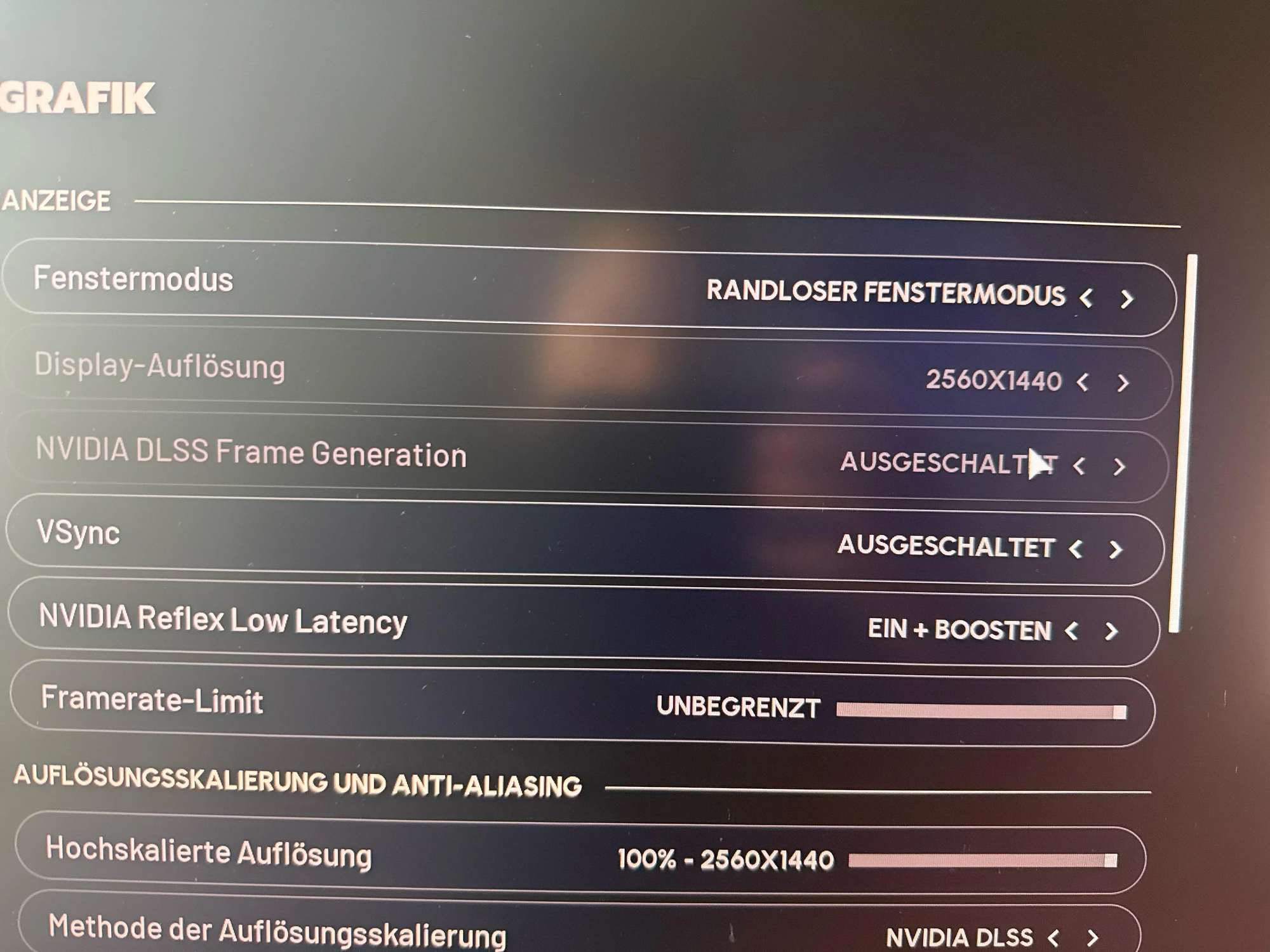
Step 3: With DLSS Super Resolution enabled, look for a separate setting for Frame Generation or Multi Frame Generation. On RTX 50 Series GPUs this should be selectable when you are using a compatible display mode. Enable Frame Generation to allow DLSS 4 to synthesize additional frames between the traditionally rendered ones.
Step 4: Make sure NVIDIA Reflex is enabled in the Arc Raiders settings if it is present. Reflex reduces system latency, which is especially important when using Frame Generation because synthetic frames are built from prior frames and motion data. Reflex helps keep input‑to‑photon delay under control when the GPU is both rendering and generating frames at very high rates.
If the DLSS or Frame Generation options are missing entirely on an RTX 5070‑class or better card, a full driver reinstall using NVIDIA’s clean‑install option or a third‑party display driver uninstaller has resolved the issue for other players. In some cases configuration files can disable RTX features; deleting or regenerating the game’s config directory after backing it up can help Arc Raiders re‑detect supported technologies.
Upgrading Arc Raiders to DLSS 4.5 Super Resolution
DLSS 4.5’s transformer model is delivered through the driver and the NVIDIA App rather than being tied to one game. Once your system has the relevant components, Arc Raiders can take advantage of the new model even if the game itself shipped with an older DLSS DLL.
Step 1: Install the current Game Ready Driver that advertises DLSS 4.5 support. Use the standard installer or GeForce Experience flow and reboot once the installation completes.
Step 2: Install or update the NVIDIA App, which replaces the older GeForce Experience for many DLSS‑related controls. The DLSS override feature lives inside this application, not the classic NVIDIA Control Panel.
Step 3: In the NVIDIA App, open the settings for DLSS overrides. Locate the “DLSS Override feature – Model Presets” control and set it to “Latest.” You can do this globally for all DLSS titles or choose Arc Raiders from the game list and apply the override only there.
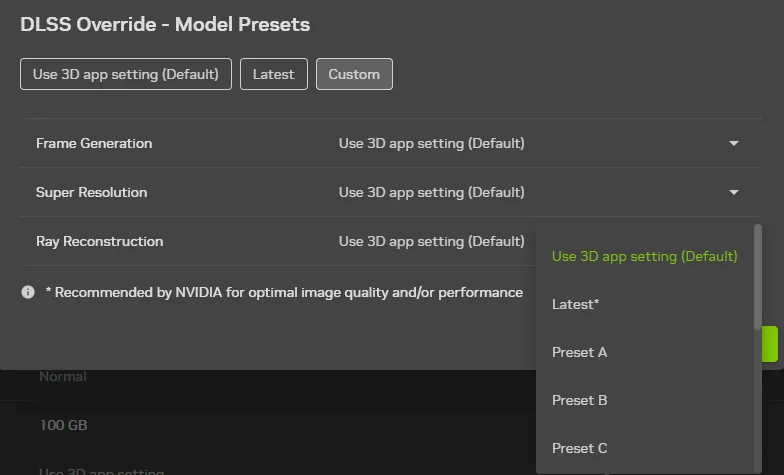
Step 4: Launch Arc Raiders and ensure DLSS Super Resolution is enabled in the game’s options. With the override set to “Latest,” the driver will load the DLSS 4.5 transformer model (such as model “M”) for Arc Raiders instead of the older CNN network.
Once this is in place you do not need to manually copy DLSS DLL files into the Arc Raiders installation folder; the driver and NVIDIA App handle model selection behind the scenes. When new DLSS 4.5 builds ship with future drivers, Arc Raiders can pick them up automatically if the override remains on “Latest.”
Choosing DLSS quality modes for Arc Raiders
With the transformer model active, the usual DLSS quality presets behave a little differently than they did under the CNN model. In most modern titles:
- DLSS Quality with the transformer model is very close to native resolution in perceived sharpness while remaining more stable in motion.
- DLSS Balanced now often looks comparable to or better than the old DLSS Quality preset, freeing up more performance headroom.
- DLSS Performance is still aggressive but noticeably less smeared than before, which matters at 4K on mid‑range RTX hardware.
For Arc Raiders at 4K on a GeForce RTX 5070 or 5070 Ti, DLSS Balanced combined with Multi Frame Generation is a sensible starting point if you want frame rates well into the triple digits without sacrificing too much clarity. On higher‑end cards like the 5080 and 5090 there is enough raw performance to run DLSS Quality with Frame Generation and still exceed 200 FPS at 4K with ray tracing. At 1440p, DLSS Quality or even DLAA (where the input resolution equals the display resolution and DLSS is used purely for anti‑aliasing) can give Arc Raiders a very clean image while Multi Frame Generation lifts frame rates far beyond most monitors’ refresh limits.
On RTX 20, 30, and 40 Series GPUs, you do not get Multi Frame Generation in Arc Raiders, but you can still benefit from the transformer model by enabling DLSS and turning on the DLSS 4.5 override in the NVIDIA App. In that context DLSS Balanced at 1440p is where the transformer model tends to shine, offering near‑native detail with substantially lower render cost.
Latency, Reflex, and high‑FPS Arc Raiders
Driving Arc Raiders at over 200 FPS with DLSS 4 and Multi Frame Generation changes how the game feels as much as how it looks. Multi Frame Generation synthesizes extra frames between traditional ones using motion vectors and history buffers. That does not reduce the time it takes the game engine to simulate a frame, so input latency without additional help could increase if you simply asked the GPU to spend more work on frame generation.
NVIDIA Reflex is designed specifically to address that problem. In Arc Raiders, enabling Reflex alongside Frame Generation reduces render queue depth and coordinates CPU and GPU work more tightly so that input samples are reflected on screen as quickly as possible even when the GPU is producing three or more frames for every one the engine simulates. NVIDIA’s own numbers for Arc Raiders with Reflex show PC latency reductions of up to around 59 percent compared to configurations without Reflex, which is important when fights get busy and you are relying on split‑second dodges and shots.
On RTX 50 cards, DLSS 4’s Multi Frame Generation also benefits from dedicated hardware in the Blackwell architecture that paces generated frames more smoothly. That hardware support helps keep frame pacing consistent when you move from 1× Frame Generation (one synthetic frame per rendered frame) to the more aggressive modes, which can go up to three generated frames per rendered frame on RTX 50 GPUs. Arc Raiders uses the standard DLSS 4 Multi Frame Generation path, so those architectural improvements apply directly.
Arc Raiders is already one of the marquee DLSS 4 titles, used alongside games like Battlefield 6 and ARC Raiders itself in NVIDIA’s own DLSS 4 adoption milestones. With DLSS 4.5 Super Resolution now available for all RTX owners through the NVIDIA App, the game also becomes a good showcase for what the transformer model can do for image quality at 4K and 1440p. On RTX 50 hardware, combining that cleaner upscaling with Multi Frame Generation and Reflex is what lets Arc Raiders move from “playable with ray tracing” to “absurdly high frame rates with everything turned on.”