

Codes in Roblox’s The Forge are redeemed entirely in-game through the settings menu. They are not entered at an NPC, the forge itself, or any external website. Everything happens from the same small text box tucked into the corner of your HUD.
Where The Forge code input lives in the UI
The code box is part of the game’s settings panel:
- The entry point is a gear icon in the top‑left corner of your screen once you’ve loaded into The Forge.
- Inside that settings window is a single text field labeled with a placeholder such as “Type Here”.
- Next to this field sits a Claim button that you press to submit a code.
You never type codes at Sensei Moro, the weapon vendor, the pickaxe shop, or the physical forge. Those NPCs are for quests, forging, and buying or selling gear. All code redemption goes through the settings gear icon.
How to redeem The Forge codes step by step
Step 1: Launch The Forge on Roblox and wait until your character fully loads into the island, with the HUD visible.
Step 2: Look at the top‑left corner gear icon to open the settings menu.
Step 3: In the settings window, locate the code text box near the bottom, usually showing a placeholder such as “Type Here”. Click inside that box so the cursor appears.
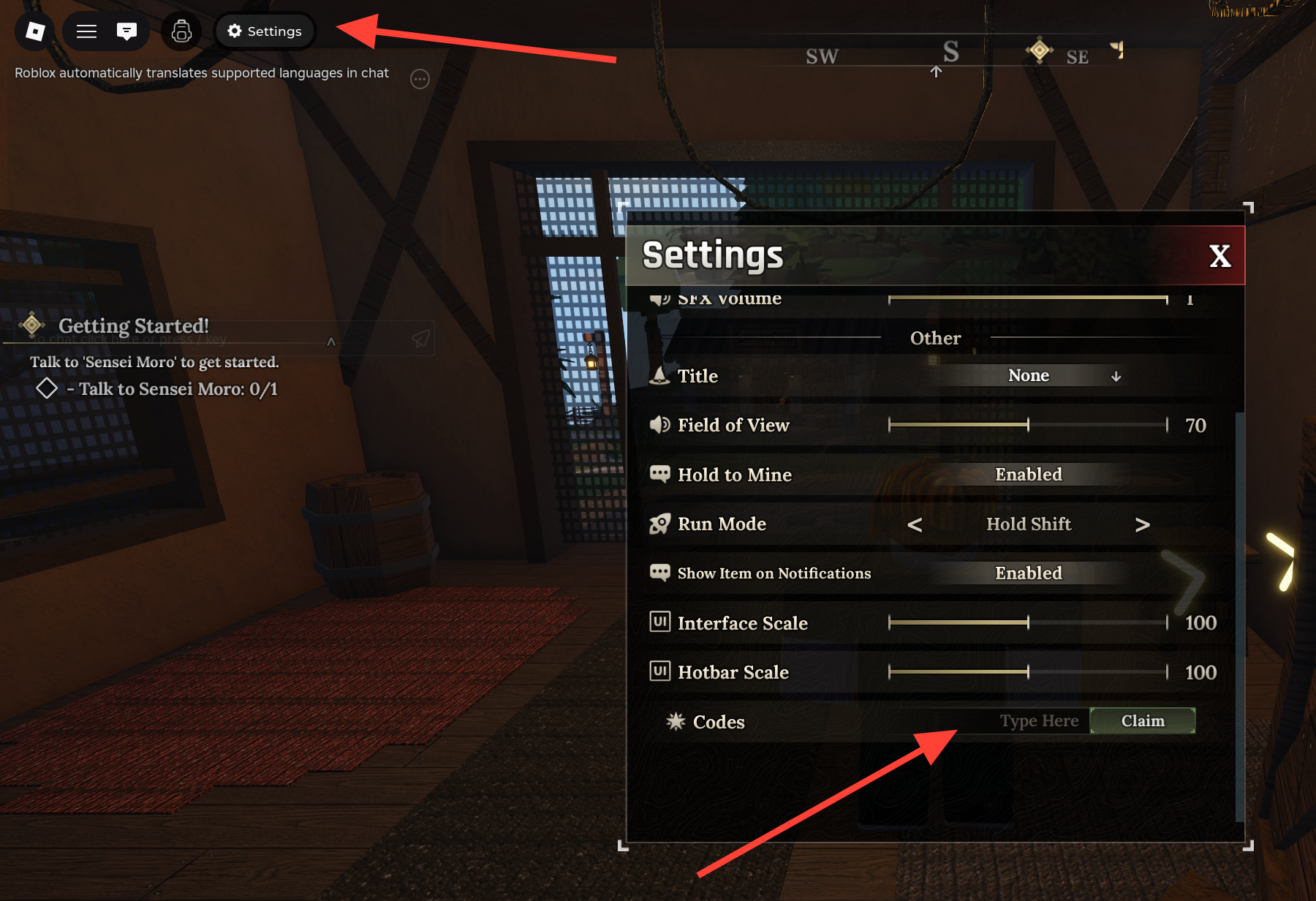
Step 4: Type a valid The Forge code exactly as written, including capitalization, numbers, and punctuation (for example, 300K!).
Step 5: Press the Claim button beside the text box. If the code is valid and active, the rewards are added to your account immediately, such as race rerolls or totems.
Step 6: Repeat Steps 3–5 for each additional working code you want to redeem. Each code can only be used once per account.
What you get from The Forge codes
The Forge uses codes mainly to give early‑game power spikes without forcing you into long grinds. Current and recent codes have focused on three reward types:
- Race rerolls: Extra attempts to roll into a stronger race such as Demon, Golem, or other high‑tier options.
- Luck Totem: A temporary buff item that improves drop chances or overall luck while it is active.
- Miner Totem: A mining‑focused totem that improves ore collection efficiency while active.
Recent examples include milestone codes tied to like counts and player milestones, handing out rerolls in small bundles and occasionally bundling a Luck or Miner Totem with them.
Entering codes correctly so they don’t fail
The Forge is strict about formatting. A single wrong character means the code will not work. Common pitfalls include:
- Missing or adding the exclamation mark at the end of codes that use it (for example, typing
300Kinstead of300K!). - Using lowercase where the code expects uppercase, especially in LIKES-style strings.
- Accidentally adding a space before or after the code when copying and pasting.
When the input is wrong or the code has expired, The Forge displays a “This code does not exist” message in the code bar after you press Claim. That same message can also appear when a code used to work but has been retired, so a cleanly typed code can still fail if it is no longer active.
How to tell if a The Forge code is expired
The game itself only shows a generic failure message; it does not label codes as “expired” inside the UI. Expired codes simply stop granting rewards and trigger the “does not exist” error.
Recent code waves have followed a pattern:
- Launch and beta celebration codes (such as early
RELEASEorBETARELEASE!) were available around release and later disabled. - Like‑milestone codes tied to specific numbers (for example, 5K, 10K, 15K, 20K, 40K likes) ran for a while, then were rotated out in favor of higher‑milestone codes.
Once a code from an older milestone stops working, there is no way to re‑activate it on your account; you need to use currently active codes instead.
Making good use of rerolls and totems once you redeem codes
Redeeming codes is only half the story; using those rewards at the right time matters just as much.
- Race rerolls: Use large bundles of rerolls when you are still early in progression and not heavily invested in one build. Chasing a strong race like Demon or Golem before you sink hours into gear and levels saves time later.
- Luck Totems: Activate these before long mining or enemy‑farm sessions, ideally in areas that drop rare ores or high‑tier essences. The buff window is far more valuable while actively grinding.
- Miner Totems: Pair mining totems with upgraded pickaxes and access to richer ore zones. The extra yield matters most when each ore node is already worth more.
In practice this means: redeem your codes at the forge island, plan a mining or PvE route, then trigger your totems just before you head into the cave or magma areas so no buff time is wasted running around town.
Once you know that every code in The Forge runs through the small gear icon in the top‑left corner, it becomes painless to plug in new milestones as they arrive. Keep an eye on fresh codes, enter them exactly into the settings text box, and then line up your rerolls and totems with the moments where they will actually shift your run: right before a race reroll streak, a forging binge, or a long grind in the mines.