

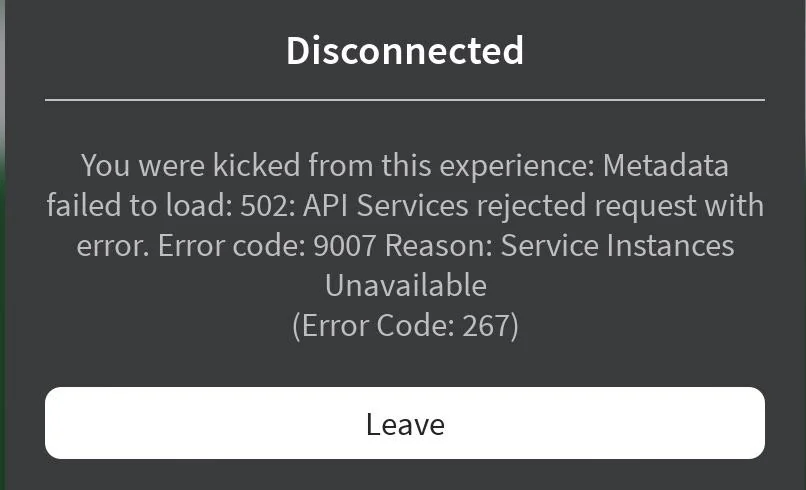
Roblox error code 9007 arrives with a JSON-style message:
{"code":9007,"message":"Service Instances Unavailable"}When this appears in a browser or client, it is not a local bug on your PC, phone, or network. It is a signal that Roblox’s own backend services are failing to respond correctly. In December 2025, this code surfaced during a major, global outage that broke most of the website, impacted core APIs, and disrupted live experiences.
What Roblox error 9007 actually means
The 9007 error is a generic service failure from Roblox’s platform. It indicates that the backend “service instances” handling your request are unavailable or unhealthy. During the December 2025 incident, that translated into:
- Home, catalog, and many other pages hanging on infinite loaders or returning the 9007 JSON error.
- Datastores and other core APIs failing, so experiences could not reliably load or save player data.
- Game joins getting stuck on loading screens when they depended on DataStore reads to finish initialization.
In other words, 9007 is a server-side problem. Restarting your router, clearing cache, or reinstalling Roblox does not fix it when the underlying platform is degraded.
How the December 2025 9007 outage unfolded
Late on December 18 (US time), player complaints spiked as Roblox.com became unreliable. Many users could not reach the main website at all, while others saw error 9007 for key routes such as the home page. Reports clustered around three symptoms:
- Website access failures, with around half of users unable to load roblox.com.
- Server connection problems that blocked logins and gameplay.
- In‑game disruptions, including mid‑session disconnects and experiences failing to load data.
Developers quickly noticed that DataStores were not working. Live experiences that tried to read or write player profiles started returning errors. Some projects in Studio accidentally overwrote valid data with empty or partial saves because error handling logic assumed the platform was healthy.
For a short window, the main Roblox status page still showed everything as “operational” while the outage was clearly affecting users globally. Status entries were updated later to acknowledge an issue preventing users from accessing the platform and to note that engineers were investigating.
Why error 9007 is dangerous for player data
When error 9007 is present, the visible problem is obvious: you cannot load the website or join games reliably. The less visible problem is data integrity.
During the 2025 outage, multiple things happened at once:
- Data load attempts timed out or failed, so games sometimes initialized players with default data.
- Save operations either failed outright or wrote incomplete state.
- Some developers, unaware of the outage, saved from Studio or live servers, unintentionally overwriting good data with bad.
That combination creates a real risk of permanent player data loss. Once a corrupted or empty save is committed and then synced across servers, rolling it back is extremely difficult for most creators.
For players, this can look like progress being reset or cosmetics and currency disappearing, only to reappear again later when services partially recover. For creators, it can result in a fragmented player base where some profiles are intact and others are unrecoverable.
What players should do when they see Roblox error 9007
When 9007 shows up, there is very little you can fix yourself, but there are steps that reduce the chance of losing progress.
Step 1: Treat 9007 as a platform outage, not a local issue. If the error appears on both web and app, or multiple people report it at the same time, assume Roblox’s servers are having trouble rather than your device or connection.
Step 2: Avoid joining data‑heavy experiences. Experiences that save inventory, levels, currencies, or cosmetics are the most at risk when DataStores and related APIs are unstable. If you insist on playing, stick to games that do not rely on persistent data.
Step 3: Do not make purchases until everything is stable. Robux purchases, game passes, and dev product buys are not worth the risk while core services are flaking out. Transactions can hang in limbo or fail to propagate correctly across systems.
Step 4: Wait, then retry periodically. Outages like the December 2025 event are handled by Roblox’s infrastructure and engineering teams. The practical move for players is patience: give it time, then refresh the page or relaunch the app every so often to see if normal behavior has returned.
Note: In some large incidents, parts of the platform recover before others. The mobile app or the standalone PC launcher can sometimes connect while the main website still struggles. Even if you can join, be cautious about playing experiences that rely heavily on saving.
What Roblox creators and developers should do during a 9007 outage
For creators, a 9007 event is primarily a data‑safety problem. The safest posture is defensive: assume any write to persistent storage can fail or behave unexpectedly while the outage is active.
Step 1: Pause non‑critical updates and testing. Avoid pushing new releases, schema migrations, or heavy changes to DataStore keys while services are failing. Testing from Studio that triggers live saves can be as risky as production traffic.
Step 2: Consider gracefully shutting down experiences that depend on DataStores. If your game cannot function correctly without reliable saves, temporarily close servers or gate new joins with an in‑experience notice explaining the situation. It is better to frustrate players briefly than to risk their progress.
Step 3: Harden your DataStore handling for next time. The December 2025 outage highlighted several patterns that help:
- Fail closed on missing data. If a load returns nil or an error, do not immediately treat that as “new player.” Show a warning, retry, or ask the player to rejoin instead of saving a blank profile.
- Defer writes during platform‑wide errors. If you detect repeated DataStore failures in a short window, temporarily stop saving progress and clearly warn players in‑game that saves are suspended.
- Log aggressively. Track failure codes, timestamps, and affected keys so you can analyze impact after the incident and respond to player support requests with more detail.
Step 4: Resume gradually once services improve. When Roblox marks the incident as mitigated and your own telemetry shows a return to normal, re‑enable saving and re‑open any temporarily closed experiences. Monitor for a while; partial regressions are common as large platforms scale services back up.
How 9007 relates to Roblox’s status page
During the 2025 outage, there was an uncomfortable gap between what users experienced and what the official status page initially showed. Many developers noted:
- Status indicators were still “operational” while they were unable to access key services.
- Timestamps like “last updated seconds ago” did not reflect the duration of the disruption.
- Specific components such as DataStores lagged behind reality in their displayed status.
This mismatch led to calls for a more transparent and precise status system, including clear UTC timestamps and better granularity for creator‑critical services. While that is outside an individual developer’s control, it does shape how you should treat 9007: prioritize what you and your players are observing in practice over what a dashboard claims in the first minutes of an incident.
Why some Roblox pages and apps work while others show 9007
During the December 2025 incident, not every surface failed in the same way. Creator Hub and some individual experience pages stayed reachable when the main website and many APIs did not. This uneven pattern is typical of large, distributed systems.
A few reasons this happens:
- Different clusters and microservices handle different parts of the site, so a failure can hit user profiles and the home feed while leaving a creator dashboard online.
- Caches can keep some content serving for a while even when origin services are unhealthy.
- Failover and mitigation work happens gradually, so certain regions or endpoints recover before others.
For users, the practical implication is simple: partial functionality does not mean the outage is over. If you are still seeing 9007 on any major route or experiencing datastore errors in experiences, keep treating the platform as unreliable until everything is stable for a sustained period.
How error 9007 compares to other platform errors
Error codes on online platforms often map to broad categories of failure. Code 9007 on Roblox is part of the “backend/service unavailable” family, similar to how some other apps use 5xx HTTP codes for server errors or dedicated numeric codes for service outages. In other ecosystems, 9007 has appeared as a save or sync failure as well, reflecting the same underlying concept of a critical backend not being able to complete a request.
The common thread is that 9007 is not a malformed URL, a bad cookie, or a misconfigured local client. It is a signal that the system responsible for your request is down, overloaded, or otherwise unreachable.
When 9007 appears on Roblox, the most effective response is restraint. For players, that means holding off on play sessions that depend on progress saving or on spending Robux. For creators, it means pausing writes, guarding data paths, and waiting until services and status updates converge on a sustained return to normal. Outages are inevitable on platforms of this scale; minimizing damage during them is where individual choices matter most.