

Chat on Roblox now runs through a new set of rules built around mandatory age checks and strict limits on how different age groups can communicate. The change is global and applies anywhere Roblox chat is available.
Age checks are now required to use any Roblox chat
Roblox now requires every user who wants to access chat to complete an age check. You can still play experiences without doing it, but text and voice communication are locked until the age check is finished.
The default method is Facial Age Estimation. You open the Roblox app, grant access to your device camera, and follow on-screen instructions to capture your face. The image or video is processed by Roblox’s age-assurance vendor Persona and then deleted immediately after processing.
Users aged 13 and older can choose an alternative route and complete ID verification instead of a face scan. Both methods are meant to confirm an age range, not a precise birthdate.
Age checks are described as “optional” at the account level, but they are now mandatory for chat. If you do not complete an age check, all chat features remain disabled.
How Roblox age groups work after the age check
Once the age check is complete, Roblox places the account into one of six chat age groups:
| Age group label (chat) | Approximate ages |
|---|---|
| Under 9 | 0–8 years |
| 9–12 | 9–12 years |
| 13–15 | 13–15 years |
| 16–17 | 16–17 years |
| 18–20 | 18–20 years |
| 21+ | 21 years and older |
These groups are specifically for chat access and may differ from how age ranges are used in other Roblox products.
Who can talk to whom under age-based chat
The main rule is that users are generally limited to chatting with people in a similar age band.
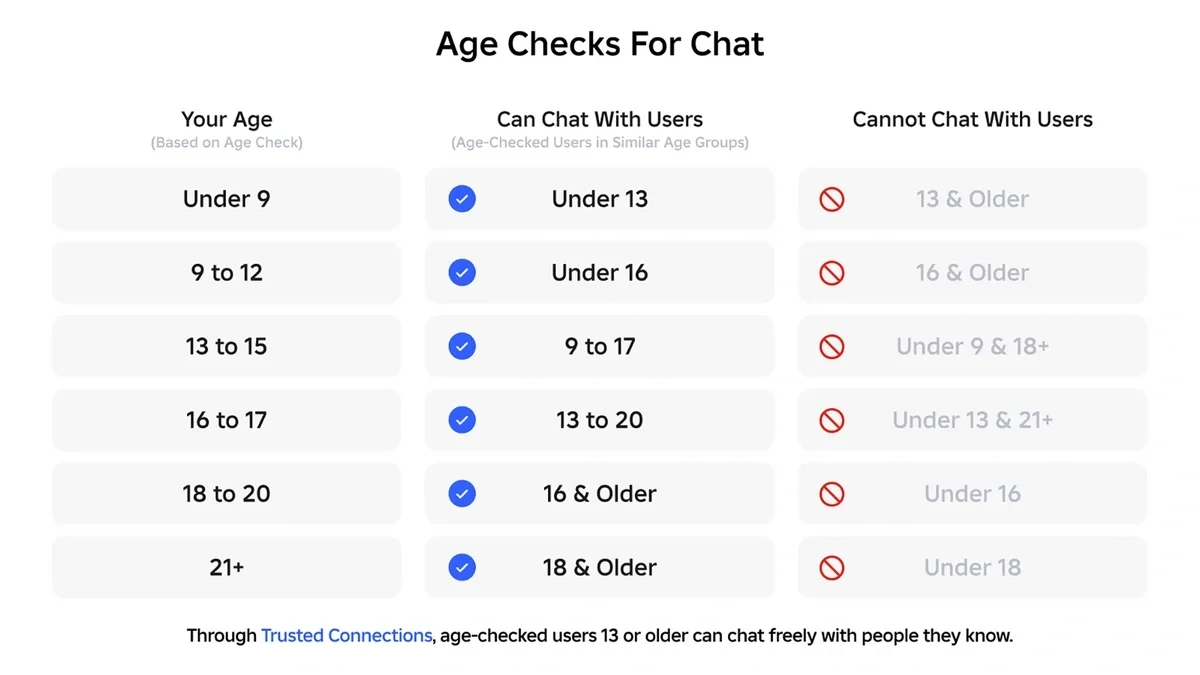
By default, each age group can chat with:
- Users in the same age group
- Users in the group directly below
- Users in the group directly above
For example, a user in the 9–12 group can chat with other 9–12 users, with Under 9 users, and with 13–15 users. A user in the 18–20 group can chat with 16–17, 18–20, and 21+ users.
The system is designed so that children under 16 are not able to communicate with adults by default. In practice, that means adults are not allowed to initiate or engage in chat with younger teens and children unless there is a specific, permitted connection type.
Chat defaults and parental consent for younger children
Roblox now takes a more restrictive stance on younger users’ chat access:
- Under 9: Chat is off by default. A parent or caregiver must provide consent after an age check before any chat features are enabled.
- Under 13: Even when chat is allowed, Roblox applies strict text filtering that blocks inappropriate content and attempts to share personal information.
Parents can review their child’s age-check status, adjust the recorded birthday where appropriate, and manage communication settings through Roblox’s parental controls dashboard at https://roblox.com/families.
Trusted Connections and family chat
The new system is built to favor age-similar communication, but Roblox also recognizes that families and close friends often span age groups.
- Trusted Connections: Age-checked users who are 13 or older can designate people they know as Trusted Connections. Within these connections, they can chat more freely, even if they fall into non-adjacent age groups.
- Future updates: Roblox is working on additional ways to let younger children chat directly with parents and siblings across age groups while keeping the broader protections in place.
Even with Trusted Connections, the broader content rules still apply, including chat monitoring and filtering.
What happens if the age estimate seems wrong
Age estimation is not treated as a one-time, unchangeable result.
- Appeals: If a user or parent believes the assigned age group is incorrect, they can file an appeal. The account can then be re-verified using alternative methods, such as ID verification or updated parental information.
- Ongoing checks: Roblox monitors behavioral signals to detect accounts that appear significantly older or younger than their current group suggests. Those accounts may be asked to repeat the age check.
Roblox also maintains customer support channels and an appeal process for users who need help resolving age-check issues, accessible through the main Support site at https://www.roblox.com/support.
What chat features are and are not allowed
Alongside age-based access, Roblox enforces long-standing communication rules across chat:
- All chat is monitored: Text and voice messages are scanned for harmful or policy-violating content so that problematic messages can be blocked or removed.
- No image or video sharing in chat: Roblox does not allow users to send images or videos through chat, removing a common path for abuse.
- Limited link sharing: Sharing most external links through chat is already restricted, with additional limits on social media links in experiences and on profiles being phased in.
These communication rules sit on top of the broader Roblox Community Standards, which define what is considered harassment, sexual content, hate content, or other prohibited behavior across the platform.
Content moderation and reporting stay in place
The new chat rules do not replace Roblox’s existing safety systems; they add another layer.
- Automated and human moderation: Uploaded content such as images, audio, and video is scanned before it appears on the platform, and reported content can be escalated to human review.
- Report Abuse: Every user can report concerning messages, experiences, or behavior using the Report Abuse tools. These reports feed into Roblox’s moderation workflows.
- Appeals for moderation actions: Users can request a review of moderation decisions that affect their accounts or content.
These systems are designed to work together with age-based chat, parental controls, and communication limits to reduce contact between adults and children and to keep abusive content from spreading.
How to complete a Roblox age check
If you or your child want to use chat, the basic flow looks like this:
Step 1: Open the Roblox app on a supported device and sign in to the account that needs chat access.
Step 2: When the age-check prompt appears, start the process and confirm that you want to use your device camera for Facial Age Estimation.
Step 3: Follow the on-screen instructions to align your face and capture the required image or short video. Hold the device steady until the capture is complete.
Step 4: Wait for the age check to process. This usually takes a short time. Once it finishes, the account will be placed into one of the six age groups, and eligible chat features will unlock automatically.
Step 5: If the user is under 9 and a parent wants chat enabled, the parent or caregiver should log in to the parental controls dashboard at https://roblox.com/families to provide the necessary consent.
For detailed troubleshooting or region-specific requirements, Roblox maintains an age-check help article that can be reached through the Help Center at https://en.help.roblox.com.
The end result of these changes is simple at the user level: no age check, no chat; and once the age check is done, who you can talk to is defined by your age group, with narrow exceptions for trusted relationships and future family features. Everything else — filters, monitoring, parental tools, and community rules — remains in force around that core.