

Crossplay is on by default in Call of Duty: Black Ops 7, mixing PlayStation, Xbox, and PC players in the same lobbies. If you want to avoid certain platforms, or keep matchmaking console-only, you have to dig into some specific settings — and what you can change depends entirely on where you play.
Black Ops 7 crossplay options by platform
| Platform | Where you change it | Available modes | Crossplay options |
|---|---|---|---|
| PlayStation 4 / PlayStation 5 | In-game: Settings → Account & Network |
Multiplayer Unranked, Multiplayer Ranked, Warzone Ranked | On, On (Console only), Off |
| Xbox One / Series X|S | System: Settings → Online Safety & Family |
All games on the console | Allow or Block cross-network play |
| PC (Steam/Battle.net) | None | All online modes | Crossplay always on |
On PlayStation you get fine-grained control per mode, Xbox hides crossplay behind system-wide privacy settings, and PC doesn’t offer a switch at all.
Turn off crossplay in Black Ops 7 on PlayStation
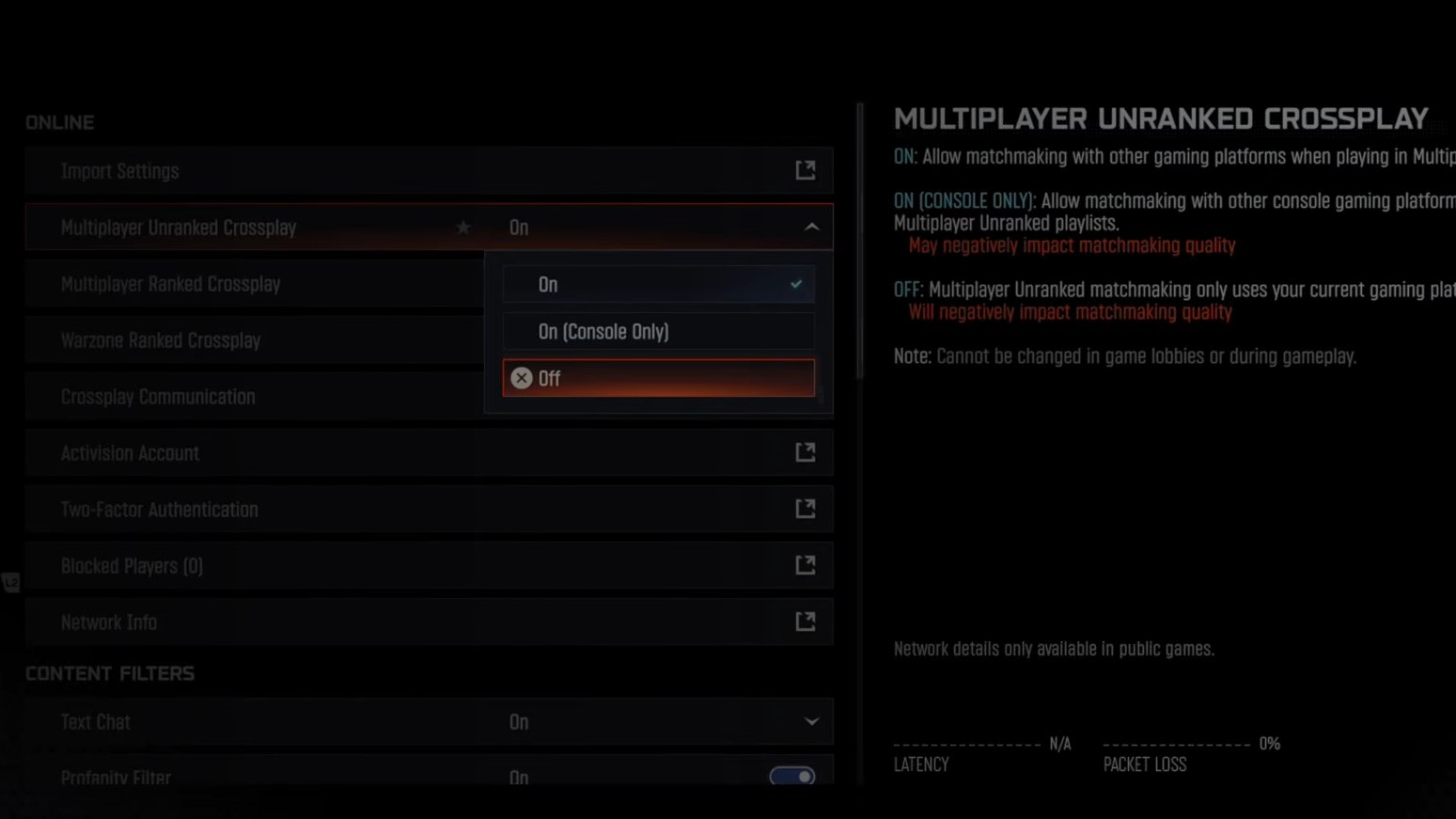
On PS4 and PS5, Black Ops 7 exposes crossplay directly in its own settings, and you can set different rules for casual multiplayer, ranked, and Warzone ranked.
From any lobby screen:
- Press the Options (or Menu) button to open the launcher overlay.
- Move to the Settings gear icon.
- Open Account & Network.
- On the right, find:
- Multiplayer Unranked Crossplay
- Multiplayer Ranked Crossplay
- Warzone Ranked Crossplay
- Select the mode you want to change and choose one of:
- On – match with every platform, including PC.
- On (Console only) – match only with other consoles (PlayStation + Xbox), no PC.
- Off – match only with your current platform (PS4 or PS5).
That’s enough to effectively “turn off” crossplay in Black Ops 7 on PlayStation: either completely (Off) or just for PC (On (Console only)).
Turn off crossplay in Black Ops 7 on Xbox
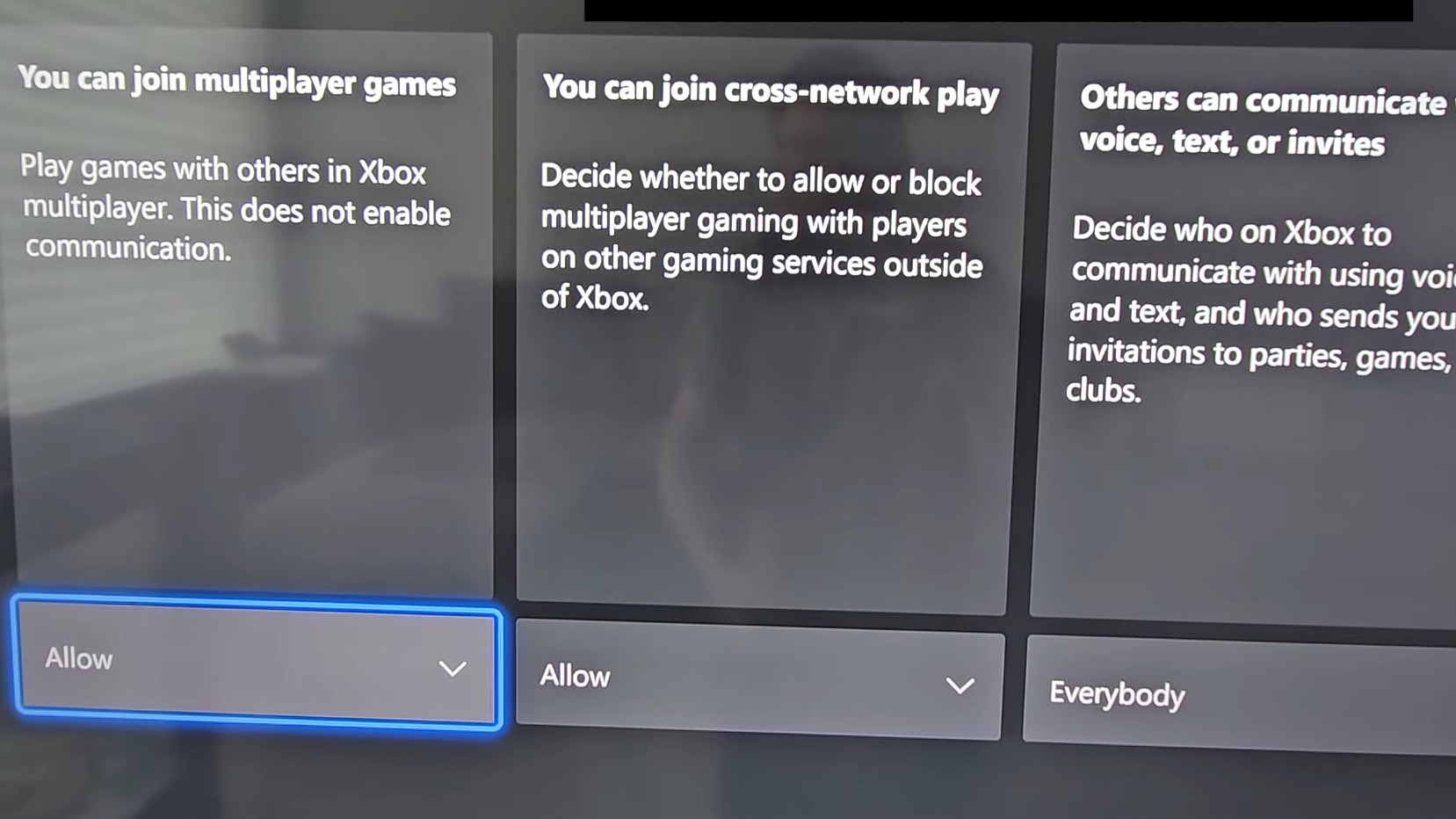
On Xbox, Black Ops 7 does not have its own crossplay toggle. The game follows your console’s system-wide “cross-network play” setting, so changing this affects every online game, not just Black Ops 7.
To block crossplay on Xbox One or Xbox Series X|S:
- Close Black Ops 7 if it’s running.
- Open the Xbox Settings app from the dashboard.
- Go to Online safety & family.
- Choose Privacy & online safety.
- Select Xbox privacy.
- Open View details & customize.
- Go to Communication & multiplayer.
- Find You can join cross-network play and change it from Allow to Block.
Once this is set to Block, your Xbox stops joining cross-network lobbies, so Black Ops 7 will only match you with players on the Xbox network.
To restore crossplay later, repeat the same path and switch You can join cross-network play back to Allow.
Change Black Ops 7 crossplay mode-by-mode on console
On consoles, Black Ops 7 lets you handle crossplay differently for specific multiplayer categories. That’s most visible on PlayStation, where three separate entries appear under Account & Network.
| Mode | What it controls | Typical use |
|---|---|---|
| Multiplayer Unranked Crossplay | Standard 6v6 and other casual playlists | Turn to Console only if you want less PC overlap in regular lobbies. |
| Multiplayer Ranked Crossplay | Ranked competitive multiplayer | Some players keep this fully On to minimize queue times. |
| Warzone Ranked Crossplay | Ranked battle royale mode | Selecting Console only is often used to avoid PC in high-stakes matches. |
Each entry uses the same three-way selector: On, On (Console only), or Off. You can, for example, run console-only in casual multiplayer while leaving full crossplay enabled in ranked to keep queues healthy.
Can you turn off crossplay on PC in Black Ops 7?
No. On PC, Black Ops 7 does not include a crossplay toggle in its menus, and there is no launcher-level switch to disable it. PC players are always in the shared cross-platform pool for multiplayer and Warzone.
That means:
- You cannot restrict lobbies to PC-only.
- You cannot avoid console players or aim assist by changing any in-game setting.
- The only way to control who you play with is through your party (inviting friends) and matchmaking region.
PC still benefits from cross-progression via your Activision account, but crossplay itself is mandatory.

Crossplay behavior and trade-offs
Changing crossplay in Black Ops 7 is mostly about choosing where you want to sit on the spectrum between fairness and convenience.
- Keeping crossplay fully on gives you:
- Faster matchmaking, especially at odd hours or in niche modes.
- More consistent lobbies in ranked and Warzone.
- Access to friends on every platform in the same party.
- Console-only crossplay reduces exposure to PC players, which many console players use to:
- Avoid perceived mouse-and-keyboard advantages.
- Limit encounters with obvious PC-based cheating tools.
- Platform-only (full off) gives the most controlled environment but:
- Can slow down matchmaking.
- Can produce higher ping or smaller lobbies for some regions.
- Prevents playing with friends on any other system.
There isn’t a single “correct” setting. If you mainly care about smooth queues and don’t notice many issues with mixed-platform lobbies, leave crossplay on. If you want stricter control over who you face and you play on console, use Console only or turn it fully off for the modes where that matters to you most.
Once you’ve adjusted the settings that match your tolerance for wait times and opponent mix, they persist between sessions, so you only need to revisit them when you switch modes or platforms.