

Hytale treats usernames as unique global identifiers. There is only one instance of each name across the entire game, and the team has put specific systems in place to handle early reservations, scalping, and later changes.
For anyone trying to secure a name before or during early access, it helps to understand how Hytale accounts, reservation tokens, and game profiles all fit together.
How unique usernames work in Hytale
Hytale usernames are globally unique. If one player claims Bob, nobody else can use that exact name. There is no extra discriminator tag system like the four-digit codes used on some chat apps.
Usernames are tied to a player’s Hytale account and then to a specific game profile. The same account can have profiles, but each username can only exist once in the overall system.
The team has committed to reclaiming names that are clearly being squatted for resale, ransom, or to block others. The Hytale FAQ makes it clear that usernames held for trading, extortion, or similar abuse can be taken back under the Terms of Service and EULA.
Create a Hytale account before reserving a username
Before doing anything with usernames, you need a Hytale account.
Step 1: Go to the main Hytale site at hytale.com and choose the “Register” option, or go directly to the registration page at accounts.hytale.com/registration. Use either a linked app (such as a Google account) or an email address.
Step 2: Set a secure password and make sure you have access to the email address you submit. This address will be used for verification, security notifications, and any reservation emails sent later.
Step 3: Enter your age. Hytale accounts are restricted to users who are at least 13 years old.
Step 4: Complete the CAPTCHA check to confirm that the registration is not automated.
Step 5: Read and accept the Hytale Privacy Policy and Terms of Service to continue the process.
Step 6: Open the verification email sent to your inbox and click the confirmation link. If it does not appear after a few minutes, check spam or junk folders and use the “Resend email” option once if needed.
Once the confirmation link is used successfully, the browser redirects to an account details page and the account is ready for game purchases and username management.
Two ways Hytale usernames are reserved
Hytale uses two main mechanisms for early name reservations: one-time reservation tokens and reservations made during pre-purchase.
1. Reservation tokens from newsletters and early signups
Some players received a one-time username reservation token by email. These were sent to people who had previously signed up for the Hytale beta or subscribed to official Hytale or Hypixel newsletters.
The token lets you reserve a username before buying the game. The token itself is single-use and is tied to the account that redeems it.
Step 1: Log into your Hytale account at accounts.hytale.com/login.
Step 2: Open the name reservation link from the token email. In many cases, a “Create account” or similar button leads back into the Hytale account system with the token applied.
Step 3: In the reservation interface, enter the username you want, following the format rules detailed later. Submit the form to attach your token to that name.
At this stage, the username is held for you but is not yet linked to an active game profile. It must still be claimed after you pre-purchase Hytale and create a profile.
Note: Official support documentation states that unclaimed reserved usernames will be released in early February 2026. If you have a token-based reservation, you need to complete your purchase and attach the name to a profile before this window closes or the name can go back into the pool.
2. Reserving a username through pre-purchase
Players who never received a token still have a path to lock in a username by pre-purchasing the game.
Step 1: Log into your Hytale account and buy the game through the official store at store.hytale.com.
Step 2: When the purchase goes through, the account receives a game profile with a temporary username. This placeholder can be changed once per cooldown period.
Step 3: After payment, open your account dashboard and go to the Game Profiles section. There you will see the new profile with its temporary name.
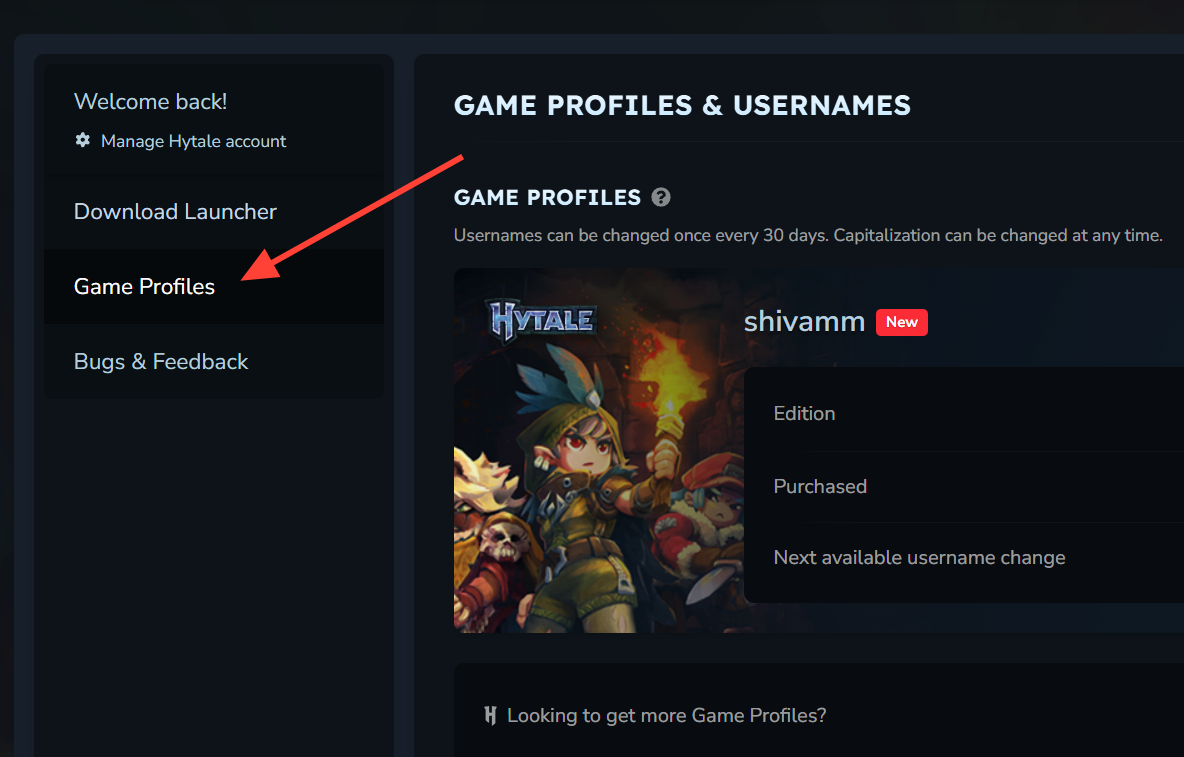
Step 4: Use the profile controls to change the username to the name you want, provided it is available and meets formatting rules. Once confirmed, that username is now tied to your profile and cannot be claimed by others.
Both token reservations and pre-purchase-based reservations converge at the profile level. The name only becomes truly active and safe from reuse once it is applied to a specific profile.
Claiming a token-based reserved username after purchase
If you already reserved a username with a token and later buy Hytale, you still need to apply that reserved name to your game profile.
Step 1: Complete your Hytale purchase while logged into the same account that used the reservation token. This creates a new game profile tied to the account.
Step 2: In your account interface, open the profile management area and select the new profile.
Step 3: When prompted to choose a username, pick your reserved name from the options. You can also decide not to use it and instead select a different available name.
Step 4: Adjust capitalization if you care about how the name is displayed. Capitalization changes are allowed at this stage.
Step 5: Click “Apply reserved username” to finalize the link between the reserved name and your profile.
Once this is done, that username is no longer a pending reservation; it is fully active and owned by that profile. If you never complete this step, the reserved name can eventually be released, as noted for early February 2026.
Changing or setting your Hytale username on an existing profile
After purchasing, you can still adjust your username, whether you had a token or not.
Step 1: Log into your Hytale account and open the account menu in the top-right corner.
Step 2: Choose the “Game Profiles” section in the left-hand navigation. Every game license on your account appears here with its current username.
Step 3: Select the profile whose name you want to change, then use the “Change Username” option.
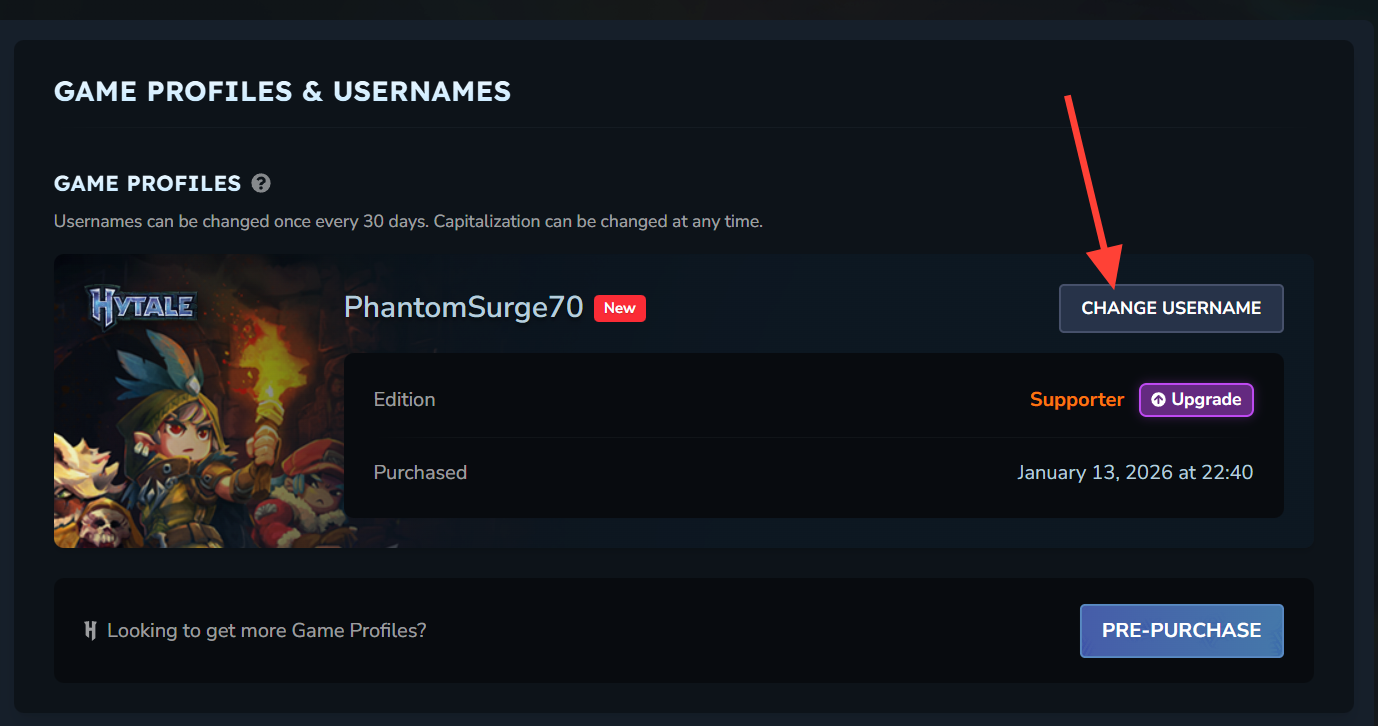
Step 4: Enter either your reserved name (if it is not yet applied) or any new name that meets the rules and is not already taken. Confirm the change to lock it in.
Once this change is confirmed, that profile will carry the new name and the old one returns to the pool, subject to any internal policies on releasing previously used usernames.
Hytale username rules and limitations
Hytale enforces several constraints on usernames to keep them readable, safe, and fair.
Format and character requirements
Hytale usernames follow a simple formatting standard:
- Length: 3 to 16 characters.
- Allowed characters: letters, numbers, and underscores.
- Not allowed: spaces or other special characters.
Names that break these rules will not be accepted by the reservation or profile systems.
Name change cooldown
Full username changes are rate-limited.
After changing a username on a game profile, you must wait 30 days before changing it again. This cooldown applies to actual name content changes, not cosmetic edits.
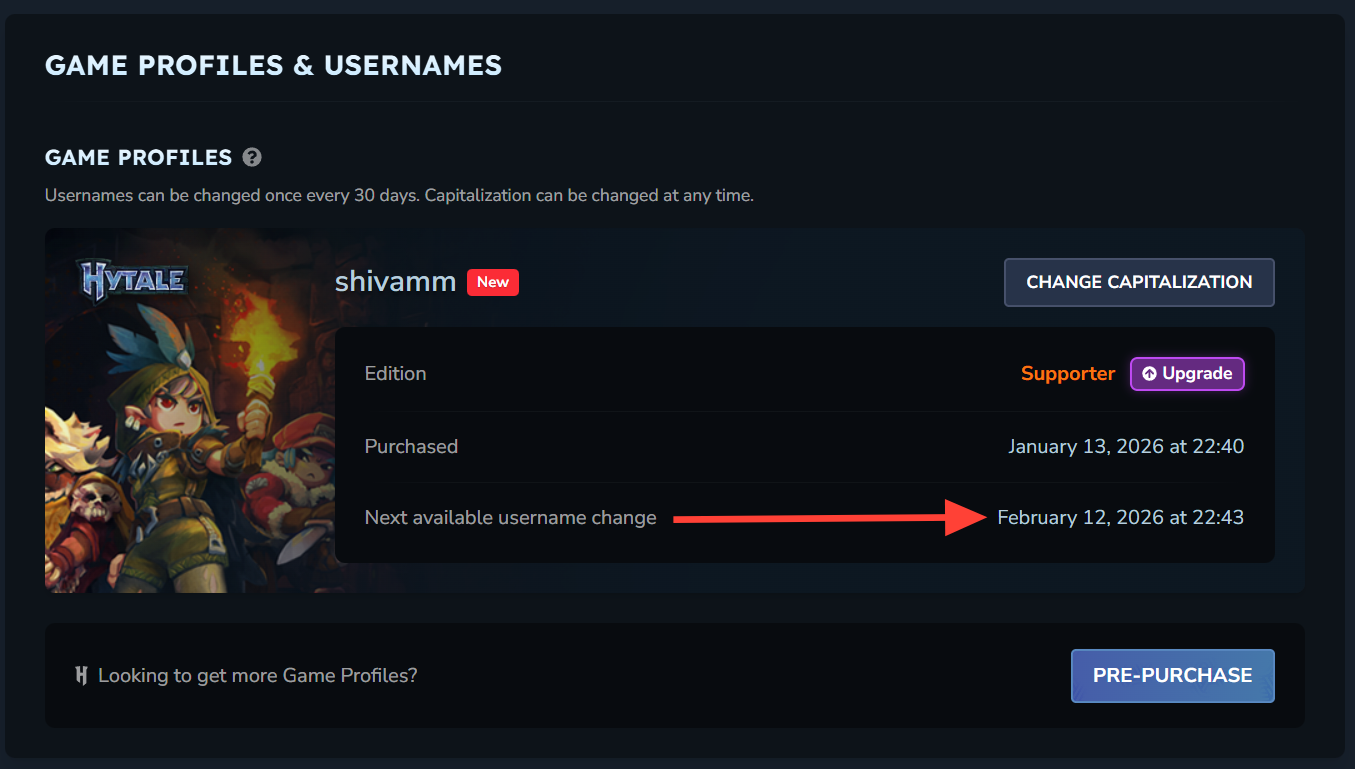
Capitalization changes are treated differently. Adjusting only the casing — for example, switching from feran to Feran — does not trigger the cooldown and is handled through a separate action.
Reservation ownership and release
Reservations and active usernames are not the same thing.
A name reserved with a token is attached to an account, but it does not become fully yours until you attach it to a paid game profile. A name picked during pre-purchase flows straight to a profile and is active immediately once confirmed.
Unclaimed reserved names can be released over time. The current schedule sets early February 2026 as the point when unclaimed reserved usernames from the initial token wave are returned to the pool. After that date, those names can be claimed by any player meeting the usual conditions.
Terms of Service and anti-scalping enforcement
Hytale’s policies explicitly target username scalping and related abuse. The studio reserves the right to reclaim usernames that are held solely for resale, ransom, or to block specific individuals from getting their names.
That policy is intended to protect both average players and well-known creators from having to buy back their own online identities. It also discourages automated hoarding of short or brandable names.
In practice, that means a name being technically available is not the only factor. If a pattern of behavior clearly violates these rules, the team can step in and move a username off an abusive account.
Changing capitalization without triggering cooldown
If you are satisfied with the characters in your username but want a cleaner look, Hytale lets you change capitalization separately.
Step 1: Log into your Hytale account and open the Game Profiles section.
Step 2: Pick the profile whose display style you want to tweak and choose the “Change Capitalization” option.
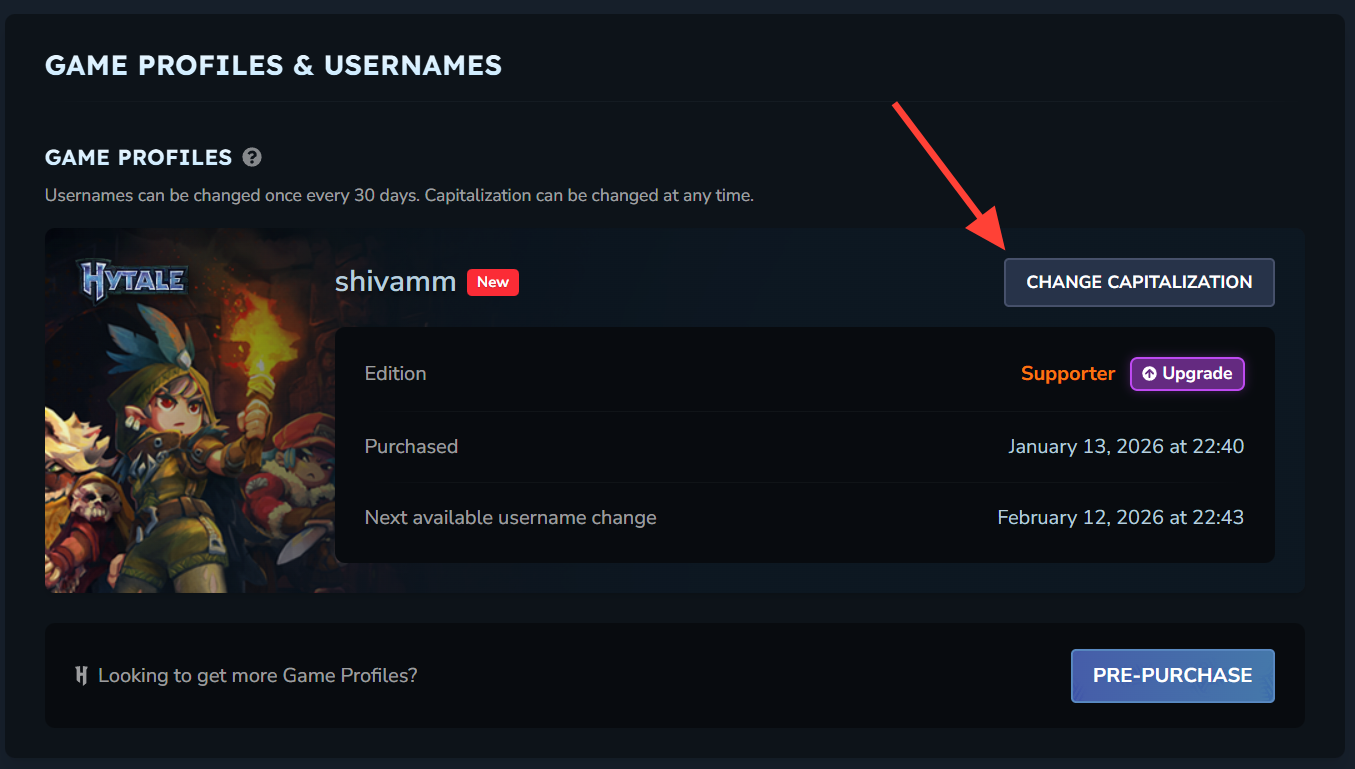
Step 3: Edit the casing of each letter as you prefer, then save your changes. The underlying name string stays the same for uniqueness checks.
Because this action does not alter the actual sequence of characters, it does not start the 30-day cooldown timer.
Securing a Hytale username is mostly about timing and understanding how accounts, tokens, and profiles connect. Create and verify a Hytale account early, redeem any token you receive, and make sure you attach that reservation to a game profile before the February 2026 release window for unused names. With the correct format and a bit of planning, your preferred name should be ready when you log into Orbis for the first time.