

Call of Duty: Black Ops 7 makes it easy to fill multiplayer matches with AI-controlled players, whether you want a solo warm‑up, a co-op session with friends, or a full custom lobby that feels close to online play.
Everything happens inside multiplayer’s Private Match and Custom Games tools. Once you know where the bot controls live, it takes less than a minute to set up a full lobby.
Black Ops 7 bot basics
| Feature | What it does |
|---|---|
| Bots | AI-controlled players that fill out teams or free‑for‑all lobbies. |
| Private Match / Custom Games | Multiplayer lobbies where you control modes, maps, rules, and bot settings. |
| Bot count | Up to 11 bots per team in team modes; multiple bots in free‑for‑all. |
| Difficulty | Adjustable AI skill, from easy targets to high‑pressure opponents; “mix” blends different levels. |
| Use cases | Aim practice, map learning, weapon testing, casual play, and warm‑ups. |
Bot lobbies live on top of the regular multiplayer systems. You choose the same modes and maps as normal, then add bots into Team 1, Team 2, or a free‑for‑all pool and tweak their behavior with difficulty presets.
How to add bots in a Black Ops 7 Private Match
This is the core flow most players use to play against bots.
| Step | Action in the menus |
|---|---|
| 1 | From the main menu, enter Multiplayer. |
| 2 | Look at the bottom left and select Find a match. |
| 3 | Scroll to the bottom of the playlist list and choose Private match. |
| 4 | In the Private Match screen, select Create private match. |
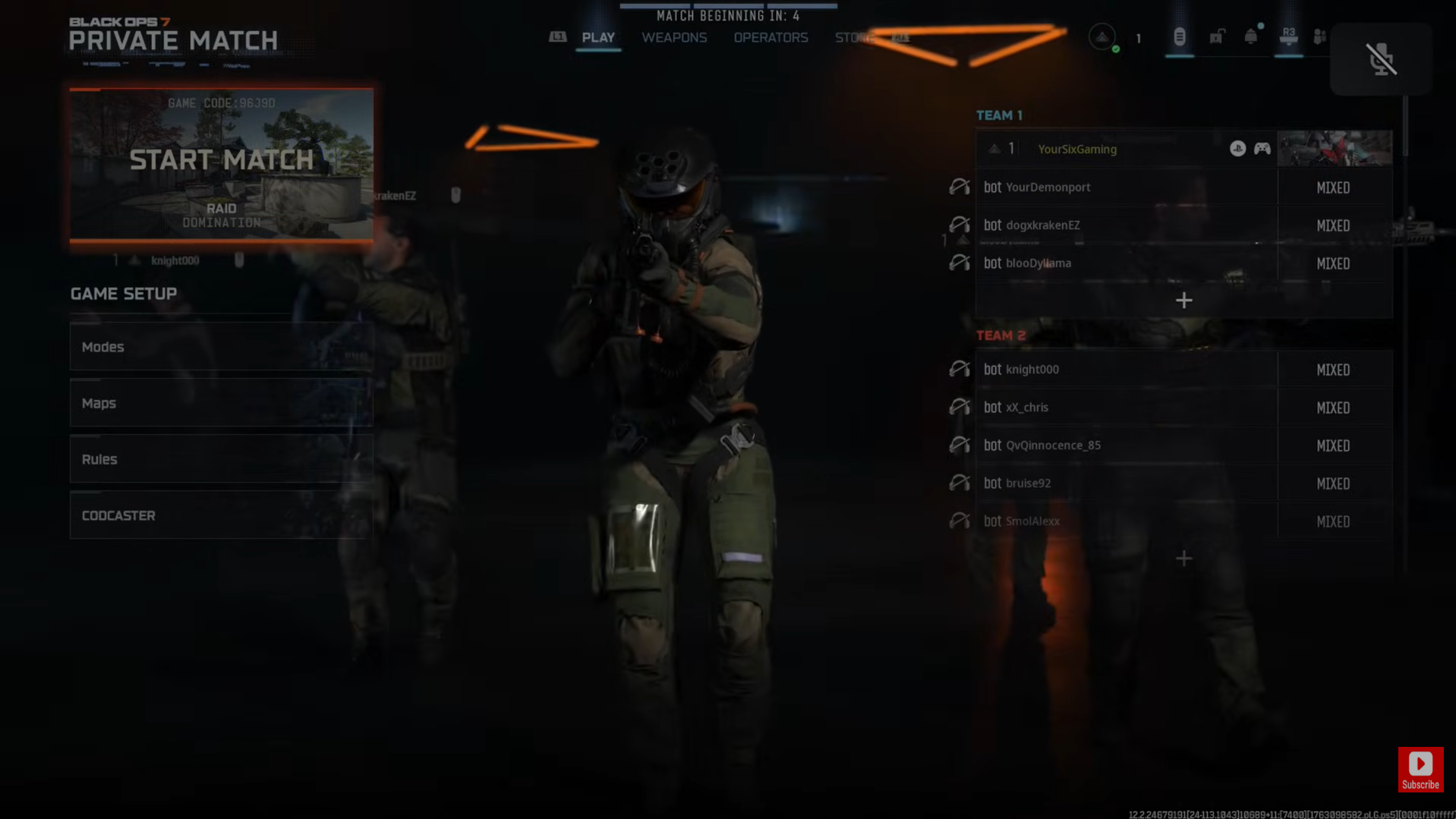
| 5 | Wait a moment for your name to appear on Team 1 on the right‑hand side. |
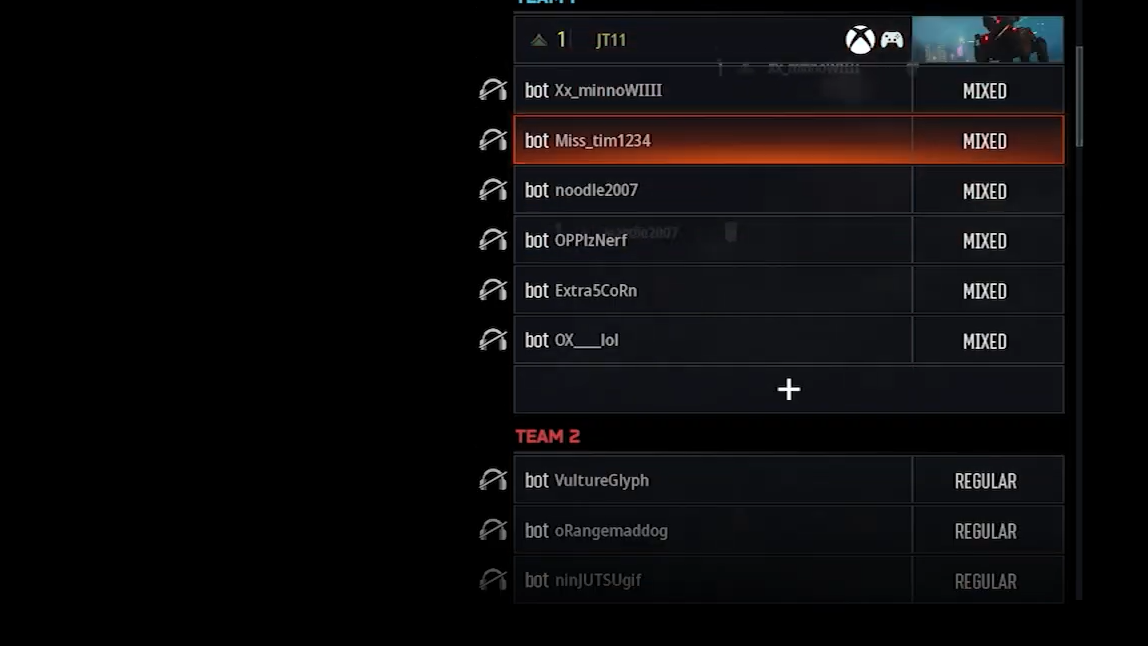
| 6 | Use the + icon under Team 1 or Team 2 to add bots and set their difficulty. |
| 7 | On the left‑hand sidebar, choose your mode, map, and rules. |
| 8 | When everything looks right, select Start match in the top left. |
Once the match loads, the scoreboard will show the bots as regular players on the enemy and/or friendly team, and the game plays out like a normal online lobby.
Setting bot count and difficulty
Bot controls sit on the right‑hand side of the Private Match screen, per team.
| Setting | How to use it | Typical use |
|---|---|---|
| Team 1 bots | Select Team 1, hit the + icon, then choose how many bots (1–11) and a difficulty. | Fill your own team with AI if you want to fight a stacked enemy side. |
| Team 2 bots | Select Team 2, hit +, add 1–11 bots, set difficulty, then confirm. | Create a full enemy squad to farm gunfights and practice positioning. |
| Difficulty | Pick from options like Easy, Normal, Veteran, or a blended Mix. | Match the lobby to your comfort level; Mixed makes games feel closer to online. |
Many players prefer “Mix” for practice because it throws in both weaker and stronger AI, which tends to resemble the spread of skill in real lobbies more than a single flat difficulty.
Choosing modes, maps, and rules for bot lobbies
On the left sidebar in a Private Match, you can tune the actual shape of the game around your bots.
| Category | What you can change | Why it matters with bots |
|---|---|---|
| Mode | Switch between Team Deathmatch, Domination, Hardpoint, Free‑for‑All, etc. | Lets you drill specific skills, from raw aim (FFA) to objective play (Domination). |
| Map | Pick from the full map list, including remastered maps like Raid or Express. | Great for learning callouts, sightlines, and spawns without pressure. |
| Rules | Adjust score limit, time limit, respawn behavior, and other match rules. | Can speed up games for quick warm‑ups or slow them down for detailed practice. |
For pure aim practice, a fast‑paced mode like Team Deathmatch or Free‑for‑All with a short score limit works well. For learning rotations and objective setups, Domination on a favorite map like Raid is a strong choice.
How to play Free‑for‑All with bots (workaround)
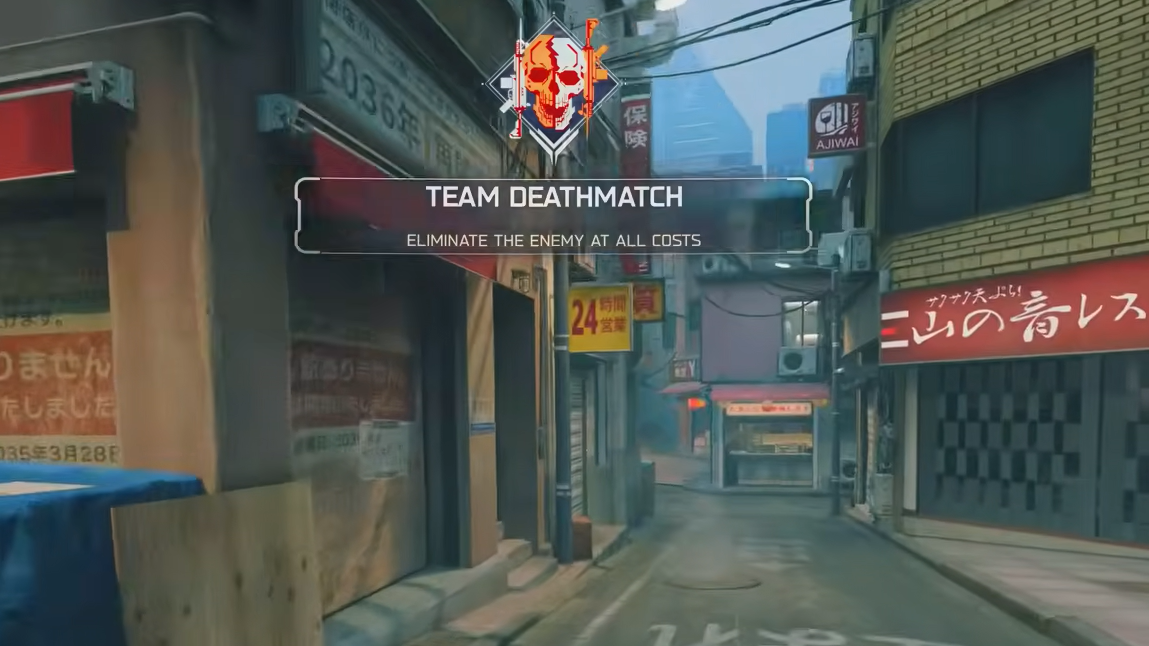
Free‑for‑All bot support in Private Match can be inconsistent. If adding bots is disabled when FFA is selected, there is a simple workaround:
| Step | What to do |
|---|---|
| 1 | In Private Match, set the mode to Team Deathmatch first. |
| 2 | Add bots to Team 1 and/or Team 2 using the + icons and set their difficulty. |
| 3 | Once the bots are in the lobby, switch the mode from Team Deathmatch to Free‑for‑All. |
| 4 | Confirm that the bots remain listed in the lobby, then start the match. |
The bots already added under Team Deathmatch will carry over into Free‑for‑All, letting you run a full FFA bot lobby even when direct bot controls are hidden in that mode.
Playing solo in a Custom Game with bots
If you prefer to keep everything inside Custom Games without worrying about teams, you can build a solo bot lobby there as well.
| Action | Effect |
|---|---|
| Select Multiplayer → Custom Games | Opens a sandbox lobby where you own all the settings. |
| Choose a mode, then a map | Defines the core structure of the match you’ll run against bots. |
| Open the bot settings on the right side | Lets you add AI players, pick difficulty, and set how many spawn in. |
| Review rules | Optional tweaks to pacing: score/time limits, respawns, and more. |
| Start the match | Loads you into a bot‑only lobby using your custom settings. |
Custom Games are ideal when you want a repeatable environment—for example, repeatedly running the same map and mode to test different weapons or sensitivities.
Playing with friends against bots
Private and Custom Games both support parties, so you can stack a group of friends and fill the rest with bots.
| Step | What you do | What happens |
|---|---|---|
| 1 | Create a Private Match or open Custom Games in Multiplayer. | You become the host with control over all settings. |
| 2 | Invite friends to your party or lobby. | Your party members appear on Team 1 (or the lobby list). |
| 3 | Add bots to Team 1, Team 2, or both, and set their difficulty. | Fills out the lobby with AI as teammates or opponents. |
| 4 | Pick a mode, map, and rules that match what the group wants. | Defines whether you all cooperate vs. bots or split into teams. |
| 5 | Start the match as host. | Everyone loads into a shared bot lobby using your settings. |
This setup works well for mixed‑skill groups, letting less experienced players learn the game without being dropped into sweaty public lobbies.
Choosing the right bot difficulty in Black Ops 7
Bot difficulty radically changes how useful a match is for practice. Different levels support different goals.
| Difficulty | Behavior | Best for |
|---|---|---|
| Easy | Slower movement, weaker aim, less aggressive pushes, poor reaction to flanks. | Absolute beginners, sensitivity tuning, or relaxed, low‑stress matches. |
| Normal | More consistent tracking, better use of cover, more typical engagements. | Intermediate practice, testing loadouts under moderate pressure. |
| Veteran | Fast reactions, strong aim, better positioning and map usage. | Advanced warm‑ups, simulating high‑skill opponents before ranked play. |
| Mix | Blends several difficulty levels in one lobby. | Realistic “public match” feel, with both easy and punishing fights. |
For many players, starting on Normal or Mix and then sprinkling in a few Veteran bots is the most productive way to build up skill without turning every lobby into a stress test.
How bot lobbies compare to regular matchmaking
Bot lobbies are useful, but they are not identical to live multiplayer:
| Aspect | Bot lobbies | Regular PvP |
|---|---|---|
| Opponents | AI following scripted behavior and difficulty presets. | Human players with unpredictable decisions and teamwork. |
| Pressure | Low‑stakes, no real consequences for dying or losing. | Higher pressure, especially in ranked; performance impacts stats and rank. |
| Progression | Can provide XP and weapon progression in some setups, but not always at the same rate as PvP. | Designed to be the primary path for XP, camos, and challenges. |
| Use case | Practice, experimentation, warm‑ups, casual sessions. | Main competitive experience, long‑term progression, and events. |
Bot lobbies are best treated as a training and testing ground: a controlled space to learn maps, try weapons, and dial in settings before heading back into public or ranked matches.
Once you know where the Private Match and Custom Games entries live, adding bots in Call of Duty: Black Ops 7 is straightforward. Set up the lobby you want, decide how punishing you want the AI to be, and you can turn multiplayer into a low‑pressure space for practice or relaxed play any time.