

ARC Raiders is running a new Discord quest that hands out free digital rewards to anyone who opts in and plays for a short session. The latest promotion ties into the Cold Snap update and uses Discord’s Quests system to track your playtime and deliver either Discord Orbs or an in-game cosmetic, depending on the specific campaign.
What the current ARC Raiders Discord quest gives you
The newest Discord quest tied to ARC Raiders rewards you with 700 Orbs on Discord when you complete it.
Orbs are Discord’s virtual currency. You can spend them in the app to pick up things like Nitro credits, cosmetic badges, and other profile or chat perks without paying real money. For this campaign, ARC Raiders is participating alongside other multiplayer games; completing its quest simply adds a chunk of Orbs to your Discord balance.
Earlier ARC Raiders Discord campaigns used the same Quest system but paid out a cosmetic item inside the game instead of Orbs. One example was the limited-time Hiker Backpack (Sky Ice), unlocked by playing ARC Raiders for 15 minutes while your Discord account was tracking your session. That kind of cosmetic reward may come back in future quests, but the current Cold Snap–era quest is focused on Discord Orbs.
Basic requirements before you start the quest
There are a few things you need in place before Discord can track your ARC Raiders playtime and pay out the reward.
- A Discord account on desktop (Windows or macOS). The Quests feature and game detection rely on the desktop app.
- ARC Raiders installed on your PC or console.
- An Embark ID linked to your game platform account (Steam, Epic Games, or Xbox). Embark ID is created automatically the first time you launch ARC Raiders.
- Embark ID connected to Discord, so Discord can associate your play with your ARC Raiders profile.
Connecting your Embark ID to Discord and your game platform is done through Embark’s account site at id.embark.games/id/connected-platforms. That connection is what allows both in-game rewards (like the Hiker Backpack) and external rewards (like Orbs) to be granted correctly.
How to connect Embark, Discord, and your game account
Step 1: Open a browser and go to the Embark ID connected platforms page at id.embark.games/id/connected-platforms. Sign in using the same platform you use for ARC Raiders (for example Steam, Epic Games, or Xbox). If you have not created an Embark ID yet, the site will prompt you to set one up.
Step 2: On the connected platforms page, find the Discord icon and select the option to link it. A Discord authorization window opens, asking you to sign in if you are not already logged in.
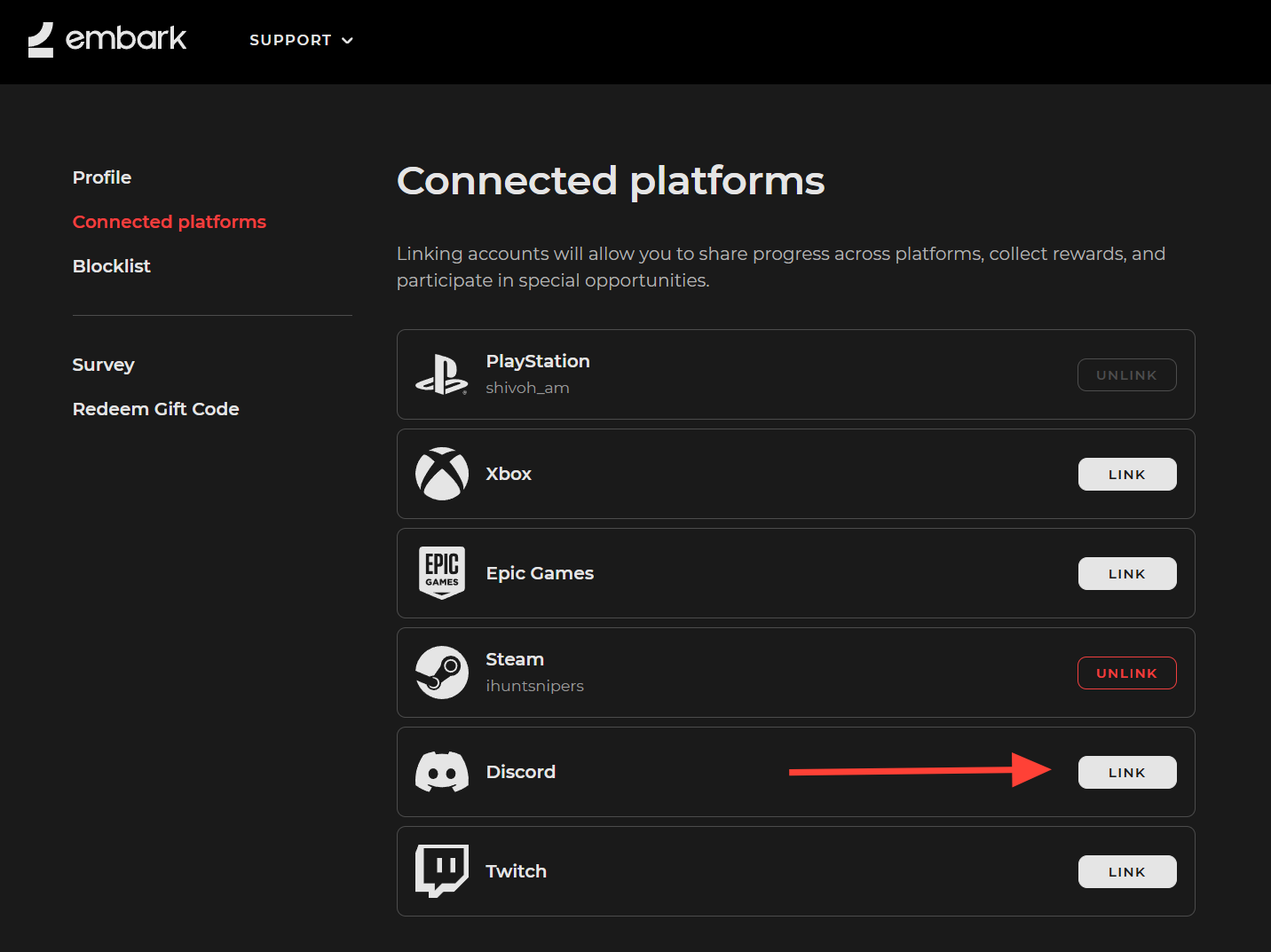
Step 3: Review the permissions Discord lists, then confirm to connect your Discord account to Embark. When it succeeds, the connection status next to the Discord logo on the Embark page changes to show it is linked.
Step 4: If you also want to use Twitch Drops alongside Discord quests, repeat the same process for the Twitch logo on that page. This is optional for Discord rewards but worth doing if you plan to claim items from ARC Raiders Twitch Drops campaigns later.
How the ARC Raiders “play for 15 minutes” quest works
ARC Raiders has Discord quests that track actual gameplay time. These assign you a short play requirement and pay out either Orbs or an in-game item when you meet it.
For ARC Raiders, the common requirement has been to play for 15 minutes with your ARC Raiders account linked to Discord. Earlier campaigns rewarded the Hiker Backpack (Sky Ice), an in-game cosmetic backpack variant, for completing that playtime requirement before a deadline around early November 2025.
When one of these play-based quests is live, the basic flow in Discord is:
Step 1: Open the Discord desktop app and find the ARC Raiders quest (on this message link). Select it and use the Accept Quest button to opt in.
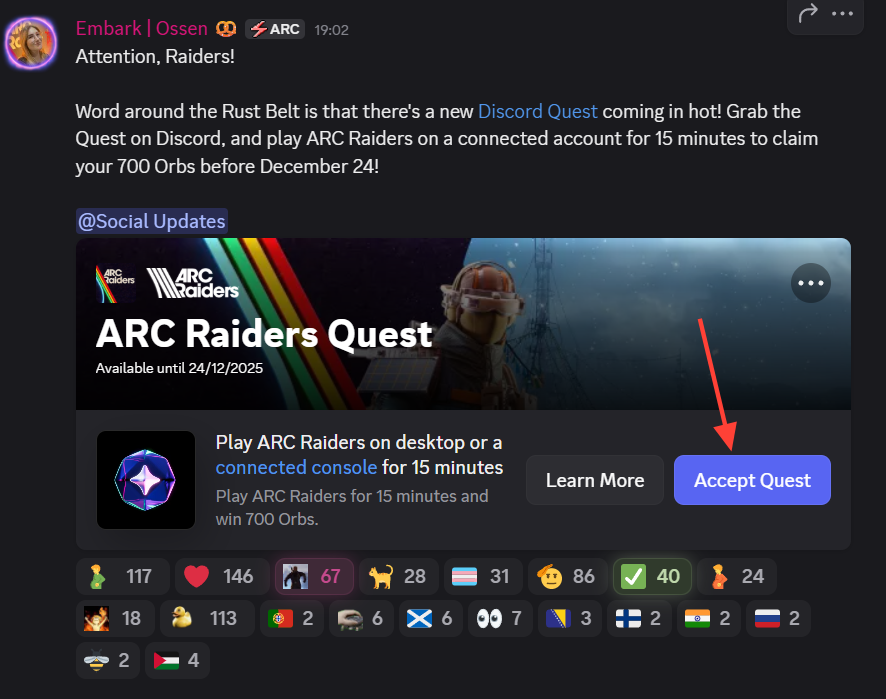
Step 2: When prompted, choose your platform: desktop (PC) or console (PlayStation 5 or Xbox). This tells Discord where to look for the ARC Raiders session.
Step 3: If you select console, follow the on-screen prompts to link your Discord account to your PS5 or Xbox account. Without this connection, Discord cannot detect that you are playing ARC Raiders on that console.
Step 4: Launch ARC Raiders while Discord is running. On PC, Discord typically detects the game automatically. For consoles, you may have a “Quest on Console” option in the quest card that helps Discord check for active launches.
Step 5: Play ARC Raiders for at least 15 minutes with the game in the foreground. The quest card shows a progress bar that fills as your time is counted.
Step 6: Once the 15-minute requirement is met, the quest status changes to show it as complete and unlocks a Claim reward button under the ARC Raiders quest. Use that button to finalize the reward. For cosmetic quests, the item then appears in your ARC Raiders account the next time you launch the game.
Note: Mobile Discord sessions do not count toward these quests. The Quests feature and time tracking depend on the desktop app and, for consoles, proper account linking.
End date for the current ARC Raiders Discord Orbs quest
The Orbs-based ARC Raiders Discord quest tied to the Cold Snap period runs until December 24, 2025. After that time, it disappears from the Quests interface and any unclaimed rewards from that specific campaign can no longer be earned.
Discord and ARC Raiders have used shorter windows for previous quests. The Hiker Backpack (Sky Ice) quest only ran until early November 2025, giving players a narrower opportunity to complete the 15-minute requirement. Expect future quests to follow the same pattern: time-limited campaigns that rotate rewards and occasionally return with different items or Orbs payouts.
Common problems claiming ARC Raiders Discord rewards
Some players run into issues when trying to claim a Discord reward after meeting the playtime or video requirement. The most frequent causes are account linking problems and confusion around how the reward is delivered.
- Quest shows as done but Claim fails: For playtime quests, Discord may provide a reward code instead of pushing the item directly. That code can be buried in Discord’s interface and needs to be entered in the appropriate redemption field (either on a game account site or inside Discord’s own redeem area), which resolves most “cannot claim” errors.
- Game account not actually linked: It is easy to assume the ARC Raiders account is connected when only Embark ID or only the platform account is linked. Double-check that Embark, your platform profile, and Discord are all tied together on the Embark connected platforms page and in your console’s Discord connection settings.
- Progress not tracking: If the quest bar does not move while you are playing, ensure ARC Raiders was launched while Discord was running, and that you accepted the quest before starting your session. On the quest card, using any “Check for launches” option can also help Discord rediscover an active game.
For Orbs quests specifically, make sure the human verification step on the claim page completes without errors. If you close that page early, the Orbs are not added to your balance.
ARC Raiders’ Discord quests are straightforward once your accounts are linked: the current Orbs campaign is completed entirely by watching a short video in Discord, while previous and future quests ask for 15 minutes of tracked gameplay. With the end date for the Orbs quest set to December 24, 2025, it is worth claiming while it is live, then watching for the return of cosmetic rewards like the Hiker Backpack in later campaigns.