

Wuthering Waves Version 3.2, titled "Resolution to Illuminate the Shadows," launches on March 19, 2026 (UTC+8), and the pre-download window is already open. If you want to jump straight into the new content — featuring Sigrika, Qiuyuan, and a Phase 2 lineup of Lynae, Zani, and Phoebe — getting the preload done now means you'll only need to wait through the maintenance period itself.
Quick answer: The PC preload is approximately 19 GB, with at least 28 GB of free storage recommended for decompression. There is no mobile preload for Version 3.2.

Preload window and Version 3.2 release date
The preload became available on March 17, 2026, and remains accessible until the Version 3.2 servers go live on March 19, 2026. This gives PC players roughly two days to grab the update files ahead of time. Once maintenance ends on launch day, the game should be ready to play immediately without an additional download.
PC preload: Download size and storage requirements
The actual download weighs in at around 19 GB on PC. However, Kuro Games recommends having at least 28 GB of free disk space available because the files need room to decompress after downloading. Installing the game on an SSD is strongly encouraged for better performance.
You may also be prompted to update the launcher itself before or during the preload process. Accept that update — it's separate from the game data and ensures compatibility with the new version.

Step 1: Open the Wuthering Waves PC launcher (either the official Kuro Games launcher or the Epic Games Store client).
Step 2: Look for the "New Version Pre-download" option located below the main "Start" button. Click it to begin the download.
Step 3: You can continue playing the current version of the game while the preload runs in the background. There's no need to close the game or wait for the download to finish before logging in.
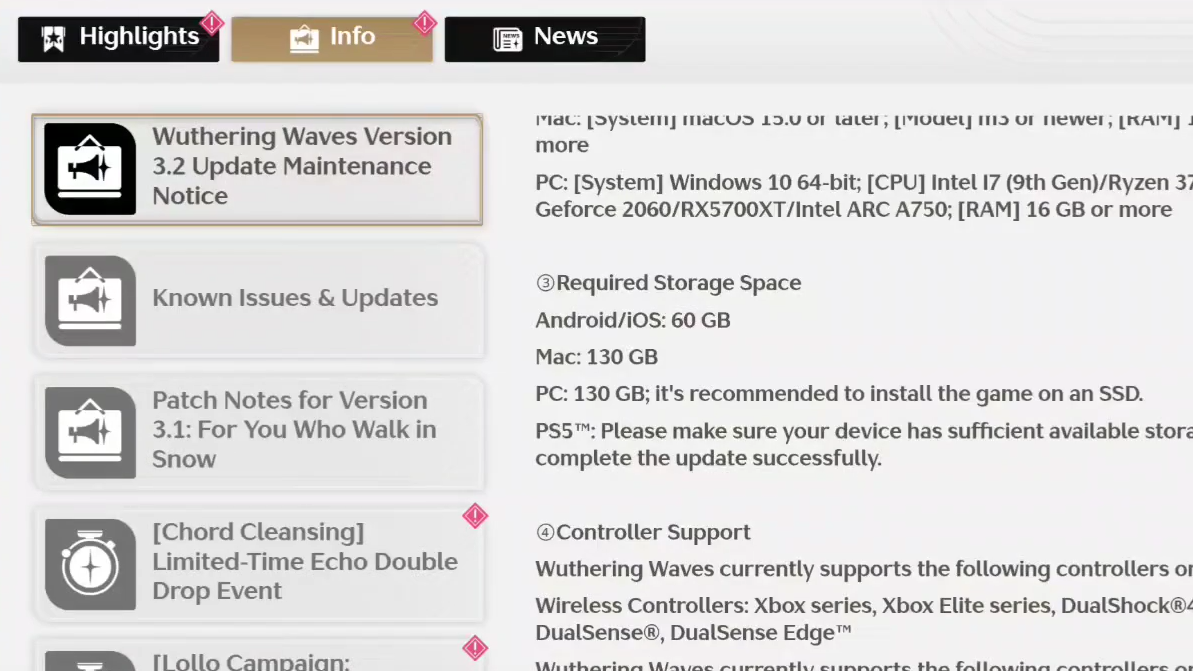
Fresh install storage requirements
If you're installing Wuthering Waves for the first time rather than updating an existing installation, the space requirements are considerably larger.
| Platform | Fresh install size |
|---|---|
| PC | ~130 GB (SSD recommended) |
| Mac | ~130 GB |
| Android / iOS | ~60 GB |
| PS5 | Ensure sufficient available storage |
These numbers represent the full game as of Version 3.2. The total footprint has actually decreased compared to earlier patches — the 3.1 installation sat above 130 GB on PC, and Kuro Games has been working on compression and optimization to bring that number down.
Why there's no mobile preload for 3.2
Version 3.2 does not include a mobile pre-download option. Kuro Games has confirmed this is due to ongoing optimizations for mobile platforms. In past updates, mobile preloads were sometimes available and sometimes not — Versions 2.8 and 3.2 both skipped mobile preloads, while Versions 3.0 and 3.1 offered them at roughly 18 GB each.
If a mobile preload does become available unexpectedly, it would appear as a "Pre-download" button on the title screen. For now, mobile players will need to download the update after maintenance concludes on March 19.

Preload size history across versions
The 19 GB PC preload for Version 3.2 is on the smaller side compared to recent major patches. Here's how it stacks up against previous updates:
| Version | PC preload | Mobile preload |
|---|---|---|
| 3.2 | 19 GB | N/A |
| 3.1 | 35 GB | 18 GB |
| 3.0 | 36 GB | 18 GB |
| 2.8 | 20 GB | N/A |
| 2.7 | 21 GB | 8 GB |
| 2.6 | 35 GB | 11 GB |
| 2.5 | 8 GB | 7 GB |
| 2.4 | 19 GB | 11 GB |
| 2.3 | 6 GB | 6 GB |
The larger patches — 3.0, 3.1, and 2.6 — typically coincided with new regions or major content expansions. The relatively modest 19 GB for 3.2 suggests this update focuses more on story progression, new characters, and events rather than a massive map addition.
Saving storage space
Wuthering Waves includes an option to delete completed cutscene resources, which can reclaim a meaningful chunk of disk space. If you're running low on storage — particularly on mobile, where the game already occupies around 60 GB — this is worth doing before the update drops. The option is accessible through the game's settings menu.

What's coming in Version 3.2
The Phase 1 banners for Version 3.2 feature Sigrika as the new Resonator alongside a Qiuyuan rerun. Phase 2 will bring Lynae, Zani, and Phoebe. Several new events are also lined up, including "Soar to the Beat," "Knights of the Wild," and "The Flaming Red in Memory," among others. The main story continues with new Chapter 3 quests.
With the preload already live and just over a day until servers open, now is the time to queue up that download and free up some disk space. The maintenance window on March 19 is your last chance to prepare before the new version goes live.