

Hytale includes a built-in arachnophobia mode so you don’t have to mod the game or quit your world the moment a spider appears. Instead of removing the enemy entirely, the setting swaps every spider’s model for a crab while keeping their behavior and loot the same.
Where Arachnophobia mode is in Hytale’s settings
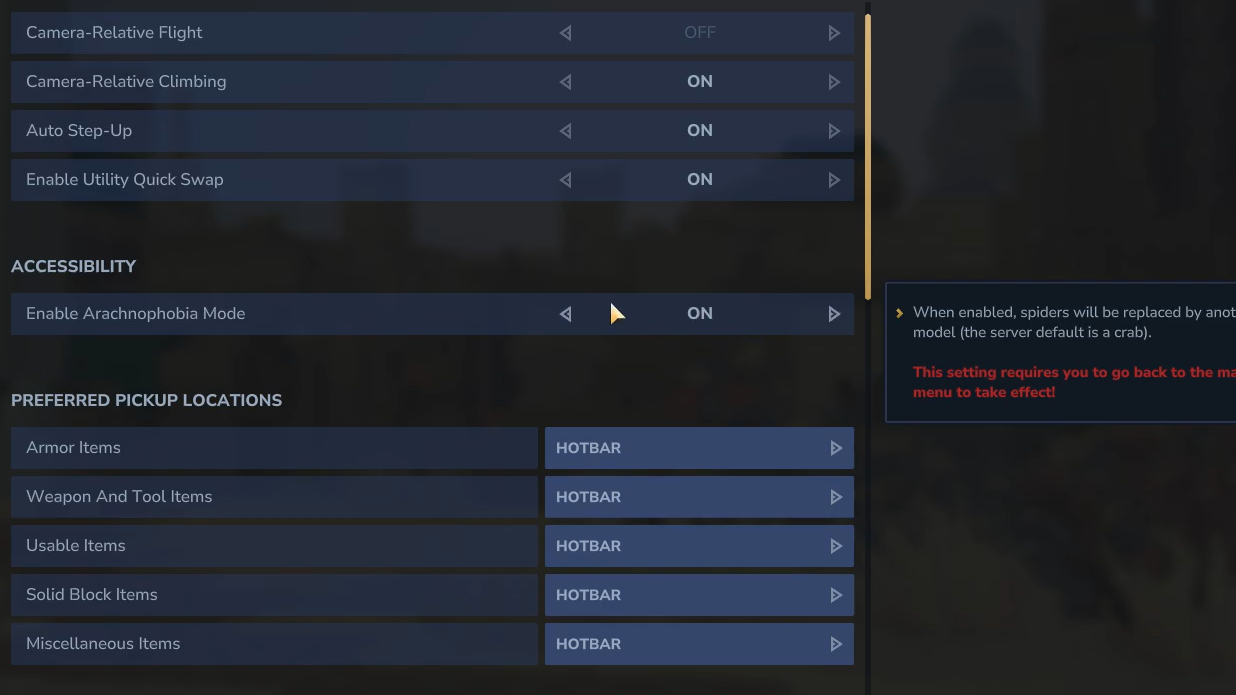
The arachnophobia option lives in Hytale’s main settings, under the Gameplay tab in an Accessibility section. It’s disabled by default, so if you’re already running into spiders in caves and forests, you need to switch it on manually before it helps.
The safest way to do this, especially if spiders are a strong trigger, is from the main menu before loading any save. You can also toggle it while paused in-game, but the visual change won’t show up until you return to the main menu once.
Turn on arachnophobia mode from the main menu
Step 1: Launch Hytale and stay on the main menu instead of loading a world. This prevents any spiders from spawning around you while you change the setting.
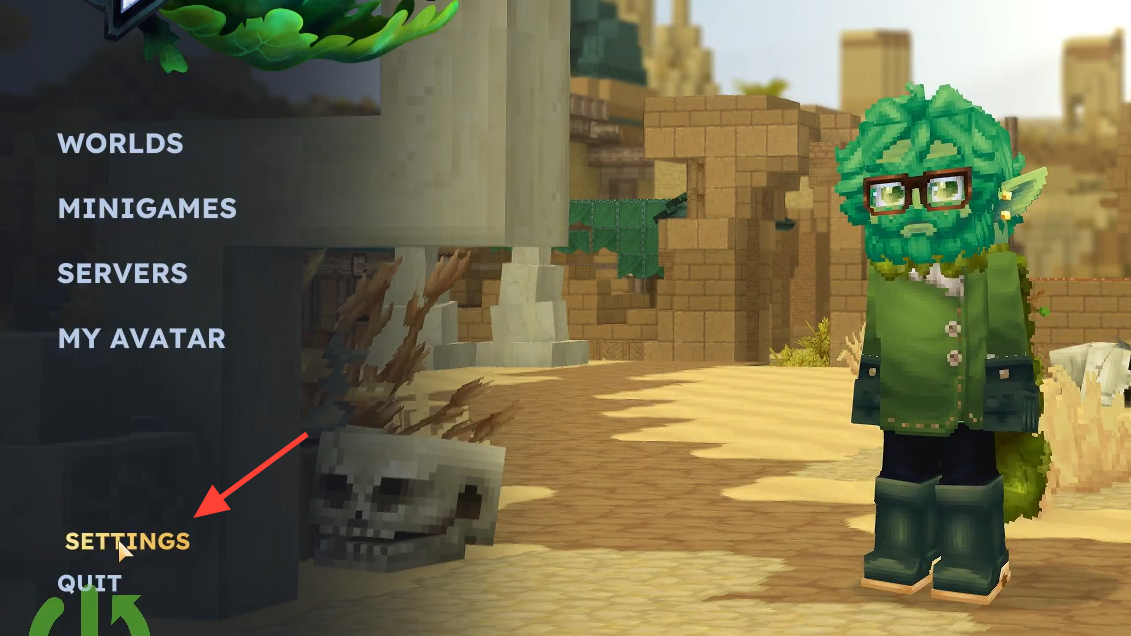
Step 2: Open the settings menu from the main menu screen.
Step 3: Switch to the Gameplay tab. Scroll until you find the Accessibility section.
Step 4: Look for the option called Enable Arachnophobia Mode. It will be set to Off by default. Toggle it to On.
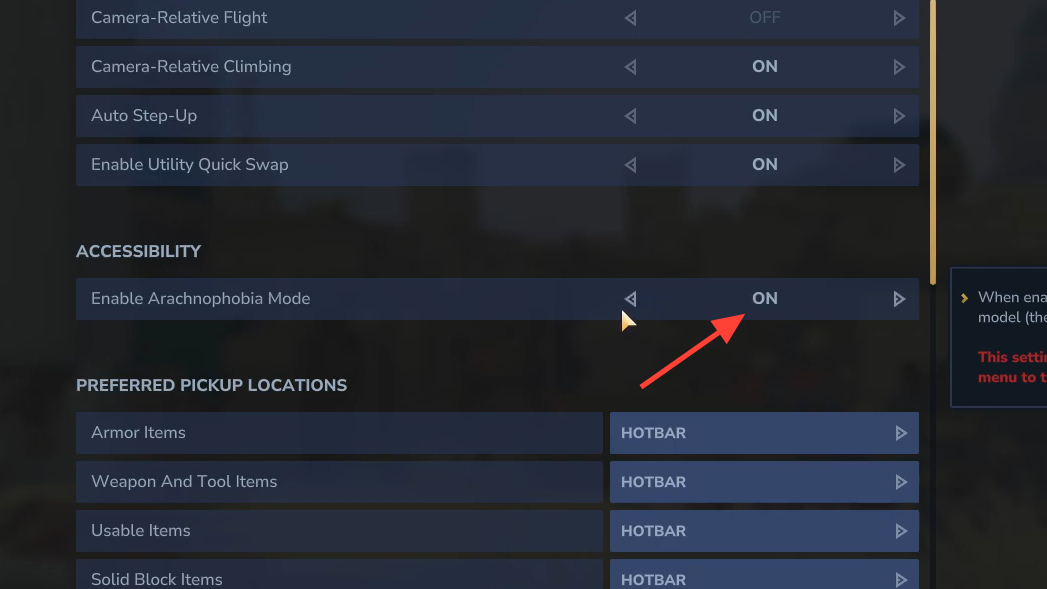
Step 5: Confirm or save your settings if the game prompts you, then start or continue your world. All spider enemies will now appear as crabs instead of spiders.
Turn on arachnophobia mode while you’re already in a world
If you ran into a spider mid-session and had to pause or quit in a panic, you can still enable the setting from inside the game.
Step 1: Pause the game to open the in-game menu.
Step 2: Open Settings, then move to the Gameplay tab.
Step 3: In the Accessibility section, toggle Enable Arachnophobia Mode from Off to On.
Step 4: Save or apply the changes.
Step 5: Quit back to the main menu once, then reload your world. The mode only takes visual effect after returning to the main menu; once you come back in, any spiders that spawn will use the crab model.
What arachnophobia mode changes (and what it doesn’t)
Arachnophobia mode is a visual accessibility feature. It changes how spiders look, not how they behave.
With the mode turned on:
- Spiders are visually replaced by crabs. Anywhere a spider would normally appear, you see a crab model instead. This applies across the world, including underground spider caves and web-covered areas.
- Attack patterns stay the same. The “crabs” still move quickly, chase you for long distances, and use the same melee and ranged attacks their spider counterparts use, including venom spit that causes damage over time.
- Spawns and loot are unchanged. These enemies still spawn in the same locations and drop the same items, such as Venom Sacs from poisonous variants. You are not losing access to any resources by enabling the mode.
- Only spiders are affected. Other creatures and critters, including worms, keep their normal appearance.
For progression, this is important. You still need to fight these enemies to obtain spider-related drops and to clear spider-heavy areas, but you can do so without dealing with spider models and animations directly.
How arachnophobia mode fits with Hytale’s other accessibility settings
The arachnophobia toggle sits alongside other accessibility options in the Gameplay settings. That placement reflects its purpose: it is not a “fun cosmetic” so much as a way to make the game playable for people who experience strong fear responses to spiders.
If you already spend time in the settings to adjust things like enemy health bars or visibility options, add this to your initial setup checklist. For many players with arachnophobia, toggling it on is the difference between abandoning a world after a single cave encounter and settling into long-term exploration.
Once arachnophobia mode is enabled and applied from the main menu, you can explore Hytale’s forests, villages, and spider caves knowing that any spider encounter will be wrapped in a crab-shaped package. The fights are just as challenging, but the visuals are far more manageable for anyone who cannot stand eight-legged enemies.