

Tools, weapons, and armor in Hytale wear down with use. Mining, fighting, and even dying all reduce durability, and once an item is worn ou,t it becomes far less useful. Keeping key items in good condition depends on one thing: Repair Kits.
Repair Kits are crafted items that restore durability to gear at the cost of materials and a permanent reduction to the item’s maximum durability. Understanding how they work and how to make them efficiently is essential for long-term progression.
How durability and repairing work in Hytale
Every tool, weapon, and armor piece has a durability value that drops as you use it. Heavy combat or long mining sessions can push items all the way down to zero durability, effectively leaving them “busted” until you repair or replace them.
Each time you repair an item with a Repair Kit, that item’s maximum durability is reduced by 10%. The repair restores current durability, but the upper limit shrinks, so you cannot keep the same tool or weapon going forever. Over repeated repairs, the item will eventually reach a point where replacement is more efficient.
Dying also carries a durability penalty: a death causes a 10% durability loss. That pushes already damaged items closer to the point where you either spend resources on a Repair Kit or retire the gear and craft or loot a better replacement.

Repair Kit recipe and what it can fix
Repair Kits are crafted at a Workbench and can be used on three main categories of equipment: tools, weapons, and armor pieces. The same kit works across these types, so you do not need separate variants for pickaxes, sword,s or chest pieces.
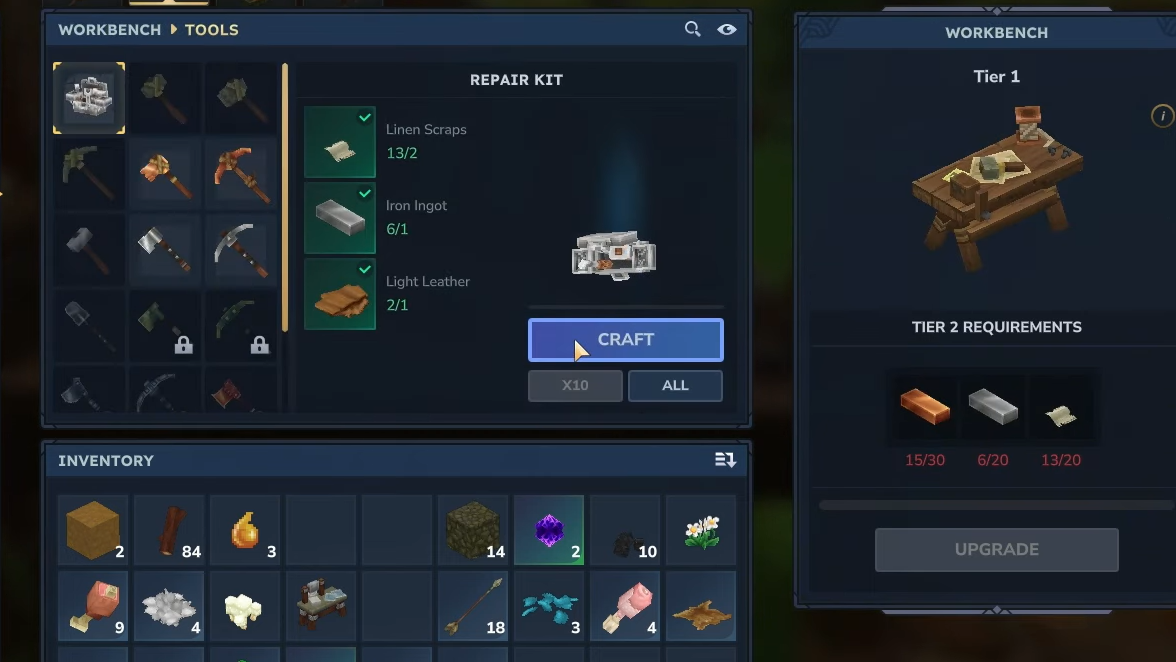
A standard Repair Kit requires these materials:
| Material | Amount | Primary sources |
|---|---|---|
| Linen Scraps | 2 | Skeleton fighters and chests in skeleton points of interest, villages and forts |
| Iron Ingot | 1 | Iron ore in mines and general underground digging, rarely from chests |
| Light Leather | 1 | Crafted at a Tanning Rack from Light Hide dropped by small wild animals in lower-tier regions |
Once you have these components, any Tier 1 or higher Workbench can turn them into a Repair Kit.
How to craft a Repair Kit at the Workbench
Step 1: Go to a Tier 1 (or higher) Workbench in your base or any settlement you control. Interact with it to open the crafting interface so you can browse available recipes.
Step 2: In the Workbench menu, switch to the tools-related tab, which uses a small pickaxe icon. This tab lists tool and maintenance recipes rather than basic building or furniture items.
Step 3: Look for the Repair Kit recipe, which appears in the first slot on that tools tab. Hovering over the icon shows the recipe, so confirm you have 2 Linen Scraps, 1 Iron Ingot, and 1 Light Leather in your inventory.
Step 4: Select the Repair Kit recipe and start crafting it. When the craft completes, the Repair Kit is added to your inventory, ready to move onto your hotbar when you want to restore an item.
How to use a Repair Kit to repair tools, weapons and armor
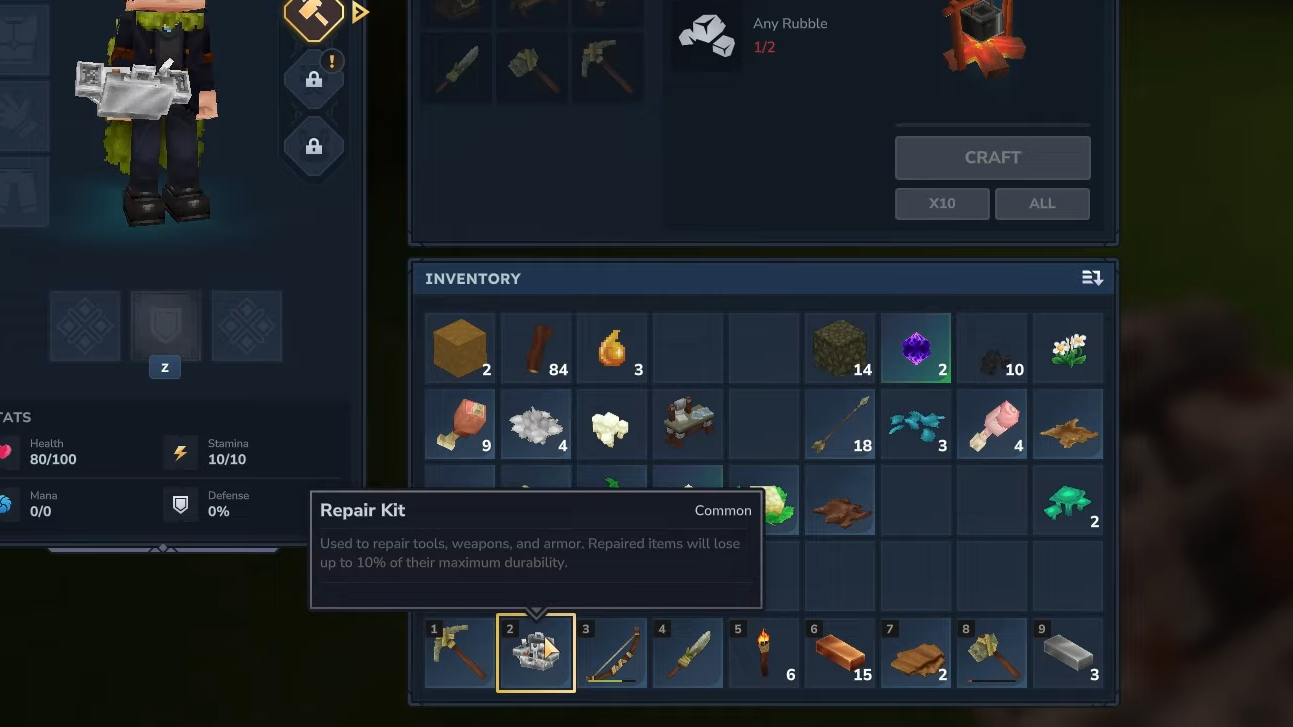
Step 1: Place the crafted Repair Kit on your hotbar so it can be selected like any other usable item. Make sure the tools, weapons or armor you want to repair are in your inventory or equipped.
Step 2: Select the Repair Kit from the hotbar and use it. This opens a dedicated repair interface or window that focuses on items eligible for repair, helping you avoid using the kit on something you do not care about.
Step 3: In the repair window, choose the damaged item you want to fix. You can select it directly from the interface or by interacting with the piece of gear that needs attention, such as right-clicking the item.
Step 4: After using the kit on the chosen item, check that item’s durability. Its current durability will have been restored, and its maximum durability will now be 10% lower than before the repair.
When to repair items and when to replace them
Because every repair lowers an item’s maximum durability, it is important to be selective about what you fix. Repair Kits are most efficient when used on gear that is expensive or time-consuming to replace, rather than on disposable starter tools.
Iron and thorium tools are good candidates for repairs once you reach those tiers, since gathering the resources to craft or find replacements takes effort. The same logic applies to rare and epic-quality weapons and armor that come from deeper progression or difficult encounters.
On the other hand, basic early-game items or gear you have large numbers of in storage are usually not worth repairing. When you move into higher tiers and start stockpiling common equipment, it is often more sensible to equip a fresh spare rather than spend linen, leather, and iron on extending a low-value item’s life.
As items approach several repairs, the cumulative reduction in maximum durability also makes each additional repair less attractive. At some point, even a once-valuable tool becomes a poor investment for further kits, and crafting or looting a new version will provide far more durability for the same or fewer resources.
How to farm Repair Kit materials efficiently
Making good use of Repair Kits depends on a steady supply of linen, iron and leather. Targeted farming helps avoid running out of materials at a critical moment, such as deep underground or mid-expedition.
Linen Scraps are tied closely to undead threats. Skeleton fighters are a reliable enemy type to hunt for these, and they often appear around skeleton-themed points of interest, as well as in certain villages and forts. Clearing those areas not only gives combat practice and general loot but also a consistent trickle of linen.
Iron Ingots come primarily from mining. Exploring mines and digging in varied underground directions will uncover iron ore that can be smelted into ingots. Chests can rarely contain Iron Ingots as well, but relying on mining ensures you do not depend on random loot for such a core resource.
Light Leather starts with Light Hide. Small wild animals in lower-tier regions, such as rabbits, cows, does, and deer, drop Light Hide when hunted. After collecting enough, you can craft a Tanning Rack, then use additional Light Hide at that station to convert it into Light Leather. Once that production chain is set up, your only limit is how quickly you can gather more hides.
Balancing these activities with your normal exploration and questing keeps you stocked without feeling like you are grinding purely for repairs. When your supply of Repair Kits and their ingredients is healthy, you can confidently push further from home, knowing that a few worn-down tools or armor pieces will not bring an expedition to a halt.

Durability, death penalties, and the permanent cost of each repair make Hytale’s equipment system more strategic than simply swapping tools when they go red. By understanding how Repair Kits work, where to get the materials and which items deserve to be restored, you can keep your best gear in circulation for longer while still moving steadily into stronger equipment tiers.