

Trees in Hytale look like they should behave the way they do in other blocky survival games: chop one down, wait a bit, and expect the forest to grow back. That never happens. Once a tree is gone, it stays gone unless you step in and replace it yourself.
The game treats wood as a managed resource. You control when new trees appear by crafting and planting saplings through the farming system, not by relying on random drops from leaves. That design makes tree regrowth part of the same loop as growing crops and producing Essence of Life.
How tree regrowth works in Hytale
Chopping a tree in Hytale gives you wood and plant materials, but not a way to immediately replant that specific tree. Leaving a stump does nothing. Trees do not respawn naturally over time, and standard harvesting does not produce saplings.
The only way to regrow trees is to craft sapling items and place them on suitable ground. Once planted, each sapling slowly matures back into a full tree over several in‑game days. No extra watering or interaction is required after placement.
That means your long‑term wood supply depends on two things: having a Farmer’s Workbench to manufacture saplings, and generating enough Essence of Life to pay the crafting cost for each one.

How to unlock saplings with the Farmer’s Workbench
The Farmer’s Workbench is the center of the tree regrowth system. Until you place one, you cannot turn raw materials into saplings.
Step 1: Gather the basics by cutting down trees and breaking foliage. You need Tree Trunk blocks from the logs and Plant Fiber from leaves and bushes. These are the building blocks for the Farmer’s Workbench recipe.
Step 2: Go to a regular Workbench. Open it and move to the third crafting tab, which contains more specialized stations. In that tab, select the Farmer’s Workbench and craft it using your Tree Trunk and Plant Fiber.
Step 3: Place the Farmer’s Workbench near your base. This location becomes your farming and replanting hub, since the station unlocks additional tabs for crops, seeds, Essence of Life, and a dedicated Saplings tab for tree regrowth.
From this point on, every new tree you want to grow starts as a recipe inside the Farmer’s Workbench.
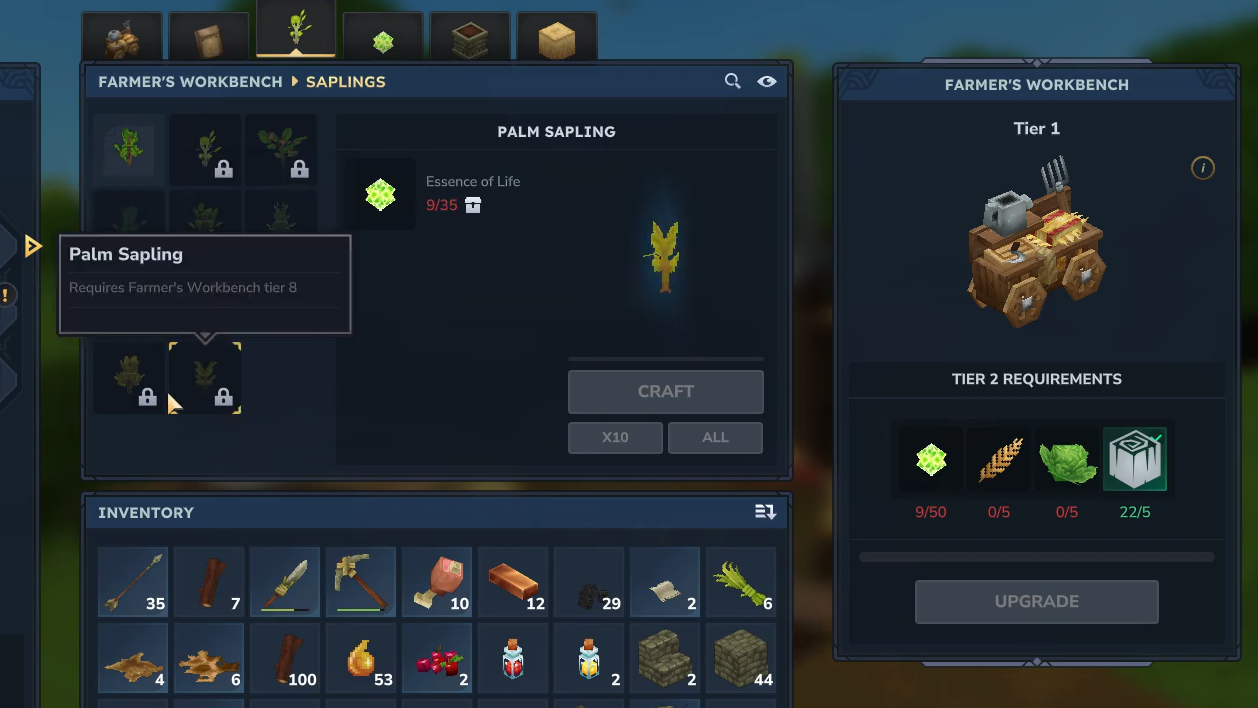
Essence of Life: the currency behind every sapling
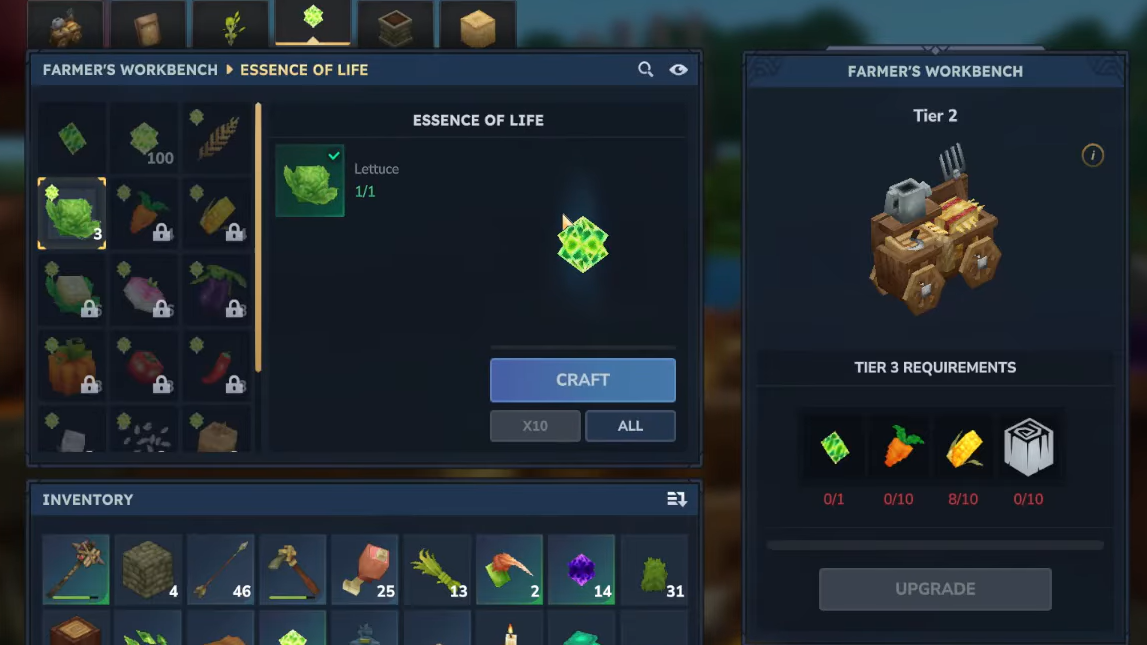
Essence of Life (often shortened to EoL) is the key ingredient for all sapling recipes. You spend it each time you craft a new sapling, which turns tree farming into a resource loop tied directly to agriculture.
Crops and other plants are the primary way to build up a stockpile of Essence of Life. Basic produce like wheat or carrots can be harvested and later converted into essence through the Farmer’s Workbench. Looting established fields in villages also provides an early injection of crops and essence if you are still setting up your own farm.
How to farm Essence of Life efficiently
Step 1: Acquire a Hoe and a small amount of Essence of Life. The Hoe lets you till soil, and a little essence is required to craft your initial seed bags at the Farmer’s Workbench.
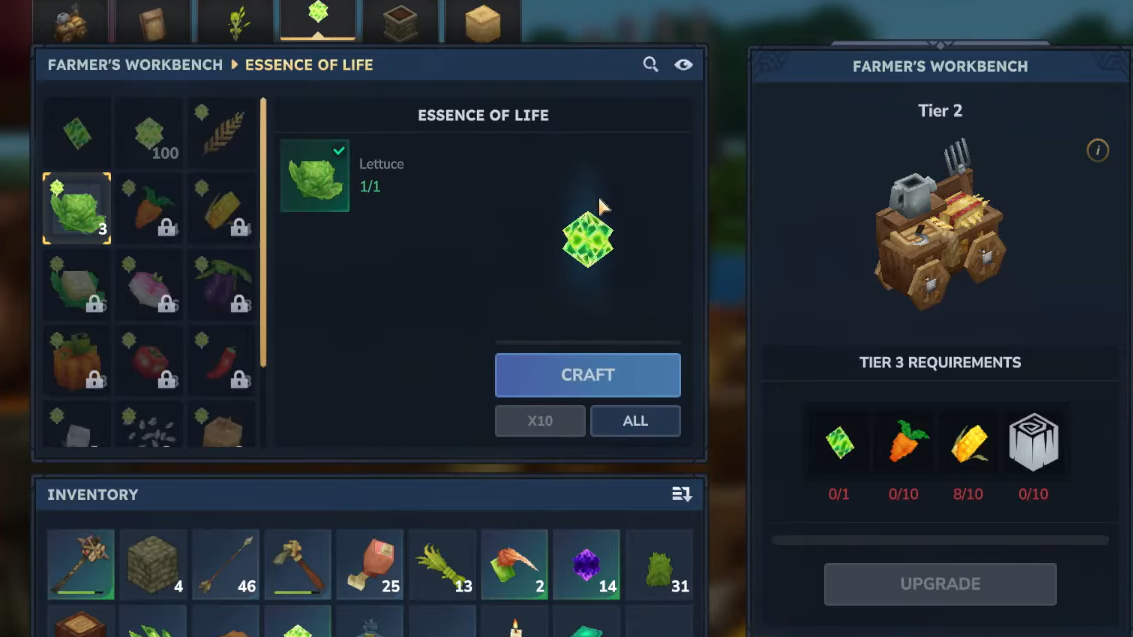
Step 2: At the Farmer’s Workbench, open the second tab to craft a Wheat Seed Bag. This costs some Essence of Life, but it unlocks your first self‑sustaining crop cycle.
Step 3: Find flat land close to water. Use the Hoe to till dirt blocks into farmland, then equip the Wheat Seed Bag and sow the seeds across the tilled area.
Step 4: Optionally, craft a Watering Can from Iron in the first tab of the Farmer’s Workbench. Use it to water your wheat so it grows more reliably over the next several in‑game days.
Step 5: Harvest the fully grown wheat. Return to the Farmer’s Workbench and switch to the fourth tab, where you can convert harvested crops into Essence of Life. Repeat this loop until you have a comfortable essence reserve.
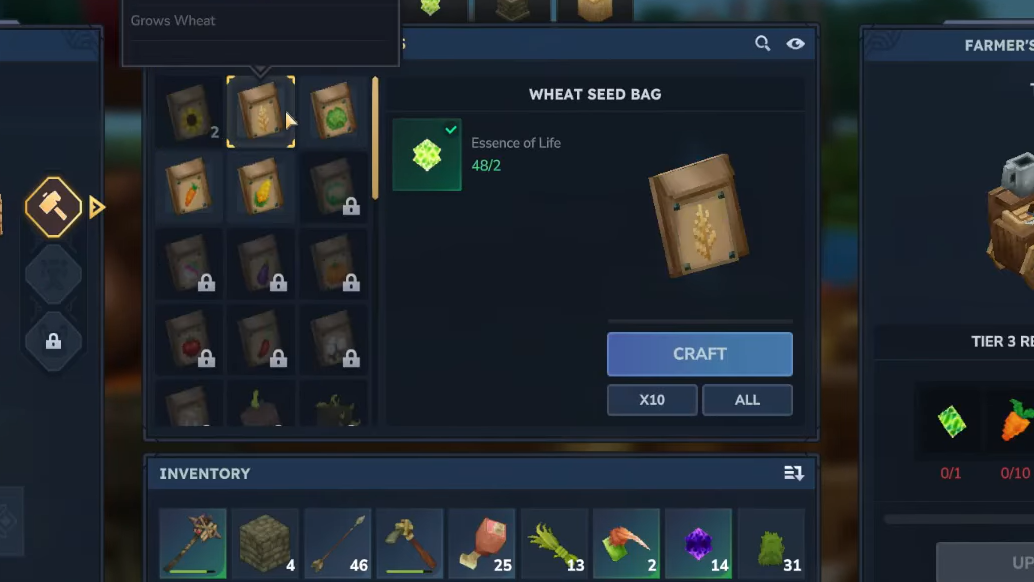
Once the farm is running, each cycle of planting and harvesting multiplies your EoL supply, which can then be redirected into saplings and other life‑based recipes.
How to craft saplings at the Farmer’s Workbench
With Essence of Life in hand, you can finally start manufacturing trees on demand. Saplings behave like any other placeable item, but they are created only at the Farmer’s Workbench.
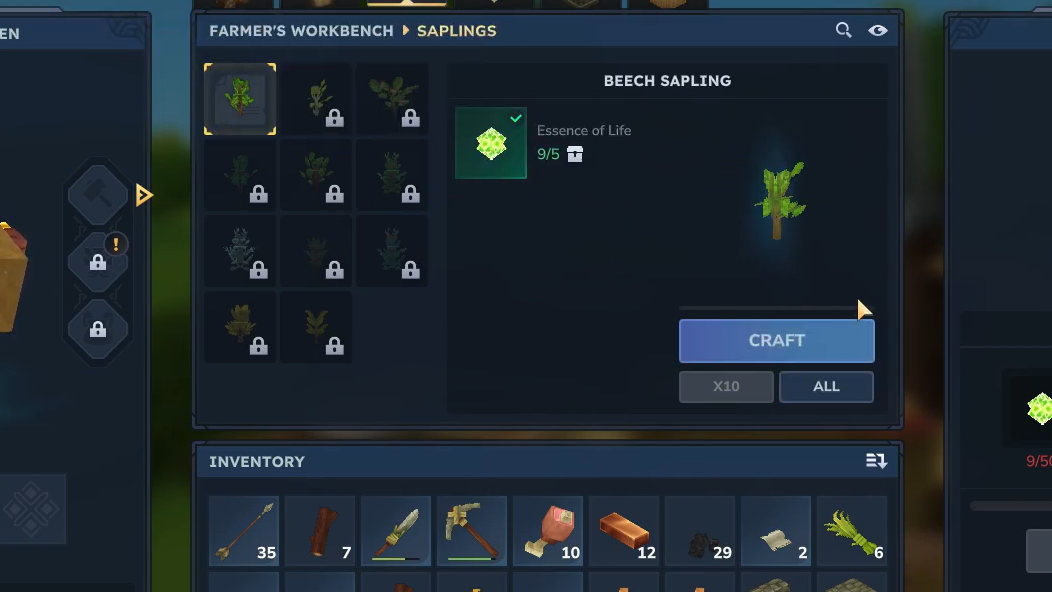
Step 1: Interact with the Farmer’s Workbench and open the Saplings tab (the third tab on the station). This view lists all tree types you can currently turn into saplings.
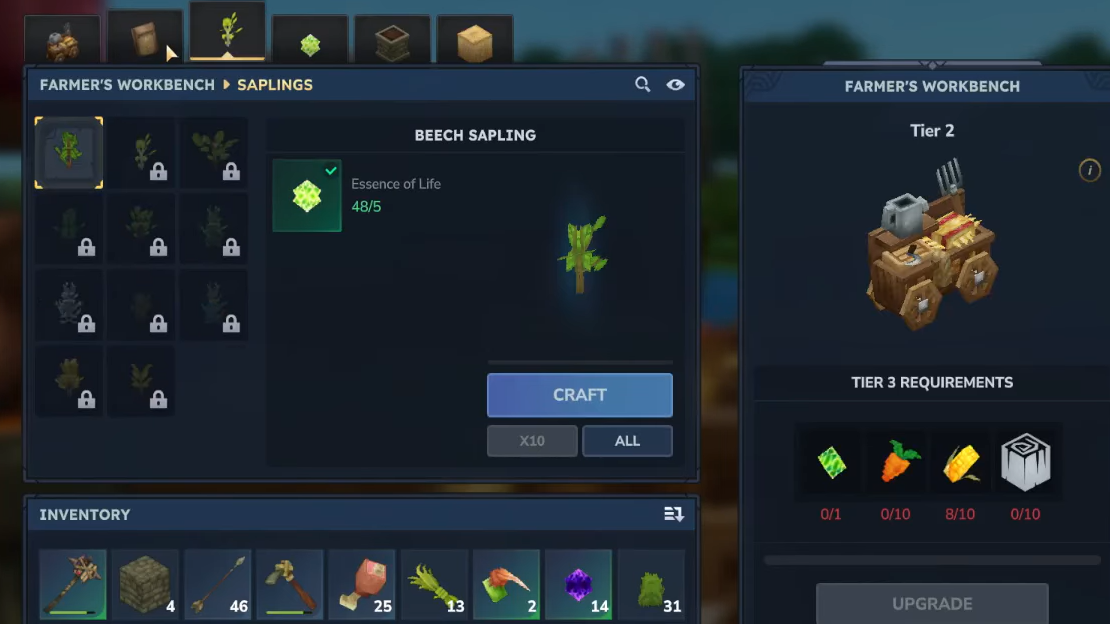
Step 2: Choose the tree species you want to plant. Each option shows a crafting cost that includes Essence of Life and may use other basic materials you already gather while exploring.
Step 3: Craft the sapling. The finished item appears in your inventory; move it to your hotbar so you can equip it like a block. Remember that “Tree sap” is not the same thing as a sapling. Tree sap functions as a material or fuel and cannot be planted on its own.
After crafting, you have a portable tree in item form, ready to be placed back into the world wherever you decide to rebuild your forest.
How to plant saplings and regrow trees
Planting is straightforward once you know the rules, but a few constraints can make saplings feel finicky if you treat them like normal blocks.
Step 1: Equip the sapling item in your hotbar. Make sure you are not holding seeds or tree sap by mistake; only items labeled as saplings will grow into trees.
Step 2: Stand on or next to a patch of suitable ground. Saplings need dirt or grass to take root. They will not plant on stone, solid building blocks, or most artificial surfaces.
Step 3: Aim at the target block and use the place action, typically right‑click on mouse and keyboard. If nothing happens, double‑check that the block is valid soil and that you are actually holding a sapling.
Step 4: Space your saplings with care. Leaving around 8 to 10 blocks between them prevents overlapping canopies and gives each tree enough room to fully generate. Tight clusters can stunt growth or create awkward, interlocked trunks that are annoying to harvest.
Step 5: Wait several in‑game days. Saplings grow passively; there is no need to water them or apply any extra item once they are placed. After some time, each sapling transforms into a mature tree you can chop for logs and plant fiber.
Planting your own grove near your base eliminates the constant trek to distant forests and lets you control exactly how your local landscape looks, even after heavy logging.
Managing wood long‑term and avoiding terrain damage
Because trees do not respawn on their own, clear‑cutting large areas without replanting leaves permanent scars in the world. On top of that, trees can disturb terrain when they generate, which can tear up nearby blocks if they are too close to structures or delicate landscaping.
A dedicated tree farm helps in both directions. By confining most of your saplings to a controlled plot, you keep regeneration away from fragile terrain and builds, while retaining ready access to logs. A simple layout with orderly rows and consistent spacing keeps trunks easy to reach and reduces the amount of stray leaves and branches spilling into your base.
Many players also treat farming settlements as a shortcut early on. Harvesting existing village crops yields a decent chunk of Essence of Life and food, which accelerates the transition into a self‑sustaining farm and, by extension, stable sapling production.
Common pitfalls when trying to regrow trees
Several small details tend to cause confusion when people first try to replant trees:
- Expecting natural regrowth: Forests do not slowly refill over time. If you care about keeping an area green, plan to replace almost every tree you cut.
- Planting the wrong item: Tree sap is not plantable. Only crafted saplings from the Farmer’s Workbench will grow.
- Using the wrong control: Placing saplings uses the same action as placing blocks, typically right‑click, not left‑click.
- Planting on invalid blocks: Saplings require dirt or grass. Stone, wood planks, and many decorative blocks will simply reject them.
- Crowding saplings: Dropping saplings one or two blocks apart tends to cause messy tree clusters. Wider spacing improves growth and makes harvesting smoother.
Once these details are clear, tree regrowth in Hytale becomes predictable and easy to manage. The only real limit is how much Essence of Life you are willing to funnel into saplings instead of other recipes.
Treated as part of your farming setup rather than a passive background mechanic, trees shift from a depleting resource into a fully renewable one. A single Farmer’s Workbench, a modest wheat field, and a ring of carefully spaced saplings around your base are enough to keep your builds supplied with wood for the rest of your save.