

Marvel Rivals is turning Jeff the Land Shark into a literal low-resolution menace. Season 6 opens with Whac-a-Jeff, an arcade-style event that lets you play through a mini-game, feed chimichangas to Deadpool, and pick up a new free Jeff costume called 8-Bit Bash.
Whac-a-Jeff event start time and duration
Whac-a-Jeff goes live on January 16, 2026 at 9:00 AM UTC. It launches alongside Marvel Rivals Season 6 and runs for the entire season, so there is no need to race through it on day one. As long as you log in and engage with the event missions during Season 6, you have time to clear the rewards track and grab the Jeff skin.
How the Whac-a-Jeff event works
Whac-a-Jeff is built as an in-client, arcade-style progression track. Instead of a standard checklist of challenges with a linear bar, the event leans into the theme of Jeff popping up and being smacked back down — with Deadpool acting as the intermediary.
The core loop ties together three pieces:
- Event missions that you complete by playing matches and fulfilling specific objectives.
- Chimichangas that function as an event currency and fuel for the mini-game.
- “Whacs” that you perform in the arcade interface to flip tiles and reveal rewards.
The event interface shows a counter such as “9/3 chimichangas” in the corner, which signals a simple ratio: once you collect three chimichangas, you gain one attempt to whack Jeff in the mini-game. You keep playing normal modes, stack chimichangas through the missions, and then cash them in on the event board to advance along the reward path.

It is still a standard seasonal grind at its core, just skinned as a Deadpool-and-Jeff sideshow. You play Rivals, complete event-tagged missions, bank chimichangas, then spend them on whacs until you’ve claimed everything on the board.
All confirmed Whac-a-Jeff event rewards
The marquee reward is Jeff’s new costume, but the event is structured as a small bundle of cosmetics rather than a single drop. The confirmed items are:
- Jeff 8-Bit Bash costume – a free event-exclusive look that turns Jeff into a deliberately blurry, pixelated version of himself.
- Exclusive gallery cards themed around Jeff and the event.
- Units, the game’s cosmetic currency for unlocking additional items.
- Additional cosmetics such as emotes, sprays, or nameplates, filling out the nine-slot reward lineup hinted at in the event trailer.
The event UI is built around a grid with multiple unlock points, and the trailer layout suggests there are nine total rewards scattered across the mini-game. The 8-Bit Bash costume sits at the top of that hierarchy as the endpoint you are working toward; the rest of the tiles hand out side cosmetics and units on the way there.

Because the skin is tied to an event track rather than a shop bundle, it does not cost premium currency. Once you have played enough to reach its tile and perform the required whac, the costume is permanently added to your Jeff collection.
How to get the free Jeff 8-Bit Bash skin
The actual unlock process is simple, even if the event wrapper looks chaotic. You only need to engage with the event during Season 6 and focus on building chimichangas through missions.
Step 1: Log into Marvel Rivals after Season 6 and Whac-a-Jeff are live. From the main menu, open the seasonal events section and enter the Whac-a-Jeff panel so the game starts tracking your event progress.
Step 2: Check the listed Whac-a-Jeff missions. These typically ask for straightforward in-match actions such as completing games, winning a certain number of matches, or performing role-specific tasks. Queue up in your usual modes and play with those objectives in mind.
Step 3: As you complete missions, watch your chimichanga counter increase in the Whac-a-Jeff screen. Once it hits the threshold (three chimichangas per attempt), you gain a whac you can spend on the event board.

Step 4: Use your whac charges in the mini-game interface to hit Jeff tiles and flip rewards. Each successful whac unlocks one of the event items or advances you closer along the path that leads to the 8-Bit Bash costume.
Step 5: Keep repeating the loop of playing matches, finishing missions, banking chimichangas, and spending whacs until you reach and claim the Jeff 8-Bit Bash tile. At that point the costume is unlocked and selectable on Jeff’s customization page.
Nothing in the structure suggests any hidden paywall or alternate requirement, so the only real cost is time. With the event running throughout Season 6, regular play should be enough to secure the skin as long as you remember to burn your chimichangas on the event board instead of letting them sit.
What Jeff’s 8-Bit Bash skin actually is
The 8-Bit Bash costume leans into a joke a lot of players have already been making: low-fidelity Jeff. Instead of rebuilding the character from scratch, the skin applies a heavy pixelation and softness to his model, making him look like he is being rendered at a much lower resolution than the rest of the roster.
Players have compared it to playing on older hardware or a handheld — more 480p than true 8-bit. It does not dramatically change his silhouette or add new geometry; the appeal is the visual gag that your mascot hero looks like someone smeared a mosaic filter over him while everything else in the match stays sharp.
That minimalism is part of the punchline. It is closer to the “definitely not” parody skins in other hero shooters than a fully bespoke outfit, which fits the fact that it is free and event-bound rather than a premium store cosmetic.
How Whac-a-Jeff fits into Marvel Rivals Season 6
Whac-a-Jeff is only one slice of a larger Season 6 rollout. The patch that brings the event also introduces Deadpool as a playable hero, complete with his own Captain Pool costume sold through the in-game store. The seasonal update layers in broad hero balance changes and system tweaks on top of that.
If you care about cosmetics, Season 6 also stacks another free-skin route on top of Whac-a-Jeff. A separate Twitch Drops campaign centered on Invisible Woman runs from January 16, 2026 at 12:00 PM UTC through February 13, 2026 at 9:00 AM UTC. Watching eligible Marvel Rivals streams on Twitch during that window grants a themed spray, nameplate, emote, and eventually the Invisible Woman “Will of Galacta” costume, extending the long-running Will of Galacta collection.
How to claim the Season 6 Invisible Woman Twitch Drops
The Twitch Drops track is more rigidly timed than Whac-a-Jeff, and it depends on your accounts being linked correctly before you start watching.
 Shivam Malani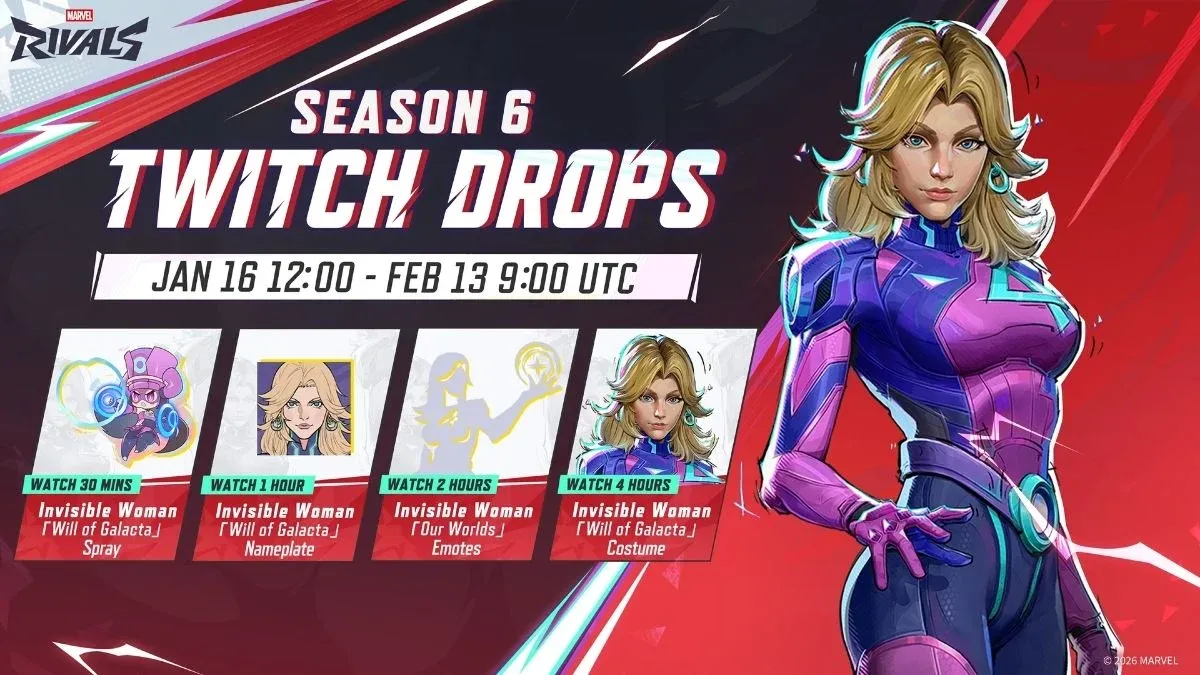
Step 1: Sign into the official Marvel Rivals website with your game account and link your Twitch account in the drops or account connections section. This makes sure watched time can be credited to your profile.
Step 2: On Twitch, search for Marvel Rivals streams that have the “Drops Enabled” tag. Only these broadcasts count toward the event watch-time thresholds.
Step 3: Keep a Drops-enabled stream open during the event window. Milestones unlock in order: 30 minutes of watch time for the Invisible Woman “Will of Galacta” spray, one hour for the nameplate, two hours for the “Our Worlds” emote, and four hours total for the full “Will of Galacta” costume.
Step 4: Visit your Twitch inventory to manually claim each drop once its timer completes. Rewards do not auto-claim, and unclaimed items can eventually expire.
Step 5: Log back into Marvel Rivals and open your in-game inbox. The drops arrive there as messages you can accept, after which the cosmetics appear in the relevant customization menus.
Unlike the Jeff event, this drops campaign ends on a fixed date. If the Invisible Woman skin is on your list, clear the four-hour requirement before February 13.
Whac-a-Jeff is built as a low-stress way to hand out a joke costume to one of Marvel Rivals’ most visible heroes, and to keep players bouncing around Deadpool’s corner of the client while Season 6 settles in. The 8-Bit Bash Jeff skin will not change how the game plays, but it does give Jeff mains a free, deliberately scuffed look to rotate in — and a reason to grind a few more chimichangas than usual.