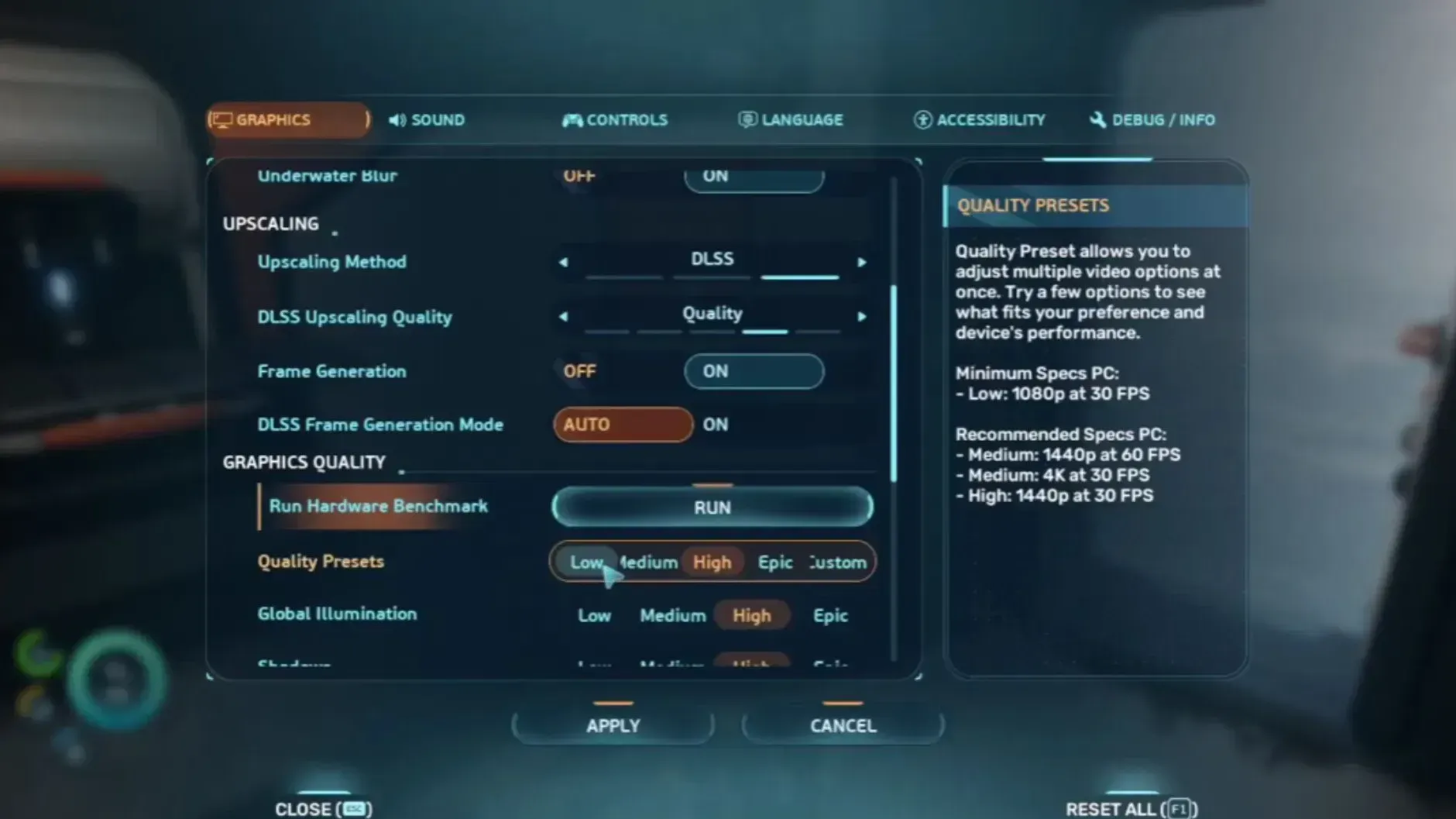
Subnautica 2 runs on Unreal Engine 5, and its Epic preset leans heavily on Lumen, dense volumetrics, and high-resolution shadow maps. On mid-range hardware those features can push a steady 60 FPS into the 30s once you reach kelp forests, crystal caves, or deep trenches. Lowering five specific options from Epic to High keeps almost all of the visual character while clawing back a large chunk of GPU time.
Quick answer: Open Options → Graphics in Subnautica 2 and set Global Illumination, Shadows, Volumetric Lighting (Fog), Reflections, and Foliage from Epic to High. Apply the changes and reload the save to let Lumen and shader caches rebuild.
Why Epic is the bottleneck in Subnautica 2
Unknown Worlds targets 1440p High at 60 FPS as the upper “Ultra” tier, with 4K High at 60 FPS reserved for an RTX 5070 Ti class GPU. The Epic option in the menu sits above that target. It scales internal resolution of effects like volumetric fog, Lumen reflections, and shadow cascades well past what is visible during normal gameplay, which is why dropping a single notch to High often produces double-digit FPS gains.
The five settings below are the ones with the steepest cost curve between High and Epic. Lowering them further to Medium is possible, but the visual hit becomes obvious. High is the sweet spot.
The five settings to drop from Epic to High
| Setting | What it controls | Why High is enough |
|---|---|---|
| Global Illumination | Lumen bounce lighting on coral, flora, and base interiors | High keeps soft indirect light intact; Epic only refines distant bounces that water already obscures. |
| Shadows | Resolution and draw distance of dynamic shadow maps | Caustics and underwater scatter mask shadow edges, so a lower cascade resolution is hard to spot. |
| Volumetric Lighting (Fog) | God rays, murky water density, particulate scatter | High preserves the volumetric look near the surface and inside trenches; Epic mainly raises the internal render resolution of the fog. |
| Reflections | Screen-space and Lumen reflections on glass, hulls, and water surfaces | Sub Cyclops windows and seabase glass still reflect cleanly at High; Epic adds extra ray bounces that move underwater anyway. |
| Foliage | Density and draw distance of kelp, coral, and alien plant life | High keeps biomes looking thick; Epic mostly extends LOD popping range, which the murky water hides. |
How to apply the change

Verifying the gain
You should see a clear jump in average FPS in the same biome you tested before. The most reliable benchmark spot is a dense area: an alien kelp forest, the bioluminescent deep biomes, or near a built-up seabase with glass corridors. Frame-time spikes when crossing biome boundaries should also shrink, because High shadow and volumetric resolutions consume less VRAM than Epic.
If the average frame rate is unchanged, the preset likely snapped back to Epic. Reopen the Graphics menu and confirm each of the five sliders is on High, not on the Epic preset row at the top.
Settings to leave alone
Textures should stay as high as your VRAM allows. The alien flora and creature detail rely on full-resolution textures, and the cost is paid in memory rather than frame time. If you have 8 GB of VRAM or less, drop Textures one step instead of pushing the five settings above to Medium.
Upscaling is the other lever worth keeping. DLSS or FSR on Quality mode at 1080p, or Balanced at 1440p, will multiply the savings from the five Epic-to-High changes without softening the image noticeably under water.
When to go lower than High
On a GTX 1660 or RX 5500 XT class card, the Epic-to-High drop alone will not reach 60 FPS at 1080p. In that case, lower Shadows and Volumetric Lighting one more notch to Medium before touching the other three. Those two settings keep the largest performance headroom between Medium and High, while Global Illumination, Reflections, and Foliage cost most of their visual quality below the High tier.
Subnautica 2 is still in Early Access, so subsequent patches may rebalance how the Epic tier scales. The five-setting drop, however, targets the underlying UE5 systems (Lumen, volumetric fog, shadow cascades, screen-space reflections, and foliage density) that will keep costing frames regardless of patch tuning.