Indifferent Broccoli runs dedicated Palworld servers with mod support, full file access, and a two-day free trial that does not require a credit card. Pricing is tied to the maximum player count rather than memory, and every plan ships with uncapped RAM on hardware that holds at least 128GB.
Quick answer: Start a Palworld server by entering your email, choosing a plan size and region, then pressing Launch 2-Day Free Trial on the Palworld server hosting page. The server is live in under 60 seconds, and you join through the in-game server browser.
Plan sizes and monthly pricing
Plans scale by the number of players allowed on the server. The recommended tier is the 4-player plan. Longer billing terms lower the effective cost, with quarterly saving 3%, semi-annual saving 6%, and annual billing including one free month.
| Player slots | Monthly price |
|---|---|
| 1 player | $5.99 |
| 2 players | $6.99 |
| 4 players (recommended) | $9.99 |
| 6 players | $12.99 |
| 8 players | $15.99 |
| 10 players | $18.99 |
| 16 players | $20.99 |
| 32 players | $24.99 |
The 32-player plan is the largest option. Because Palworld is still in early access, server stability at higher populations depends on player count, mod choices, and general settings, so large communities may notice more instability.
Server regions and latency
You pick a region during signup to keep ping low for you and your players. Data centers span North America and Europe, with an Asia location as well.
| Region | Locations |
|---|---|
| North America | San Jose, Dallas, Salt Lake City, Washington DC, Montreal |
| Europe | Frankfurt, Roubaix, Amsterdam |
| Asia | Singapore |
In the signup form, these map to NA-West (California), NA-Central (Texas), NA-East (Montreal), and EU (Germany).
What every plan includes
- Mod compatibility, including Pak mods added through the file manager
- Full file access over FTP
- Uncapped RAM with at least 128GB available on the hardware
- A custom control panel plus a Discord bot for managing the server
- DDoS protection, instant setup, and no setup fees
- A 7-day refund policy and the ability to cancel anytime
- Subusers and cost-splitting for shared servers
- 24/7 human support through Discord
The Discord bot handles common tasks without leaving chat. Running /status returns the server name, game, online state, IP, and port, while /restart reboots the server and confirms when it comes back up.
Launch a hosted server in three steps
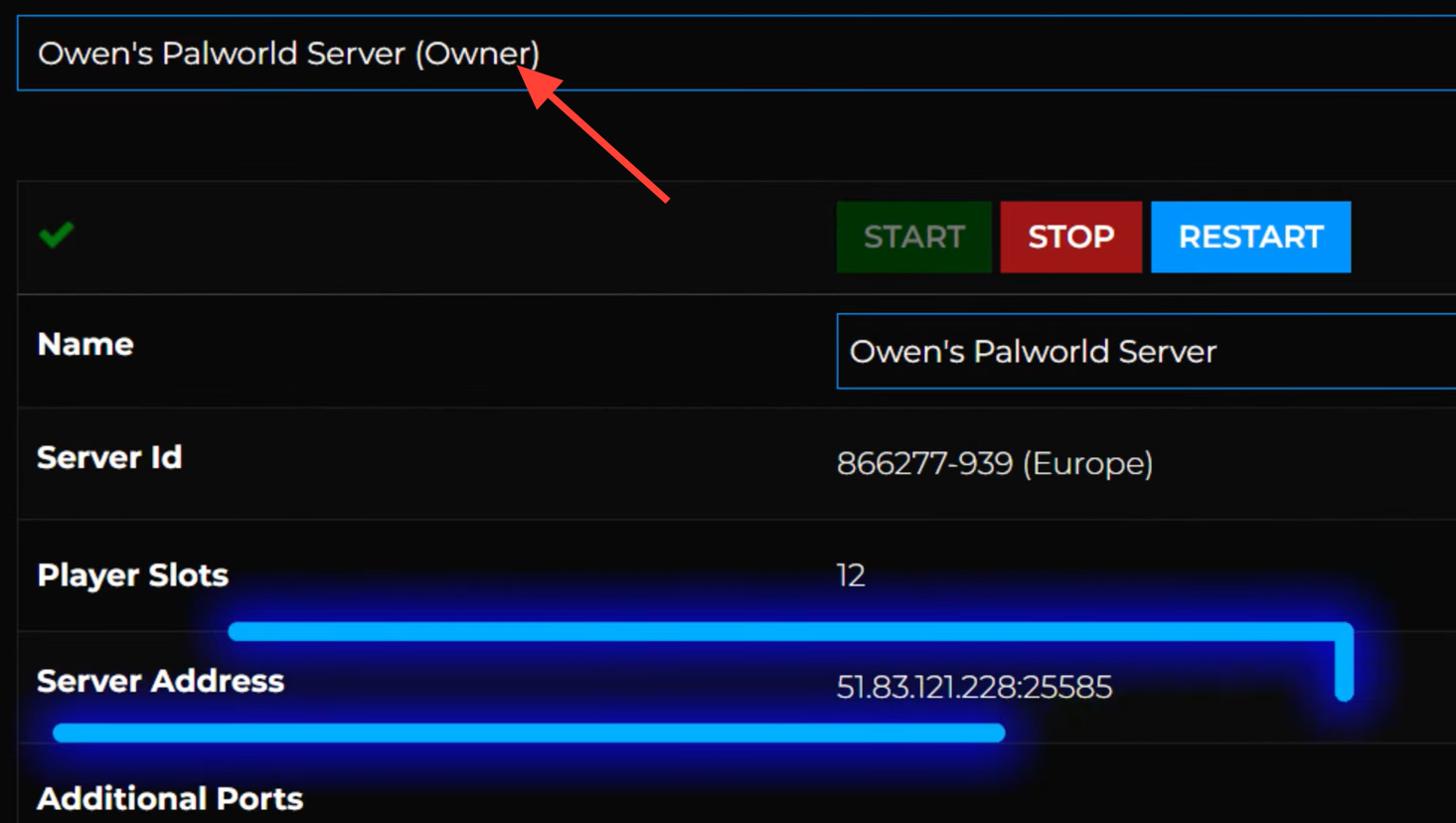
You know the server is ready when it appears online with an IP and port. To connect, open Palworld’s in-game server browser and join using those details.
Self-hosting a Palworld dedicated server
You can also run the dedicated server yourself, either locally or on a VPS, though it takes more setup. A machine with at least 16GB of RAM, a quad-core processor, and a minimum of 40GB of free storage is recommended. Supported operating systems include Linux (Ubuntu 16.04 or newer), Windows 7/8/10 64-bit, and Windows Server 2012 through 2022. Larger servers need more processing power.
Install the server files
Install from your Steam library or use SteamCMD with app ID 2394010.
Linux:
steamcmd +force_install_dir ./Palworld_server/ +login anonymous +app_update 2394010 +quit

Windows:
steamcmd.exe +force_install_dir c:SteamCMDPalworld_server +login anonymous +app_update 2394010 +quit
Forward UDP ports 8211 and 27015 so players can reach the server.
Start the server
Launch it from the Steam library to get a terminal window, or run it from the command line inside the server’s directory.
Windows:
PalServer.exe

Linux:
./PalServer.sh
Common questions
How much RAM does a Palworld server need?
Requirements depend on player count, mods, and settings. A server with 16GB is generally enough for small to medium communities. Hosted plans provide uncapped RAM, so only the player limit changes between tiers.
What is the maximum server size?
The largest hosted plan supports up to 32 players. Since the game is in early access, expect stability to vary with population, mods, and configuration.
Can I use an existing world?
Yes. An existing save can be transferred to the server, and Pak mods are added through the file manager. Full FTP access lets you manage everything directly.
For most groups, the hosted route is the fastest path to a stable server with mod support and managed backups, while self-hosting suits anyone who wants full control over their own hardware. Either way, connecting is the same once the server is online. Open the in-game browser and join with the IP and port.