Far Far West entered Steam Early Access on April 28, 2026, and the modding scene has already moved quickly. The game has no official Workshop, so everything runs through community packaging on Nexus Mods, with most advanced changes layered on top of UE4SS (the Unreal Engine scripting framework). The picks below focus on quality-of-life, progression, and customization changes that work today on PC.
Quick answer: Install UE4SS first, drop Lua-based mods into ...\FarFarWest\Binaries\Win64\ue4ss\Mods, and use the ...\FarFarWest\Content\Paks\~mods folder for .pak mods. Mod Hub is the alternative when a mod ships as a blueprint loader and does not need UE4SS.
UE4SS for Far Far West (foundation)
UE4SS is not a gameplay mod, but almost every advanced Far Far West mod depends on it. It injects Lua scripting and runtime hooks into Unreal Engine, which lets community scripts change game logic without touching core files.
Install it once, and the rest of the list becomes plug-and-play. Without it, mods like XP multipliers, auto bunny hop, and the level-requirement remover simply will not load.
Why install: required dependency for most Lua mods on Nexus.
Install path: extract the UE4SS files into ...\Far Far West\FarFarWest\Binaries\Win64\. Launch the game once so it generates the ue4ss\Mods folder structure.
Mod Hub (blueprint loader without UE4SS)
Mod Hub is a shared in-game menu space built around a blueprint mod loader. It does not rely on UE4SS, which makes it useful for users who want to avoid Lua-based injection or who run into UE4SS compatibility issues after a Far Far West patch.
It supports multiple mods loading side by side and gives them a common UI entry point inside the game. Install it by dropping the mod files into the Paks\~mods folder. Create the ~mods folder manually if it does not exist.
Why install: a stable host menu for blueprint-based community mods, and a fallback when UE4SS breaks with a game update.
XP-Gold-Souls Multiplier
Early progression in Far Far West is slow. Souls and gold drop in modest amounts, and most weapon and spell upgrades require sustained farming. The XP-Gold-Souls Multiplier scales the three main currencies, which compresses the grind without removing it entirely.
Why install: faster access to new weapons, spell tiers, and the cactus support line without rerunning the same low-tier contracts.
Setup: drop the XPMod folder into ...\Binaries\Win64\ue4ss\Mods\, then add the line XPMod : 1 at the bottom of mods.txt. Requires UE4SS.
Basically Free skins
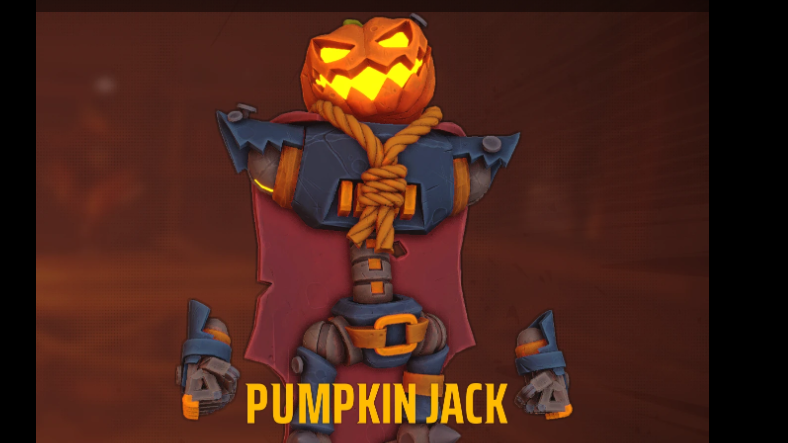
The in-game shop sells character skins, mounts, and emotes for currency. Basically Free skins drops every shop cosmetic price to 1 gold, including event and quest skins like Pumpkin Jack. Nothing else changes, so combat economy is untouched.
Why install: unlocks all cosmetic options for testing builds visually or playing co-op themed runs without grinding bounty payouts.
Setup: a .pak mod. Place it in ...\FarFarWest\Content\Paks\~mods.
Auto BHop Mod
Bunny hopping carries momentum between jumps in Far Far West, but the timing window is tight under pressure from horde waves. The Auto BHop Mod automates the input so each landing chains into the next jump without frame-perfect spacebar tapping.
Why install: consistent movement speed during extraction sprints and skeleton swarms, especially when carrying objective items to the train.
Setup: requires a working UE4SS install. Drop the mod folder into ...\Binaries\Win64\ue4ss\Mods\ and enable it in mods.txt.

Save Editor
The Save Editor is a standalone Windows tool, not an in-game mod. It decrypts .save files, exposes player progress fields, and writes the file back encrypted so the game still loads it.
Use it for resource recovery after a corrupted run, build testing, or rolling back a bad upgrade choice. Treat it carefully because a wrong field edit can render a save unusable.
Why install: precise control over progression values without running multiplier mods during normal play.
Setup: drag and drop a .save file from Documents\My Games\FarFarWest\Saves onto the editor window. The Python build needs the pycryptodome package installed; the prebuilt Windows version does not.
Saves folder to a zip before editing.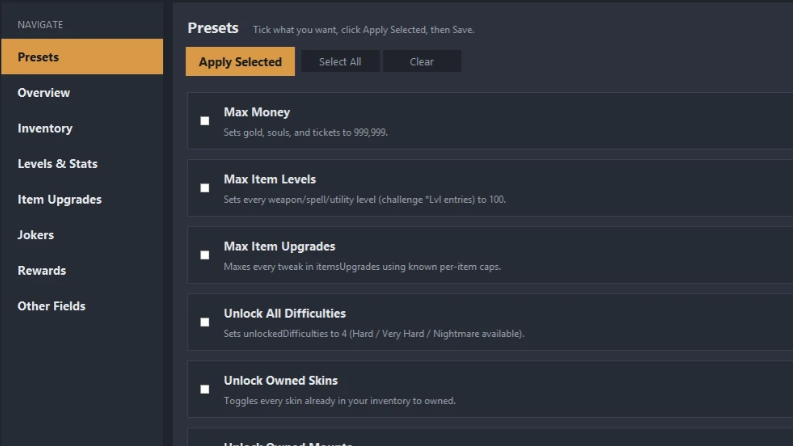
Mappings File (USMAP)
The Mappings File is a developer-facing utility rather than an end-user mod. It provides a USMAP file that reverse-engineering tools like FModel and UAssetGUI need to read Far Far West’s serialized assets correctly.
If you create mods, edit textures, or unpack .pak archives to inspect game data, the USMAP is the link that turns raw bytes into named properties. Players who only install mods can skip it.
Why install: required for asset extraction and mod authoring workflows on Far Far West’s current Unreal version.

Comparison and requirements
| Mod | Type | Needs UE4SS | Install folder |
|---|---|---|---|
| UE4SS | Framework | — | Binaries\Win64 |
| Mod Hub | Loader / menu | No | Paks\~mods |
| XP-Gold-Souls Multiplier | Progression | Yes | ue4ss\Mods |
| Basically Free skins | Economy / cosmetic | No | Paks\~mods |
| Auto BHop Mod | Movement | Yes | ue4ss\Mods |
| Save Editor | External tool | No | Run as standalone |
| Mappings File (USMAP) | Modding utility | No | Used by FModel etc. |
Install order and folder paths
Documents\My Games\FarFarWest\Saves folder to a zip archive before installing anything.C:\Program Files (x86)\Steam\steamapps\common\Far Far West. On Epic Games, it is C:\Program Files\Epic Games\Far Far West....\FarFarWest\Binaries\Win64\. Launch the game once so the loader creates the ue4ss\Mods directory.~mods folder at ...\FarFarWest\Content\Paks\~mods if it does not already exist. This is where every .pak-based mod goes....\Binaries\Win64\ue4ss\Mods\ and enable each one with a line in mods.txt using the format ModName : 1.When mods stop working after a patch
Far Far West is in active Early Access development, so binary signatures shift between updates. If the game crashes on launch or boots without any mod effects after a patch, three checks resolve most cases.
First, disable the most recently added .pak files and try booting again. Second, update UE4SS to the latest build, since older versions stop injecting when the game’s executable is rebuilt. The Signatures folder mod on Nexus exists specifically for this case. Third, verify game files through Steam properties to repair any overwritten core file.
Multiplayer caveat: gameplay mods that change values like XP rates only apply locally to the host. Joining a vanilla lobby with a multiplier mod loaded will not push those values to other players, and some mods may desync if the host is unmodded.
Modding here is still early. The list above covers what is stable and useful right now, with the understanding that any mod can break the next time Evil Raptor pushes a build to Steam. Keep a clean save backup, install one mod at a time, and confirm each works before stacking the next.