Palworld 1.0 raised the level cap to 80, doubled the map with the Sky Islands and the World Tree, and added 72 new Pals to catch. All of that content is fun, but the default survival pacing can feel like a grind once you push into the late-game zones. Custom world settings let you reshape the rules so you spend more time exploring and capturing and less time babysitting food boxes and repair benches.
Quick answer: Open Change World Settings from the main menu (or edit PalWorldSettings.ini on a dedicated server), then set Death Penalty to No Drops, Time to Incubate Massive Egg to 0, Structure Deterioration Rate to 0, EXP Rate to 1.5–2.0, and Item Weight Rate near 0 for the smoothest 1.0 run.
Where to change world settings
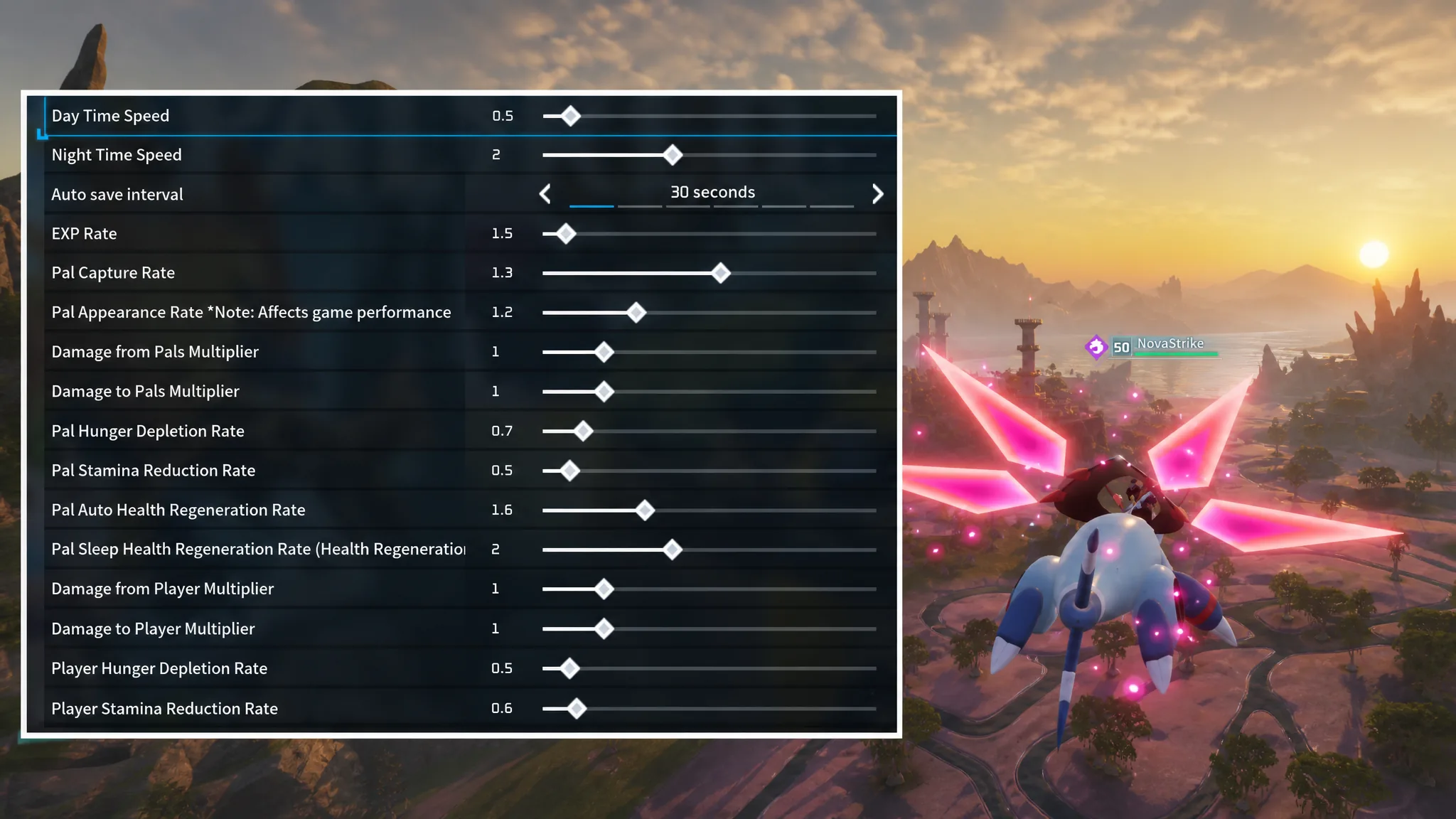
For a solo or local world, launch Palworld, choose Start Game, then pick an existing world or create a new one. Selecting Change World Settings opens the full parameter list, and any value you don’t touch stays at the game default. Every setting listed below can be adjusted here.
For a shared world, a dedicated server gives you the same controls plus persistence. Install Palworld Dedicated Server from your Steam Library, then edit PalServer/Pal/Saved/Config/WindowsServer/PalWorldSettings.ini. Copy the block starting at [/Script/Pal.PalGameWorldSettings] from DefaultPalWorldSettings.ini into that file before adding a ServerName, AdminPassword, and ServerPassword. The full parameter reference lives in the official Palworld server documentation.
Best 1.0 quality-of-life tweaks
These changes address the specific pain points that the expanded map and higher level cap introduced. They keep the survival loop intact but remove the busywork that slows down exploration and breeding.
| Setting | Value | Result |
|---|---|---|
| Death Penalty | No Drops | Keeps your endgame gear and team Pals when you die in a dungeon or boss arena |
| Time to Incubate Massive Egg | 0 | Removes the real-time wait so eggs hatch instantly |
| Structure Deterioration Rate | 0 | Stops buildings that sit just outside the Palbox circle from crumbling |
| Meteorite/Supply Drop Interval | 30–60 min | Increases the flow of supply drops that hold elixirs and rare loot |
| Item Weight Rate | 0 (or very low) | Lets you haul large stacks of stone and wood without slowing down |
| EXP Rate | 1.5–2.0 | Smooths the late-game leveling curve toward the level 80 cap |
| Player Stamina Reduction Rate | 0.5 | Extends running, climbing, and gliding across the larger map |
| Pal Hunger Depletion Rate | 0.5 | Keeps base Pals fed longer, cutting time on food management |
| Equipment Durability Loss Multiplier | 0.2 | Makes armor and high-tier weapons last through long boss fights |
Note: setting Death Penalty to No Drops is the single most important change if you plan to run the World Tree radiation biome or the Sunreach tower bosses, since a wipe there would otherwise scatter your best gear at the bottom of the fight.
Preset profiles by playstyle
If you’d rather apply a complete profile than tune each slider, use one of the four presets below. Sandbox is built for relaxed creative play, Survival makes the world punishing, Action centers on combat, and Balanced sits in the middle. Values not shown stay at the game default.
| Setting | Sandbox | Survival | Action | Balanced |
|---|---|---|---|---|
| EXP Rate | 20 | 1 | 1 | 3 |
| Pal Capture Rate | 2 | 1.5 | 0.5 | 1.5 |
| Pal Appearance Rate | 1 | 1.5 | 1.5 | 1.5 |
| Damage from Pals | 0.1 | 2.5 | 2 | 1 |
| Damage to Pals | 5 | 1 | 0.5 | 1 |
| Damage from Player | 5 | 1 | 0.5 | 1 |
| Damage to Player | 0.1 | 1.5 | 1.5 | 2 |
| Player Hunger Depletion | 0.1 | 2 | 2 | 1 |
| Player Stamina Reduction | 0.1 | 2 | 2 | 1 |
| Player Auto HP Regen | 5 | 1 | 1 | 4 |
| Structure Deterioration | 0 | 2 | 2 | 1 |
| Gatherable Items | 3 | 3 | 3 | 1.5 |
| Incubate Massive Egg (h) | 0 | 1 | 5 | 1 |
| Raid Events | Off | On | On | Off |
| Death Penalty | No Drops | Drop items | Drop items and Pals | Drop items and bag |
| Max Pals at Base | 20 | 20 | 10 | 16 |
Full randomization for return players
If you’ve already beaten the base game and want a fresh run, Palworld 1.0 includes randomization toggles that scramble which Pals appear where. This turns the whole map into an unknown, so a legendary encounter could show up right outside the starting valley.
Extra settings for dedicated servers
A shared world adds parameters that only matter with multiple players. These live in the same PalWorldSettings.ini file and control PvP, guild limits, and how bases are managed.
| Setting | Effect |
|---|---|
bIsPvP=True | Enables PvP; set to False for a PvE server |
BaseCampMaxNum=128 | Total bases allowed across the server |
BaseCampWorkerMaxNum=50 | Maximum Pals working per base |
BaseCampMaxNumInGuild=8 | Bases per guild (default is 4) |
MaxBuildingLimitNum=0 | Per-player building cap; 0 is unlimited |
bBuildAreaLimit=False | Allows building near fast-travel points and other structures |
bEnableInvaderEnemy=True | Set to False to stop invaders attacking bases |
bEnableVoiceChat=True | Set to False to disable in-server voice chat |
Your changes take effect once you confirm them on the settings screen, or after you relaunch the dedicated server following an edit to the .ini file. You’ll know it worked when the tuned behavior appears in play, for example instant egg hatching or no dropped items on death. Before you jump into 1.0, back up your save first, because the update reset main and sub-mission progress and stale Early Access mods can corrupt fresh saves.