
Google Docs is a versatile platform that offers a user-friendly interface for creating and editing documents online. One of its essential features is the ability to highlight text, which allows you to emphasize important information and organize your content effectively.
Applying highlights to your text can draw the reader’s attention to key points, enhancing the overall readability of your documents.
Highlighting text in Google Docs
Open your Google Docs document and select the text you want to highlight by clicking and dragging your cursor over the desired words, phrases, or sentences.
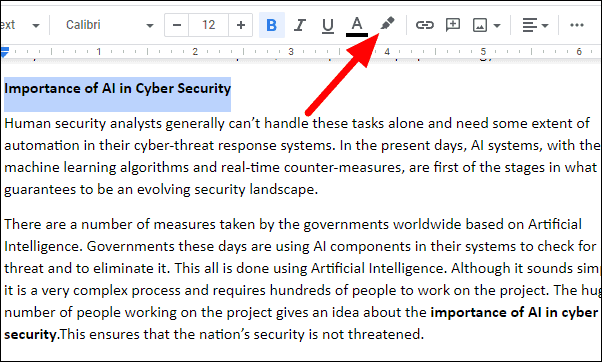
With the text selected, locate the Highlight color icon on the toolbar. This icon resembles a highlighter pen and is situated between the Text color (an underlined “A”) and the Insert link icons.
Click on the Highlight color icon to open the color palette. Choose a color from the available options to apply it to your selected text. If you wish to use a custom color, click the plus (
+) icon at the bottom of the palette to select a specific shade.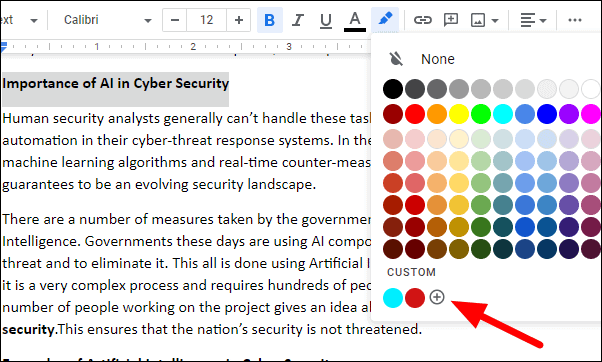
Once you select a color, the text you’ve chosen will be immediately highlighted with the color you’ve applied.
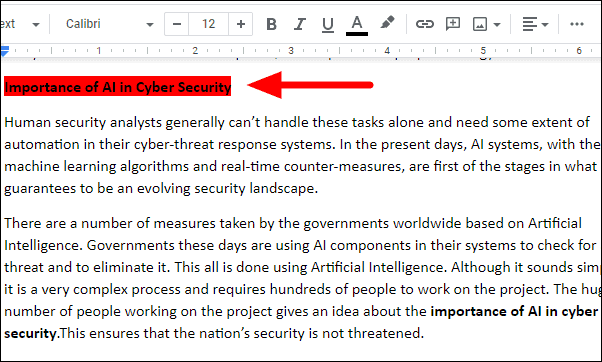
By using the highlighting feature in Google Docs, you can effectively emphasize critical information and make your documents more engaging and easier to navigate for your readers.