Gmail offers 15 GB of free storage shared across its services like Google Drive, Google Photos, and Gmail itself. Over time, this space can fill up, preventing you from sending or receiving emails. Fortunately, there are effective ways to free up space and keep your Gmail account functioning smoothly.
Freeing up space in Gmail
size:10mb to find emails larger than 10 MB.
larger: and smaller: to find emails within specific size ranges. For example, typing larger:5mb smaller:10mb will display emails between 5 MB and 10 MB.older: operator followed by a date to find emails before a certain date, such as older:2019/12/31.Managing storage in Google Drive
If Google Drive is using a large portion of your storage, you can free up space by deleting unnecessary files.

Optimizing storage in Google Photos
Photos and videos can consume considerable storage space, especially if stored in original quality.
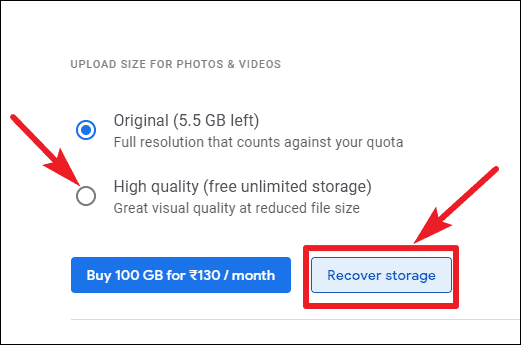
Google Photos’ high-quality setting supports photos up to 16 megapixels, which is sufficient for most users.
Identifying what is using your storage
Understanding which services are consuming your storage is crucial. Visit Google One to see a breakdown of your storage usage across Gmail, Google Drive, and Google Photos.

With this information, you can focus your efforts on the services that are using the most space.
By following these steps, you can effectively manage your Google account’s storage and ensure you have enough space for the emails and files that matter most.