Evolution in +1 Venom Evolution is handled through its own button on the main screen, not through regular leveling. You can push your symbiote to the level cap, pile up millions of Venom, and still have no evolution bonus applied. Knowing where the Evolve button is and how to read the stat that tracks it saves a lot of guesswork.
Quick answer: Open the Evolve button on the main HUD. Your progress shows as the “Evolve” percentage in the stat panel, which starts at +0% until you evolve.
Where to find Evolve in +1 Venom Evolution
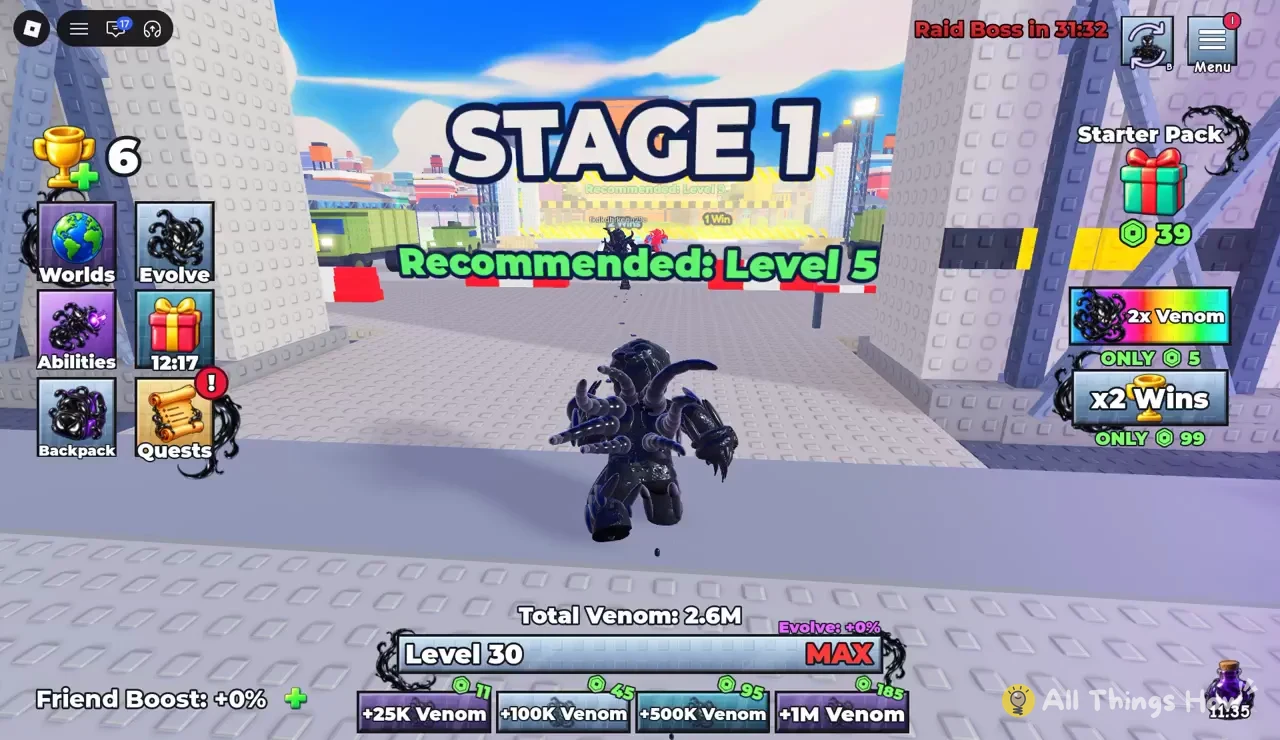
The Evolve option sits with the game’s other feature buttons on the main interface, so you can reach it from anywhere without walking to a specific spot in the world. It shares space with the menus you’ll use most often:
- Menu for general game options
- Worlds for moving between areas
- Evolve for evolution
- Abilities for your symbiote’s powers
- Backpack for stored items
- Quests for objectives
Because Evolve is its own menu rather than an automatic reward, nothing happens to your evolution stat just from playing. You have to go into it deliberately.
Reading the Evolve bonus and your stat panel
The stat panel on the HUD is where you confirm your evolution status. It lists four lines, and each one tells you something different about your character.
| HUD line | Example value | What it tracks |
|---|---|---|
| Friend Boost | +0% | Bonus from playing with friends |
| Total Venom | 2.6M | Venom you have collected |
| Evolve | +0% | Your evolution bonus |
| Level | 30 (MAX) | Character level |
The Evolve line is the one that matters here. At +0%, no evolution bonus is active on your character, regardless of how much Venom you hold or what level you’ve reached. A character sitting on 2.6M Total Venom at Level 30 can still read +0% Evolve, which shows clearly that the two systems are separate.
Level 30 is flagged as MAX, so once you hit it, leveling stops being a way to grow. Evolve is the stat to look at from that point on.
Venom reward tiers on the lower HUD
Venom is the currency you build up across the game, and the bar along the bottom of the screen lists four Venom rewards. Each one has its own counter, and every counter starts from zero.
| Reward | Counter |
|---|---|
| +25K Venom | 0/11 |
| +100K Venom | 0/45 |
| +500K Venom | 0/95 |
| +1M Venom | 0/185 |
The pattern is simple. Bigger Venom payouts come with much higher targets, from 11 at the bottom tier up to 185 for the +1M reward. Watch these counters fill up as you play to see how close you are to each payout.
Stage 1 level recommendations and Wins
Stages are where you earn Wins, the second stat that shows your progress. Stage 1 carries a floating banner recommending Level 5, so a fresh character should level up a little before stepping in. The arena gate behind it lists Recommended Level 3 and a reward of 1 Win, which makes it the easier entry point for brand-new players.
Your Win count sits on the HUD next to your other numbers. Treat the recommended levels as a guide to when you’re ready for a fight. Going in below the recommendation is likely to be harder.
Paid boosts and timers that affect progress
You don’t need to spend Robux to reach the Evolve menu, but the shop sells boosts that speed up the Venom and Wins grind.
| Offer | Price |
|---|---|
| Starter Pack | 39 Robux |
| 2x Venom | 5 Robux |
| x2 Wins | 99 Robux |
Several countdowns also run on the HUD at the same time. One counts down to the next Raid Boss, one to a free gift reward, and one shows how long an active potion boost has left. They tick down in real time, so check them before you leave a session if you want to collect the gift or get full use out of a potion.
How to confirm your evolution worked
After you use the Evolve menu, go back to the stat panel and look at the Evolve line. If it has moved off +0%, your evolution bonus is active. If it still reads +0%, no bonus has been applied yet. Your Level and Total Venom lines are no help here, since a maxed character with millions of Venom can still show zero Evolve.