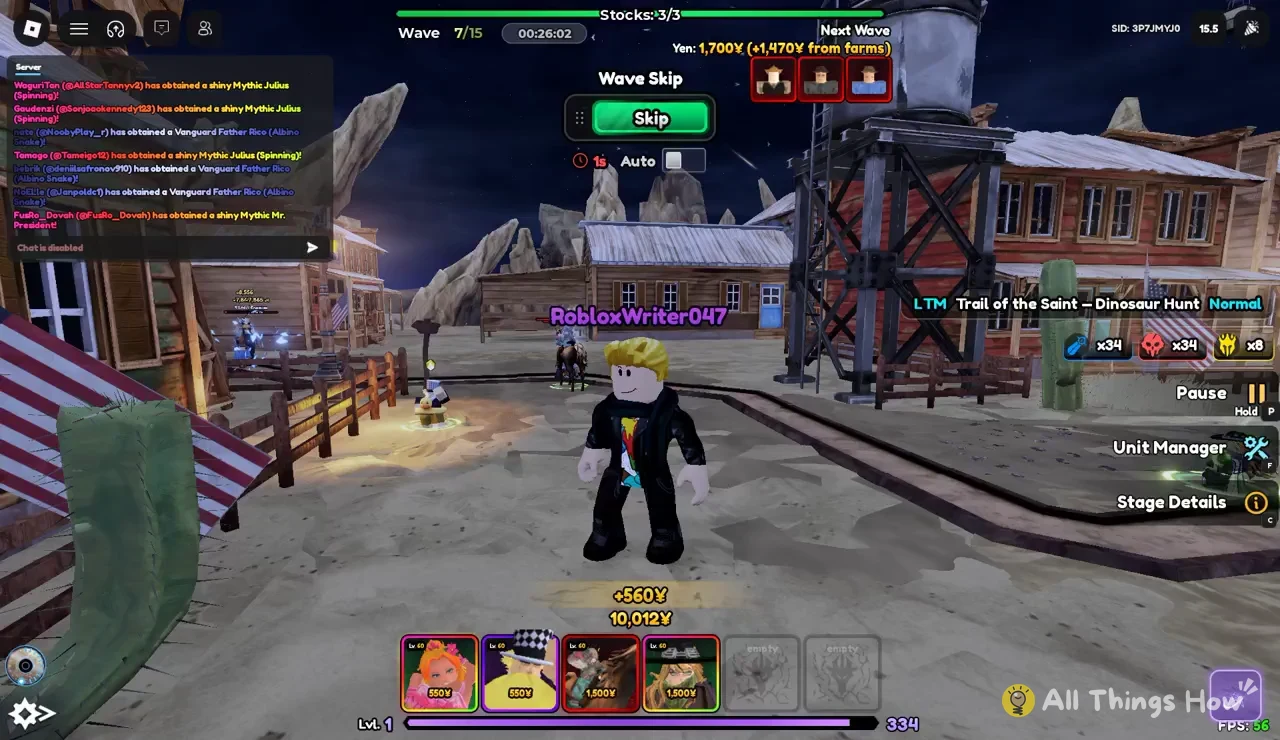
Trail of the Saint – Dinosaur Hunt is a limited-time mode in Anime Vanguards on Roblox. It takes place in a dusty western frontier town and runs for 15 waves on Normal difficulty. Like other Anime Vanguards stages, you win by spending Yen on units and holding the path until the final wave, without running out of stocks. The match screen packs a lot into a small space, so it helps to know what each readout means before you start skipping waves.
Quick answer: Clear all 15 waves while keeping at least one of your 3 stocks. Use farm income to grow your Yen, and use the Wave Skip panel‘s Skip button to move to the next wave early.
Dinosaur Hunt HUD: What each readout means
Every number you need to make a decision is already on the screen during a match. The mode name and difficulty appear as “LTM Trail of the Saint – Dinosaur Hunt Normal,” so you can always confirm that you loaded the right stage.
| On-screen element | Example value | What it tells you |
|---|---|---|
| Wave counter | Wave 7/15 | Current wave out of the total |
| Match timer | 00:26:02 | Time elapsed in the match |
| Stocks | Stocks:3/3 | Lives you have left |
| Yen balance | 10,012Y | Money you can spend now |
| Next Wave Yen | 1,700Y (+1,470Y from farms) | Income due at the next wave |
| Unit slots | 550Y, 1,500Y, empty | Your loadout and placement costs |
The stocks counter deserves the most attention. You start with 3/3, and that number is your buffer for mistakes. As long as it stays above zero, the run is still alive. The Unit Manager and Stage Details buttons sit on the same HUD. Use Unit Manager to look over the units you have already placed. Use Stage Details to review information about the stage you are playing.
Yen, farms and unit costs in Dinosaur Hunt
Yen is the only currency that matters inside a match. Every unit you place and every upgrade you buy comes out of the balance shown on the HUD. The bottom bar shows six loadout slots, and each one lists the Yen it costs to place that unit. In a typical setup, two units cost 550Y each and two cost 1,500Y each. The last two slots are marked “empty,” which means nothing is equipped there and they add nothing to your options in the match.
Farms are how your income grows. The Next Wave Yen readout shows how much money arrives when the next wave starts. It also shows how much of that amount comes from farms. In a reading of 1,700Y (+1,470Y from farms), farms make up most of the payout. Floating “+560Y” pop-ups appear on screen as income lands, so you can watch your balance grow without opening a menu.
Early on, it usually makes sense to fill your cheaper slots and get farm income running. Once your balance passes the price of your expensive units, you can afford them without leaving the path undefended. By wave 7, a farm-heavy setup can already hold more than 10,000Y. That is enough to place several of the 1,500Y units at once.
Fill both empty slots in your loadout before you queue. An empty slot gives you nothing to spend Yen on during the run.
How to skip waves and pause a Dinosaur Hunt match
Waves start on their own, but you can call the next one early. Skipping speeds up the run and pulls the next wave’s Yen in sooner. Only skip when your defense can handle more enemies arriving at once.
Unit drops announced in the Dinosaur Hunt chat log
The chat log keeps posting server-wide notices about rare units while you play, even when player chat is turned off. These notices show what other players are pulling while the event is live:
- Shiny Mythic Julius (Spinning)
- Vanguard Father Rico (Albino Snake)
- Shiny Mythic Mr. President
A finished run is easy to confirm. The wave counter reaches 15/15 and your stocks never drop to zero. If you can still see a stock on the HUD after the final wave, you cleared Trail of the Saint – Dinosaur Hunt on Normal.