
Quick answer: Hold left on the D-pad from inside the vehicle, then check the card at the screen’s bottom right. Press R3 to flip through its three pages.
How to open a car’s stat card in GTA 6

What’s on each page of the vehicle card
Page 1: Make, name and access
The opening page has the manufacturer on top and the vehicle’s name under it, so “VAPID” and “JASON’S ’70 GANADO” for Jason’s truck. Below that is a single row with a small car icon, which reads ACCESS: REGISTERED for this pickup.

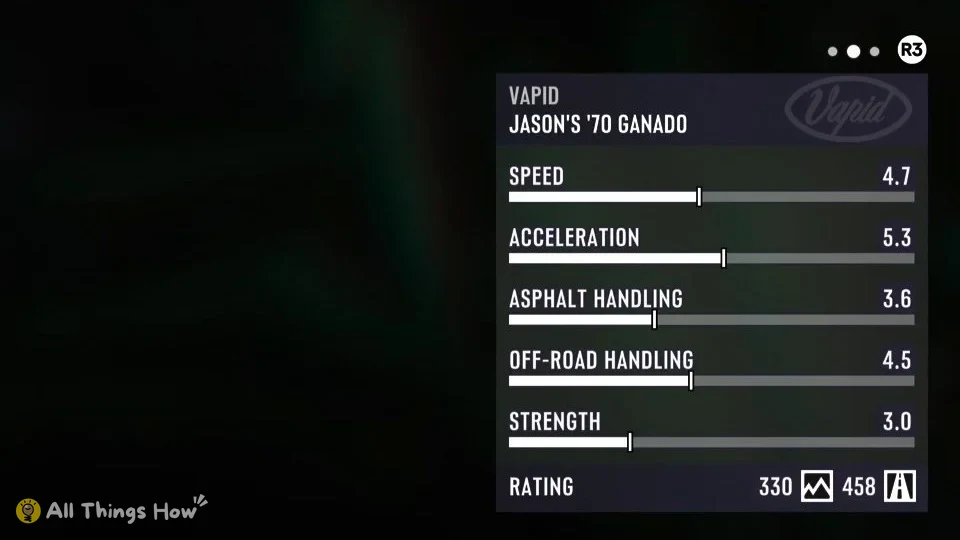
Page 2: Speed, handling, strength and Rating
The second page is where the performance numbers live. It has five bars, each with a number next to it, followed by a Rating row:
- Speed
- Acceleration
- Asphalt Handling
- Off-Road Handling
- Strength
The Rating row has two numbers instead of one, each with its own icon. One sits next to an off-road icon and the other next to a road icon, so the card gives a separate figure for each.
Page 3: Type, era, seats and condition
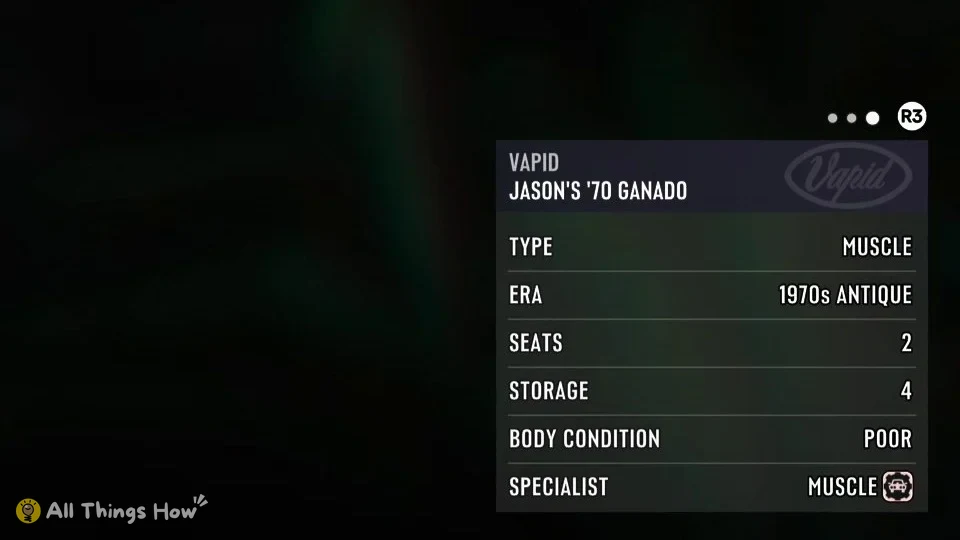
The last page lists what kind of vehicle you’re in: Type, Era, Seats, Storage, Body Condition and Specialist. The Specialist row also has an icon beside it.
Jason’s ’70 Ganado stats
Here’s how the full card reads for Jason’s Vapid ’70 Ganado pickup in Chapter 1, page by page.
| Page | Stat | Value |
|---|---|---|
| 1 | Access | Registered |
| 2 | Speed | 4.7 |
| 2 | Acceleration | 5.3 |
| 2 | Asphalt Handling | 3.6 |
| 2 | Off-Road Handling | 4.5 |
| 2 | Strength | 3.0 |
| 2 | Rating | 330 (off-road icon), 458 (road icon) |
| 3 | Type | Muscle |
| 3 | Era | 1970s Antique |
| 3 | Seats | 2 |
| 3 | Storage | 4 |
| 3 | Body Condition | Poor |
| 3 | Specialist | Muscle |