Custom character import codes in Jujutsu Shenanigans let players swap out the default roster for community-built characters, from Spider-Man and Sonic to a Base Gojo variant. Each code carries a full moveset and appearance that gets loaded onto a private server, giving players a way to test unique fighters against friends without touching the standard character list.
Working custom character codes for Jujutsu Shenanigans
Fifteen custom character codes are currently available, covering popular picks like Spider-Man, Sonic, King Von, and Nightmare. These codes are long strings of text, so copying them exactly matters more than usual.
Spider Man— Custom Spider-Man character build with unique movesetSonic— Custom Sonic character build with unique movesetIsland Owner— Custom character build with unique movesetLuffy Gear 5— Custom Luffy Gear 5 character build with unique movesetKing Von— Custom King Von character build with unique movesetKing Von 2— Alternate King Von character build with unique movesetSuper Senior Gojo— Custom Gojo variant character build with unique movesetNightmare— Custom Nightmare-themed character build with unique movesetOld Sans Is Back— Custom Sans-themed character build with unique movesetVoid— Custom Void-themed character build with unique movesetSteve— Custom Minecraft Steve character build with unique movesetFlower (Horror)— Custom horror-themed Flower character build with unique movesetDevstrikes Mahoraga and Agito— Custom dual-character build with unique movesetBase Gojo— Custom base Gojo character build with unique movesetOmniman Custom— Custom Omni-Man character build with unique moveset
Each entry above corresponds to a single export code. Because these strings run into the thousands of characters, use a copy button when one is available rather than selecting and copying text by hand, since a single missed character will break the import.
How to import a custom character code
Custom character codes only work through the Character Block feature, which is limited to private servers with Free Build enabled. Public servers do not support this import system.
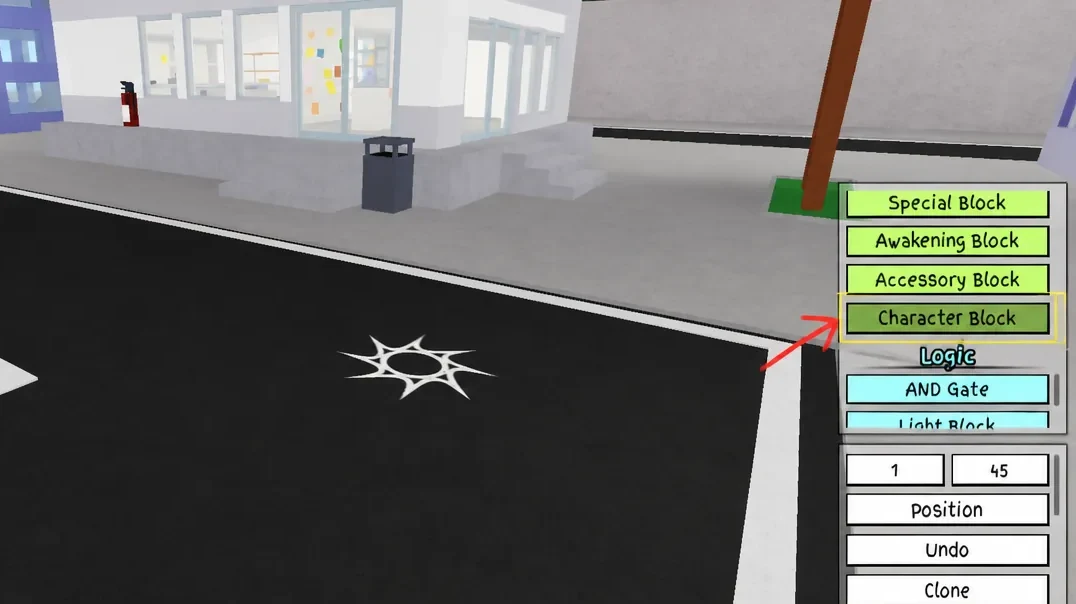
Note: a code will fail to import if any part of the moveset it references has since been removed from the game, or if even one character in the string was dropped during copying.
Where custom character codes fit into gameplay
The Character Block system exists specifically for private-server experimentation, letting a host equip community-made fighters like the ones above for friendly matches or informal tournaments. It sits alongside standard character selection but requires the extra Free Build setup, so it won’t affect anything on public servers or ranked-style matchmaking.