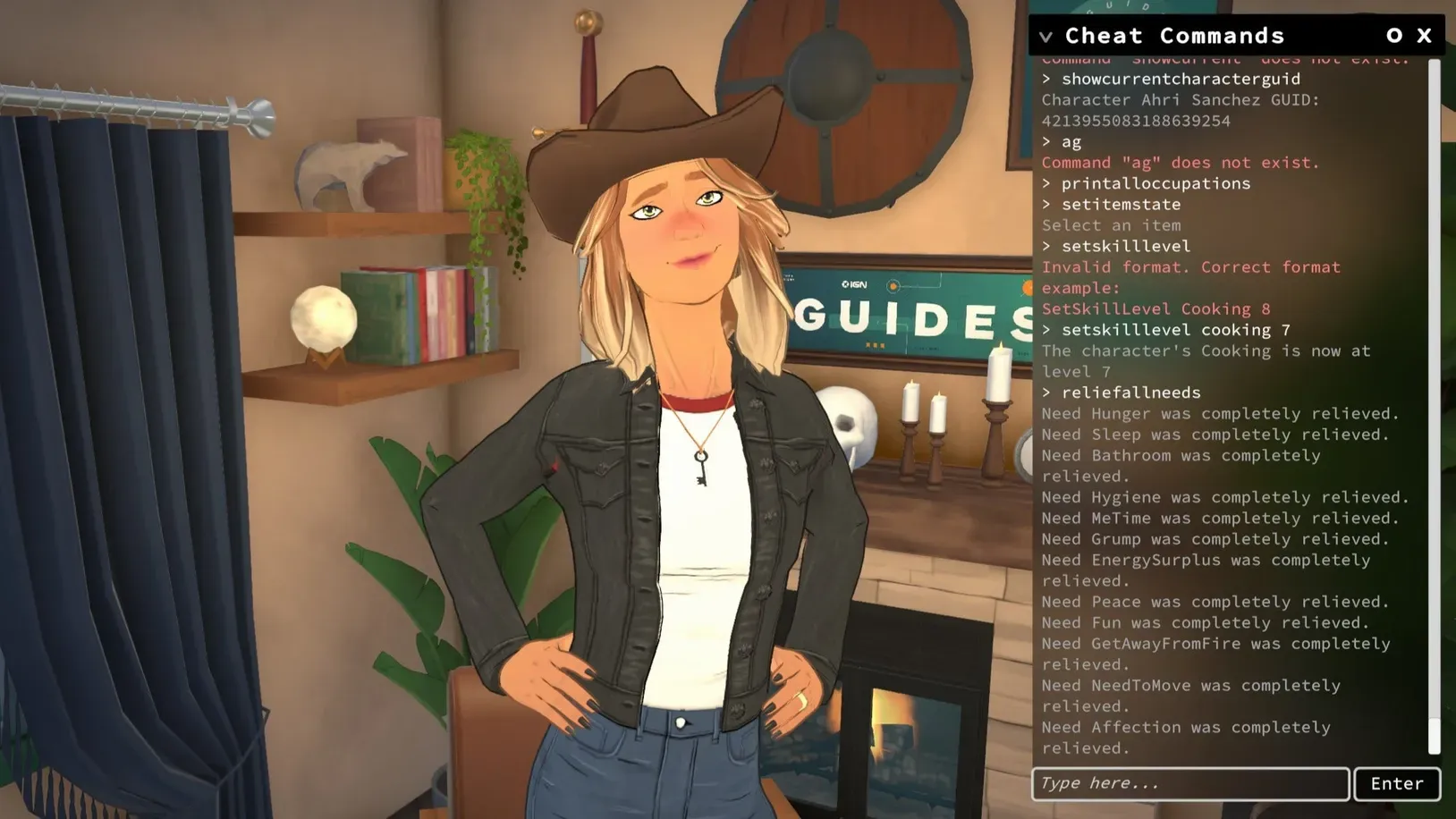
Paralives includes a built-in cheat menu with commands for household money, time control, skills, needs, careers, pregnancy, aging, fire states, build tools, and debug functions. Cheats are entered directly in-game, and many of them act on the currently selected Para.
How to use cheats in Paralives
Open your save and make sure the Para or household you want to affect is active. Some commands work on the selected Para, while others affect the whole household or the full world state.
Press
Ctrl+F1 to open the cheat window. Type the command exactly as written, then confirm it in the cheat box.Check the result in-game. If the command worked, you will usually see the household funds change, the selected Para update, the time jump forward, or the requested action happen immediately.
Money cheats in Paralives
PIGGYBANK— Gives 1000 Paradimes.MAKEITRAIN— Gives 10000 Paradimes.JACKPOT— Gives 50000 Paradimes.LOTTERY— Gives a random amount from 1 to 100000 Paradimes.PAYDAY— Gives money equal to the selected Para’s salary.PRINTMONEY 1000— Adds the specified amount of money to the household.SETMONEY 1000— Sets the household balance to the specified amount.CLEARBILLS— Removes all pending household bills.
Time cheats in Paralives
ADVANCEDAY— Moves time forward by 24 hours.ADVANCEHOUR— Moves time forward by one hour.SETHOUR 5— Sets the time of day to the chosen hour.SKIPTO5MINUTESBEFOREWORK— Jumps to five minutes before the selected Para starts work.
Character cheats in Paralives
EDITCHARACTER— Opens Paramaker to edit household characters.SHOWSTATUSEFFECTS— Lists the selected Para’s current status effects.CLEARSTATUSEFFECTS— Removes status effects from the selected Para.CLEARSTATUSEFFECTSONALLCHARACTERS— Removes status effects from all Parafolks.CLEARWANTCOOLDOWNS— Refreshes Wants immediately.COMPLETECURRENTWANTS— Completes all active Wants for the selected Para.GAINSTORYCARD— Gives a Story Card.LEARNALLSKINS Recipes— Teaches all skins in the named category.ADDSELECTEDCHARACTERSTOHOUSEHOLD— Adds the selected NPC Para to the current household.CLEARALLONSELECTEDCHARACTERS— Clears needs, wants, interactions, bills, memories, and emotions on selected characters.CREATECHARACTER HumanAdult— Creates a Para from a model GUID or display name.KICKCURRENTHOUSEHOLDINTONEWHOUSEHOLD— Moves selected Paras into a new household.KICKSELECTEDCHARACTERSFROMHOUSEHOLD— Removes selected Paras from the household.LEVELUPPERSONALITY— Raises the selected Para’s personality level.LEVELUPSKILL Guitar— Raises one named skill by one level.PRINTAGE— Displays the selected Para’s age.RESETPERSONALITY— Resets personality level to 1 and removes upgrades and trait choices.SETAGE 18— Sets the selected Para’s age.SETSKILLLEVEL Guitar 5— Sets a named skill to a chosen value.SHOWCHARACTERRELATIONSHIPS— Displays the selected Para’s relationships and labels.
Need cheats in Paralives
CHANGENEED Hunger 2— Increases one named need by the chosen value.DECAYNEED Hunger 2— Lowers one named need by the chosen value.RELIEFALLNEEDS— Fills all needs for the selected character.RELIEFALLNEEDSOFALLCHARACTERS— Fills all needs for every Parafolk.RELIEFNEED Hunger— Fills one named need for the selected Para.SETNEED Hunger 2— Sets one named need to a specific value.SHOWNEEDS— Displays all needs and their current values.
Occupation cheats in Paralives
ADDVACATIONDAY— Adds a vacation day to the selected Para’s occupation.CLEARALLOCCUPATIONS— Makes the selected Para quit all occupations.ADDSTRIKETOOCCUPATIONS— Adds a strike to the selected Para’s occupations.CLEARSTRIKES— Removes all strikes from the selected Para’s occupations.ENDWORKDAY— Resolves the selected Para’s workday rewards and upgrade check.PRINTALLOCCUPATIONS— Prints the selected Para’s occupations.PRINTALLPOSSIBLEEXTRASFOROCCUPATION— Shows the current occupation’s available perks.
Pregnancy, aging, and death cheats in Paralives
GETPREGNANT— Makes the selected Para pregnant.GIVEBIRTH— Forces birth if the selected Para is pregnant.MAKEBABIES— Makes two selected Paras have a baby together.PREGNANTSTATUS— Displays pregnancy status.NEXTLIFESTAGE— Moves the selected Para forward one Lifestage.PREVIOUSLIFESTAGE— Moves the selected Para back one Lifestage.NEXTGROWTHSPURT— Advances one growth spurt.PREVIOUSGROWTHSPURT— Reverses one growth spurt.KILLCHARACTER— Kills the selected Para.REVIVEALLSELECTEDCHARACTERS— Revives all selected Paras.
Build Mode and fire cheats in Paralives
TOGGLEEDITTOWN— Opens a special town editing mode that can add or remove lots.REPAIRALLITEMS— Removes the broken state from all items.UNSPOILALLITEMS— Removes the spoiled state from food items.EXTINGUISHALLFIRES— Puts out all fires in the game.EXTINGUISHSELECTEDCHARACTERSONFIRE— Puts out fire on the selected Para.SETITEMONFIRE— Sets an item on fire.SETITEMSTATE IsOn 1— Changes an item state to a chosen value.SETSELECTEDCHARACTERSONFIRE— Sets the selected Para on fire.
Debug, save, and performance cheats in Paralives
HELP— Shows the full cheat list.CLEAR— Clears the cheat window.ALIASES— Lists defined aliases.SCHEDULE FPS— Runs a command every frame and prints its output on screen.STOP— Stops the scheduled command.UNSTUCK— Moves the selected Para to a valid navmesh position.UNSTUCKALL— Moves all Parafolks to valid positions.SAVE— Saves the current game.ZIPSAVEFILE— Creates a zipped copy of the current save on the desktop.QUITTOMAINMENU— Returns to the main menu.RAGEQUIT— Exits the game.BENCHMARKFPS— Starts a 15-second FPS benchmark.CAPFPS 60— Caps the frame rate at the chosen value.FPS— Displays the current FPS.FULLSCREEN— Switches to full screen mode.WINDOWED— Switches to windowed mode.RESOLUTION— Prints the current resolution.SETRESOLUTION 1920x100— Changes resolution to the entered value.SHADOWDISTANCE— Prints the current shadow distance.VSYNC— Gets or sets the current VSync passes.STARTTOWNBENCHMARKSTORYBOARD— Runs a town performance benchmark storyboard.
Fun cheats in Paralives
BEAR— Displays an ASCII bear.EIGHTBALL— Prints a random magic eight ball answer.HOTEL— Prints “Trivago”.RANDOMIZEALLDEFORMATIONS— Randomizes a Para beyond normal slider limits.
Some cheats were originally created as development tools, so the most practical commands for regular play are usually the money, skill, need, and time commands. If you want to see the full in-game command list at any point, open the cheat window and use HELP.