Custom character codes let you drop fan-made fighters into Jujutsu Shenanigans and battle friends with movesets that aren’t part of the standard roster. Each code is a long text string that stores a complete build, including moves, animations, hitboxes, and effects, and you load it through the Character Block in a private server. There are 15 popular builds circulating right now, covering picks like Spider-Man, Gojo, Sonic, Steve, and Omni-Man.
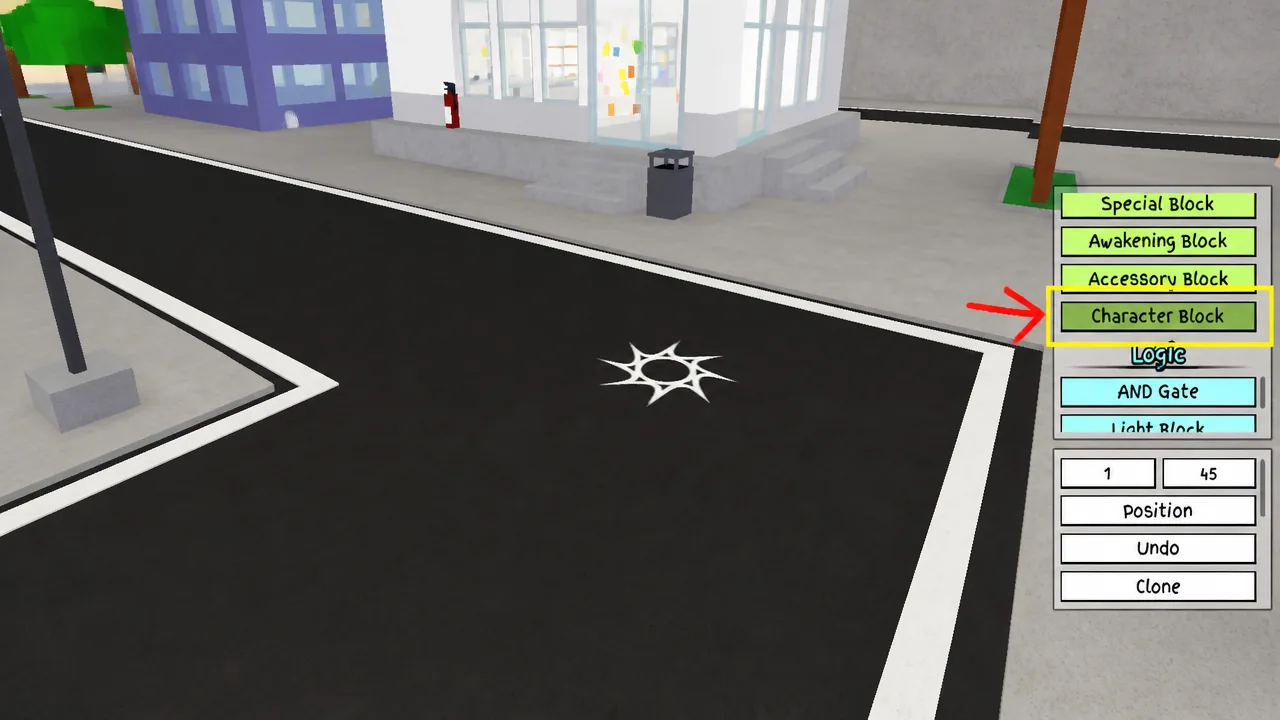
Quick answer: Create a private server, press the + button, turn on Free Build in the Players tab, open the Character Block, choose Configure, hit import, and paste the code. The build then appears in your Characters menu to equip.
The 15 custom characters you can import
These are the 15 builds you can equip and fight with on a private server. A few characters, like Gojo and King Von, have more than one version with different movesets.
- Spider Man
- Sonic
- Island Owner
- Luffy Gear 5
- King Von
- King Von 2
- Base Gojo
- Super Senior Gojo
- Nightmare
- Old Sans Is Back
- Void
- Steve
- Flower (Horror)
- Devstrikes Mahoraga and Agito
- Omniman Custom
Note: These codes are very long. Always copy them with a copy button rather than selecting the text by hand, since a single missing character will break the import.
What you need before you import
You need a private server to place blocks, since Build Mode and the Character Block only work there. You can create one for free from the Servers tab on the game’s experience page. The Custom Character gamepass is what unlocks the Skill Builder and custom character imports, so you will need it to load these builds.
How to import a custom character code
How to know the import worked
Once the code loads correctly, the build shows up as a named entry in your Characters menu with the icon you picked. Selecting it swaps you into that fighter with its full moveset. If nothing appears there, the import did not go through and the code needs another look.
Why an import code fails
These codes are unusually long, so the most common failure is a copy mistake. Grabbing a code by hand from Discord or Reddit almost always drops or changes a character somewhere in the string. Use a copy button to send the whole code to your clipboard, then paste it straight into the game.
A code can also stop working if it is corrupted or if a moveset tied to that custom character gets removed from the game in an update. In that case the build will no longer load, and you will need a fresh version of the code that matches the current game.