Private servers give you a quieter copy of Blox Fruits where you can grind Mastery, hunt Devil Fruits, and run Sea Events without a packed lobby fighting you for every spawn. Buying one costs Robux, but plenty of players share their server links for free, and the list below is filled with those free join links.
Quick answer: Click any link in the tables below on the same device where Roblox is installed. Roblox launches and drops you straight into that private server, capped at 12 players. If one is full or expired, open a different link.
Free Blox Fruits private server links
These servers are community-hosted, so a link can fill up or expire at any time. If the first one you try does not connect, move on to the next. Start with the batches from geovany_toso and Eshpex.
| Host / Server | Join link |
|---|---|
| geovany_toso 1 | Join |
| geovany_toso 2 | Join |
| geovany_toso 3 | Join |
| geovany_toso 4 | Join |
| geovany_toso 5 | Join |
| geovany_toso 6 | Join |
| geovany_toso 7 | Join |
| geovany_toso 8 | Join |
| geovany_toso 9 | Join |
| geovany_toso 10 | Join |
| Eshpex 1 | Join |
| Eshpex 2 | Join |
| Eshpex 3 | Join |
The next set are individually hosted rooms. Each one uses the same 12-player cap and the same gameplay rules as a public lobby.
| Host | Join link |
|---|---|
| whenabsent | Join |
| neil_uga | Join |
| GeneTEM1 | Join |
| kylekloe29 | Join |
| jamesjim176 | Join |
| jorji209o | Join |
| HiemalAzure | Join |
| OGepiclegend | Join |
| Fastarger | Join |
| FewReers | Join |
| Riz_Warrior07 | Join |
| Begadie | Join |
| victimofparanoia 1 | Join |
| victimofparanoia 3 | Join |
| ikesamurai | Join |
| X7LKJ | Join |
| HiimMajesty | Join |
| KendallRaider | Join |
| Uzoth | Join |
| EddyyBeingEddy | Join |
| henerrryyy | Join |
| KSECleGoat | Join |
| JamezHamez_VB21 | Join |
| Zyahn1de | Join |
| StarJinx65 | Join |
| xansnake | Join |
| NoDankMemesAllowed | Join |
| KoopekulYT | Join |
| Blox Fruits Private Server 2 | Join |
Only follow private server links from people or pages you trust. Random links posted elsewhere can be scams or phishing attempts, and some links open only on desktop, not on console or mobile.
How to join a private server
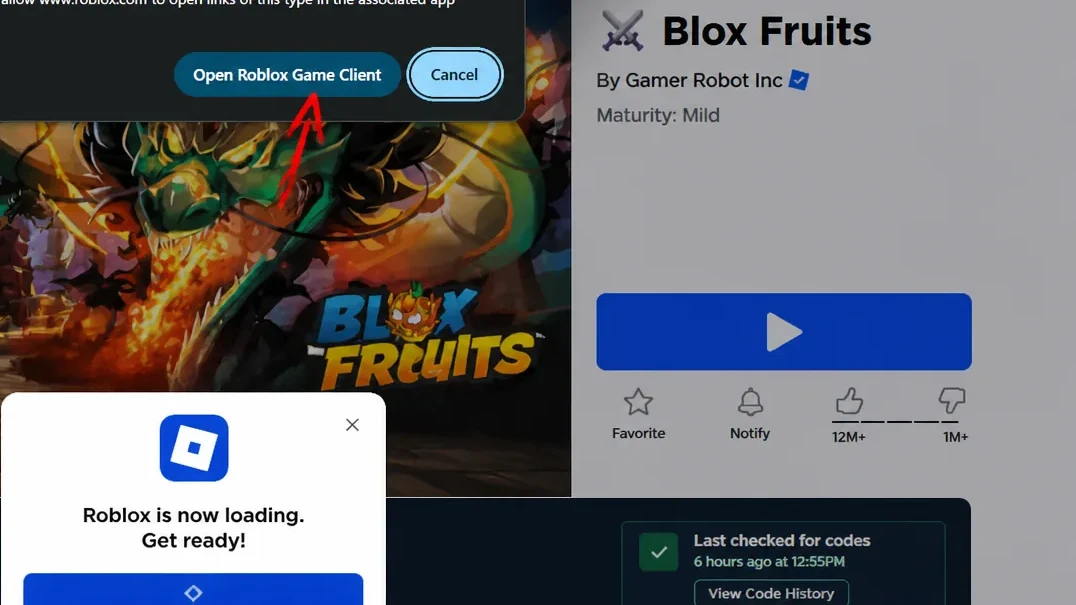
If the connection fails, the invite has usually expired, the room is at its 12-player cap, or the owner changed the privacy settings. In every case, the fix is the same: back out and try another link from the list.
What changes on a private server (and what doesn’t)
Nothing about the gameplay changes. Quests, enemies, raids, bosses, Sea Events, and Devil Fruit spawns all work exactly as they do in public lobbies. Fruits appear on the same schedule, roughly every 45 to 60 minutes, with a chance of faster spawns on weekends.
The real difference is the player count and who controls access. With up to 11 fewer people, there is far less competition for fruit spawns and far less chance of someone stealing a kill or interrupting a mission. Group content that needs coordination, like summoning a Leviathan, is much easier to pull off with a small, cooperative party.
| Feature | Private server |
|---|---|
| Player cap | 12 |
| Fruit spawn timer | Every 45–60 minutes (faster on weekends) |
| Quests, raids, bosses | Identical to public servers |
| Access control | Owner can invite or kick players |
Create your own Blox Fruits server
If you would rather host your own room, you can buy one directly from the Blox Fruits game page. It costs 200 Robux and stays active for 30 days, after which you renew to keep it. Open the Blox Fruits page, press the multiplayer or Servers option, choose Create Private Server, name it, and confirm the purchase.
Once it is created, you set who can join through the configuration menu and share the generated link with friends. Splitting the cost with a full party makes it cheap per person, and you keep the server private for solo grinding whenever you want.
Server rules to follow
Shared private servers are meant for peaceful grinding, not open PvP. Break the rules and the owner can kick you at any time.
- Treat the server as a grinding space, not a battleground.
- Do not attack other players unless both sides agree to fight.
- Do not grief or interrupt another player’s farming.
- Do not use exploits or scripts.
- Report rule breakers to the owner if asked, and respect any extra house rules they set.
Private servers are an official Roblox feature, so using them will not get you banned as long as you play fair and avoid exploits. Bookmark this page and check back when a link stops working, since fresh servers appear regularly and full or expired ones get swapped out.