Google Meet has become a go-to platform for hosting online meetings and classes, especially during times when remote communication is essential. While it’s packed with useful features, one aspect that users often seek to enhance is the ability to view all participants simultaneously in a grid format. Thankfully, there’s a way to achieve a comprehensive grid view in Google Meet, allowing you to see every participant at once.
Using the ‘Google Meet Grid View’ Chrome Extension
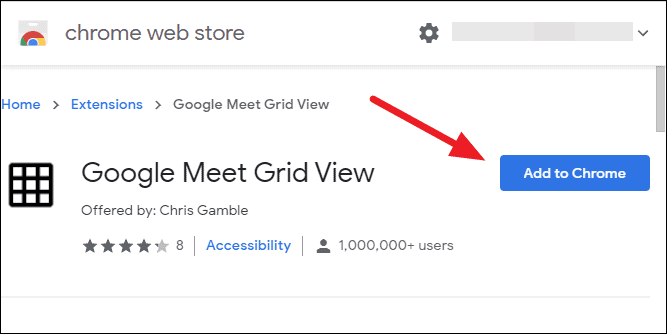
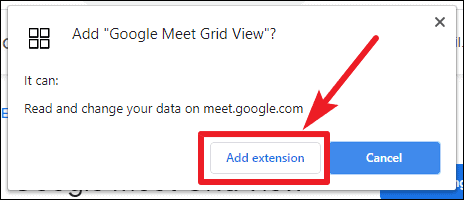
The ‘Google Meet Grid View’ Chrome extension is a simple yet powerful tool that modifies your meeting layout to display all participants in a grid format. This ensures that each person’s video feed gets equal space on your screen, regardless of the number of attendees. Here’s how you can install and use this extension:
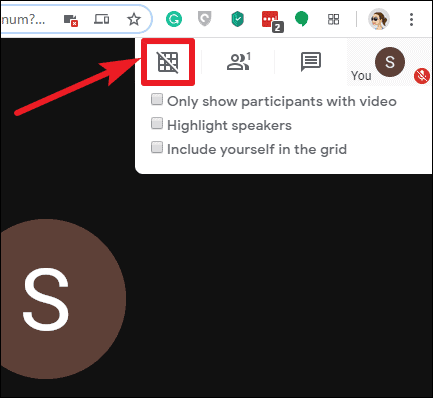
– **Only show participants with video**: Enable this option to display only the participants who have their video turned on, ensuring that inactive video feeds don’t occupy space.
– **Highlight speakers**: Activate this feature to have a yellow border around the video of the person currently speaking, making it easier to identify active speakers in large meetings.
– **Include yourself in the grid**: Turn this on if you want to see your own video feed alongside other participants in the grid.
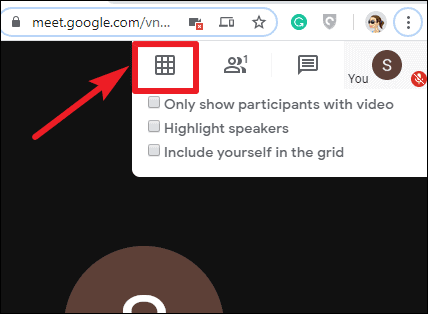
By following these steps and using the ‘Google Meet Grid View’ extension, you can enhance your Google Meet experience by viewing all participants at once, making your virtual meetings more engaging and interactive.