The FUT Gallery is a second progression track in EA Sports FC 27 Ultimate Team that sits alongside your squad. It records the Player Items that have passed through your club, sorts them into themed Sets, and rewards you for grading those Sets and climbing an overall Gallery Level. The higher you push it, the better the payouts, up to Holographic Hero and Icon player picks.
Quick answer: Fill and complete themed Sets, then submit them for grading on the D to S scale. Higher grades give more Gallery XP, and raising your Gallery Level unlocks milestone rewards every five levels.
Which Player Items count toward the Gallery
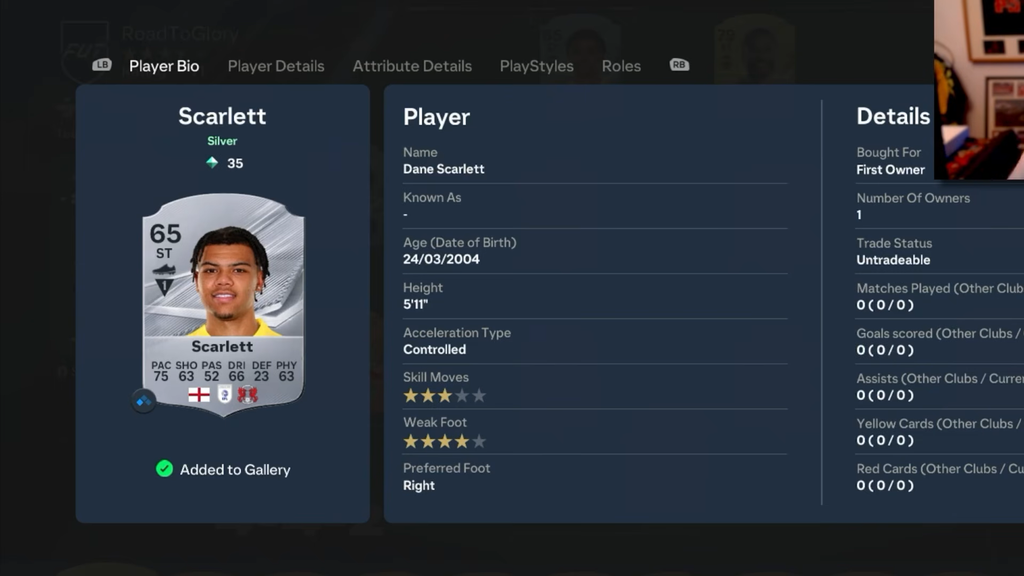
Every eligible card that reaches your Unassigned pile is logged in the Gallery automatically. Once it has been recorded, you can sell it, discard it, submit it into an SBC, or feed it into an Evolution, and it still counts toward your Sets. Packed cards you never wanted also contribute, so nothing usable is truly wasted.
- Eligible sources: Packs, Transfer Market purchases, Objectives, SBC rewards, Season Pass rewards, and other FUT rewards.
- Not eligible: Loan Items and Draft players.
- Evolution Items are recorded as the original base Item, not the evolved version.
This matters for anyone flipping cards or grinding a Road to Glory account. You can buy a card to finish a Set, grade the completed collection, then sell the card on without losing its Gallery record.
Complete Sets and grade them
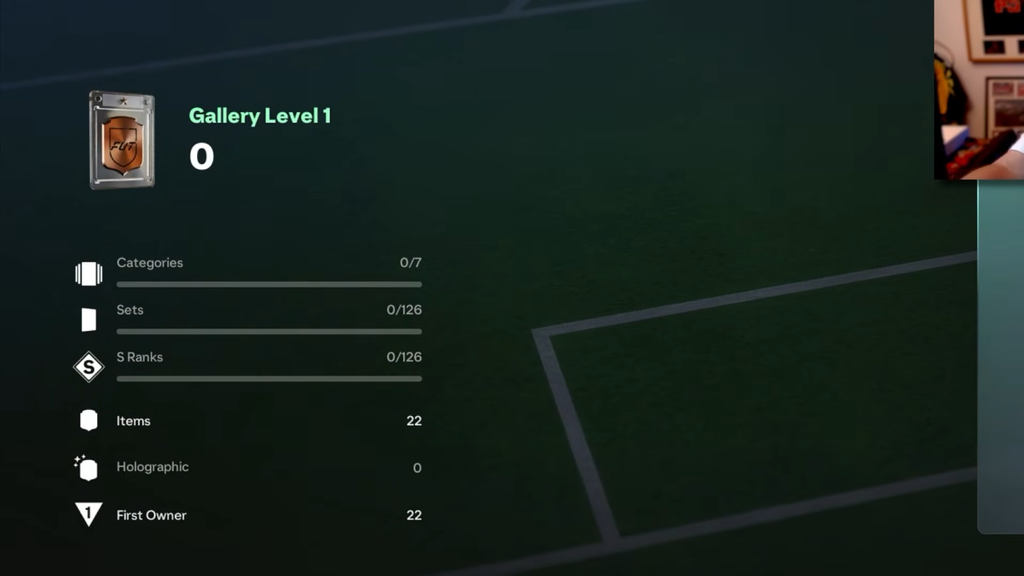
The Gallery opens at Level 1 with seven Categories and 126 Sets to work through. You reach it from the Club section of the Ultimate Team menu, then pick the Gallery tab. Sets are organized around Nations, Leagues, Clubs, Campaigns, and freeform Custom collections.
Each Set has a fixed number of slots. Club Sets vary in size, so a smaller club may need only 15 players while a larger side like Arsenal requires 20 to complete. You can fill slots by hand to control the exact cards, or use the autocomplete feature to plug open slots quickly.
After filling a Set, send it in for a grade. Cards have individual score values; higher-rated players, special versions, and Holographic cards are worth more points. Grades range from D up to S, with better grades granting improved rewards and additional Gallery XP. The result can be improved later: replace cards with stronger options, regrade that same Set, and work toward an S.
How Tags multiply your Gallery score
A Set’s result depends on more than its base ratings. Tags award bonuses according to the card combination, and multiple Tags may activate together. Put five first-owner attackers from one club, league, and nation into a Set, and the combined bonuses can increase the score well beyond what the ratings alone indicate.
| Tag | Requirement |
|---|---|
| First Owner | Five first-owner players (150% boost), scaling to 300% at 10 and 500% at 20 |
| All-Out Attack | Five attackers |
| Midfield Control | Five midfielders |
| Defensive Wall | Five defenders |
| Hands Only | Three goalkeepers |
| Skiller | Three 5★ Skill Move players |
| Ambidextrous | Three 5★ Weak Foot players |
| Multiples | Two versions of the same player |
| Golden / Silver / Bronze | Five players of the matching rarity |
| Same or Different Club / League / Nation | Five players meeting the condition |
First Owner is the standout. Because packed and reward cards qualify while bought-and-resold cards do not, the players you pull yourself carry outsized value at high grades. Team of the Week cards and Holographic versions also add strong bonuses on top of their higher base score.
Fastest ways to raise your Gallery Level
- Finish the Sets you are naturally closest to first. Daily pulls cluster around a few leagues and nations, so autocomplete and grade those before spending coins.
- Grade with your best cards, even ones you plan to sell. Slotting in a strong or special card can jump a grade, and it keeps counting after it leaves your club.
- Prioritize Holographic and Campaign items. Their extra score weight means one well-placed card can beat several Gold fillers.
- Read the active Tags before filling a slot. Hitting a Tag can raise the total more than a slightly higher-rated card would.
- Route fodder through SBCs instead of binning it. Submitted cards still contribute, so you collect the SBC reward and the Gallery credit.
- Come back to completed Sets across the season and regrade them as better promo cards arrive.
The highest grades will be hard to reach early because top promo cards are scarce at launch. Prioritize first-owner status and Tag combinations rather than only chasing the highest overall ratings.
Gallery Level milestone rewards
The Gallery runs to 25 levels, with a Milestone reward unlocked every five levels through an Objective that appears once you reach the required level. The higher milestones lean heavily on Holographic Hero and Icon picks.
| Gallery Level | Reward |
|---|---|
| 5 | Squad Foundations 84-rated Corona |
| 10 | 1 of 5 Holographic Base Hero Player Pick |
| 15 | 1 of 5 Holographic Base Icon Player Pick |
| 20 | 1 of 5 Holographic 88+ Base Hero Player Pick |
| 25 | 1 of 5 Holographic 92+ Base Icon Player Pick |
Gallery Tokens and the Token Store
Grading Sets and hitting Gallery milestones also pays out Gallery Tokens. You spend those in the Gallery Token Store, which stocks club kits, badges, cosmetics, and a new class of historical cards called Hall of FUT. The store rotates in new rewards over the season, so it is worth saving Tokens for the pieces you actually want rather than emptying it on day one.
Holographic Items explained
Holographic Items are rarer visual versions of eligible special cards. They matter for the Gallery because they contribute more to a Set’s score, so one Holographic card can lift a grade without needing a higher-rated player. Their in-match attributes are identical to the standard version, meaning there is no gameplay advantage.
- Regular Holographic: the usual animated foil treatment.
- Pristine Holographic: a higher-end presentation that uses a stylized font for the player’s name.
Each eligible card only ever gets one Holographic version, either Regular or Pristine. Base rarity has also been simplified in FC 27, with Bronze, Silver, and Gold Items no longer split into Common and Rare.
Platform limits for the Gallery Hub
The 3D Gallery Hub, where your Player Items and favorite Sets appear as physical displays, runs only on PC, PlayStation 5, Xbox Series X|S, and Nintendo Switch 2. The same list applies to 3D Items. Players on PS4, Xbox One, and the original Nintendo Switch still get FC 27, but not the 3D Hub presentation.
Early access for the Ultimate and Ultimate Plus editions begins September 18, 2026, with the worldwide launch on September 25, 2026.
How to confirm a reward landed
Rewards for graded Sets and Gallery Level milestones are added to your club automatically once you hit the required grade or level. There is no separate claim step to complete. To preview what a Set pays out, highlight it and press Square (PlayStation) or X (Xbox) to display its rewards. These stack across grades, so reaching S on the first attempt still grants the lower-grade rewards too, and your Gallery Level ticks up as each qualifying Set is graded.