The Liner tool in Makeup Mania is what you use to paint eyeliner directly onto your avatar’s face. It lives on the left-side cosmetic toolbar in the vanity, sitting between the base tools and the brow options, and it behaves like every other brush in the game. You pick it, choose a color, set a size and strength, then draw. The trick to clean wings is less about a steady hand and more about setting a few controls before your first stroke.
Quick answer: Tap Liner on the left toolbar, open the Colour Picker and choose black, shrink the brush small at full strength, rotate the head side-on, then draw outward toward the temple with Mirror Mode on.
Select the Liner tool from the toolbar
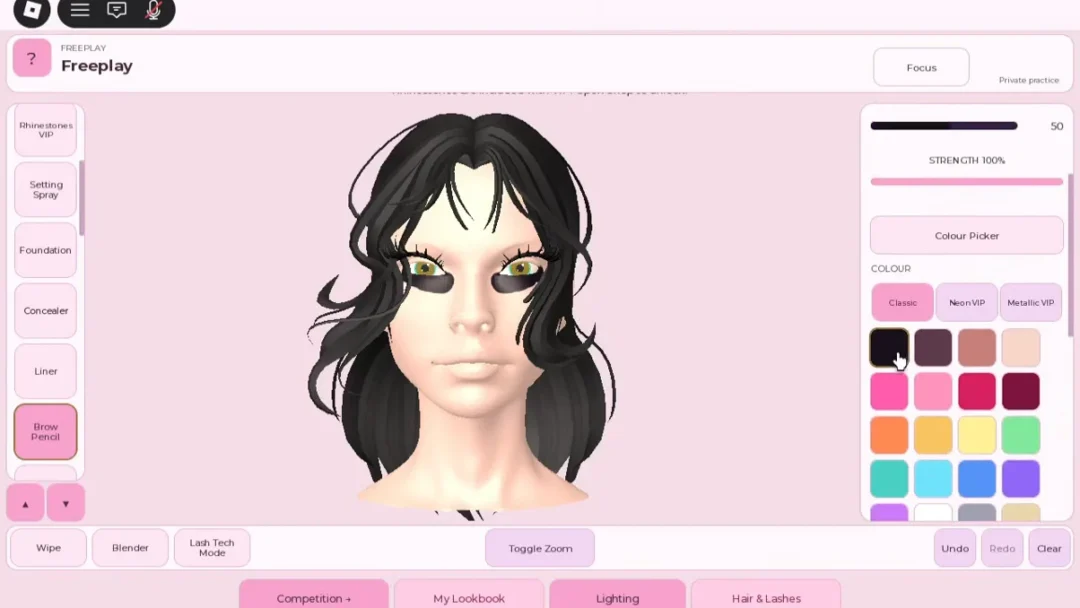
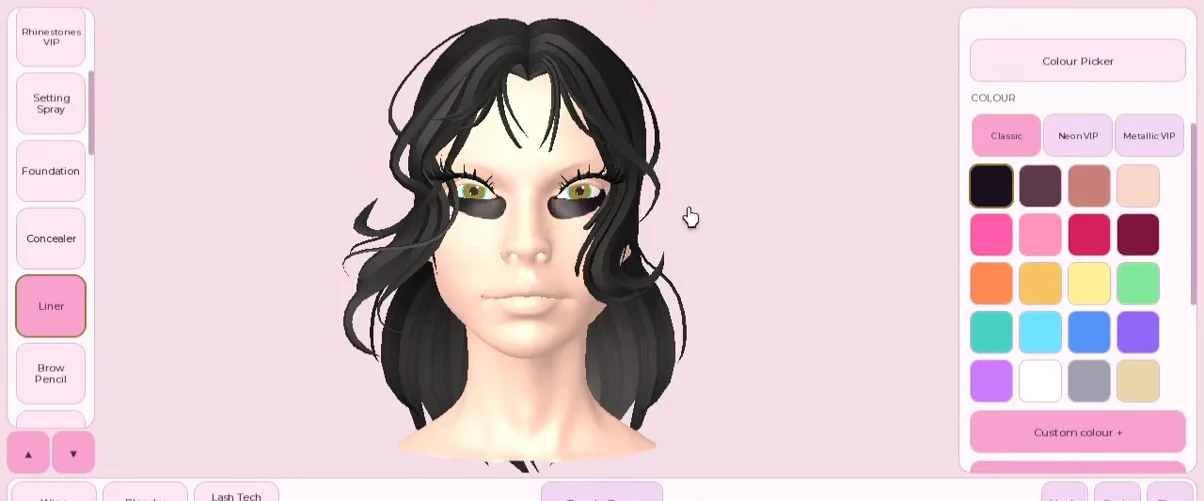
Open the vanity and look at the left-side strip of cosmetic tools. You will see Foundation, Concealer, then Liner, followed by Brow Pencil and the eyebrow shape options. Click Liner to make it the active brush. Everything you draw now lands as eyeliner, not foundation or brow pencil, even though all three brushes look similar when you test a stroke.
If you just want to learn where the tool sits without a timer running, open Freeplay first. It gives you the same customizable model and the full toolbar, but there is no runway and no vote, so you can test Liner freely before taking it into a timed round.
Set the eyeliner color with the Colour Picker
With Liner selected, click Colour Picker to open the swatch panel. It holds several color groups, and most eyeliner work starts with the standard set rather than the paid ones.
- Classic — the standard swatches, where black lives for most liner looks.
- Neon VIP and Metallic VIP — brighter and shiny finishes tied to VIP access.
- Custom colour + — mix your own shade on the wheel.
- My Saved Palette + — store shades you reuse across rounds.
Pick black for a classic wing. Once a color is set, Liner applies symmetric marks around both eyes at once, so one careful stroke places liner on both sides of the face.
Set brush size and strength before you draw
The upper-right panel holds two sliders that decide how liner lays down. Brush size controls how much of the eye a single stroke covers, and strength controls how heavily it paints. A fat brush turns a wing into a smear, so liner wants a small size and high strength.
| Control | Setting for liner | Why |
|---|---|---|
| Brush size | Small | Keeps the wing thin and sharp instead of a thick band |
| Strength | High (near 100%) | Lays a solid black line in one pass |
Zoom in with the Toggle Zoom control before you draw. Working around the eyes from a wide view makes precision nearly impossible.
Draw a clean wing from a side angle
Switch Mirror Mode off only when you want something one-sided, such as a single accent on one eye. For a standard matching wing, leave it on the whole time.
Fix stray liner without clearing the canvas
A blunt or crooked wing does not mean starting over. The bottom toolbar carries the tools you need to correct one stroke at a time.
- Undo — immediately reverse your latest stroke; if the wing goes wrong, use this instead of painting over it.
- Blender — softens a line that came out too hard into a gentler edge.
- Wipe — removes liner from an area without touching the rest of the face.
- Clear — wipes the whole canvas, so reach for it only when you truly want to restart.
Trying to hide a messy wing by painting skin tone over it creates muddy texture. Undo is cheaper and cleaner. Many players show this same mirror-and-blend routine when they share their looks.
How to know the liner applied correctly
You will see the black line appear around the eye the moment you release a stroke, and with Mirror Mode on, the matching line shows on the opposite eye at the same time. Rotate the head back to the front and both wings should sit at the same angle and length. If one side looks off, Mirror Mode was off for that stroke, so turn it on and redraw rather than hand-correcting the other eye.
Because liner is one of the first things the runway camera picks up, it is worth zooming out and checking it under the lighting view before the styling window closes. A thin, even wing on both sides is the sign the tool did its job.