The Brow Pencil is one of the paint tools in Makeup Mania on Roblox, used to draw eyebrows and fine facial detail directly onto your avatar. It sits in the left-hand toolbar alongside Foundation, Concealer, and Liner, and opens its own set of color and strength controls when you select it.
Quick answer: Click Brow Pencil on the left toolbar, pick a color from the right panel, set the STRENGTH slider, then click and drag across the avatar’s brow area to draw.
Where the Brow Pencil is located
The Brow Pencil icon is on the left-hand tool menu. Running down that column you will find Showdowns VIP, Setting Spray, Foundation, Concealer, Liner, and Brow Pencil at the bottom. Clicking it switches the brush to pencil mode and loads its adjustment panel on the right side of the screen.
If you want to practice placing it without a timer, open Freeplay. That mode has no runway and no scoring, so you can test strokes freely while you learn where each control sits.
Draw brows with the Brow Pencil
Classic palette, or open the Colour Picker for a custom tone. A soft or muted brown reads more naturally as a brow base than pure black, though black works for darker, bolder looks.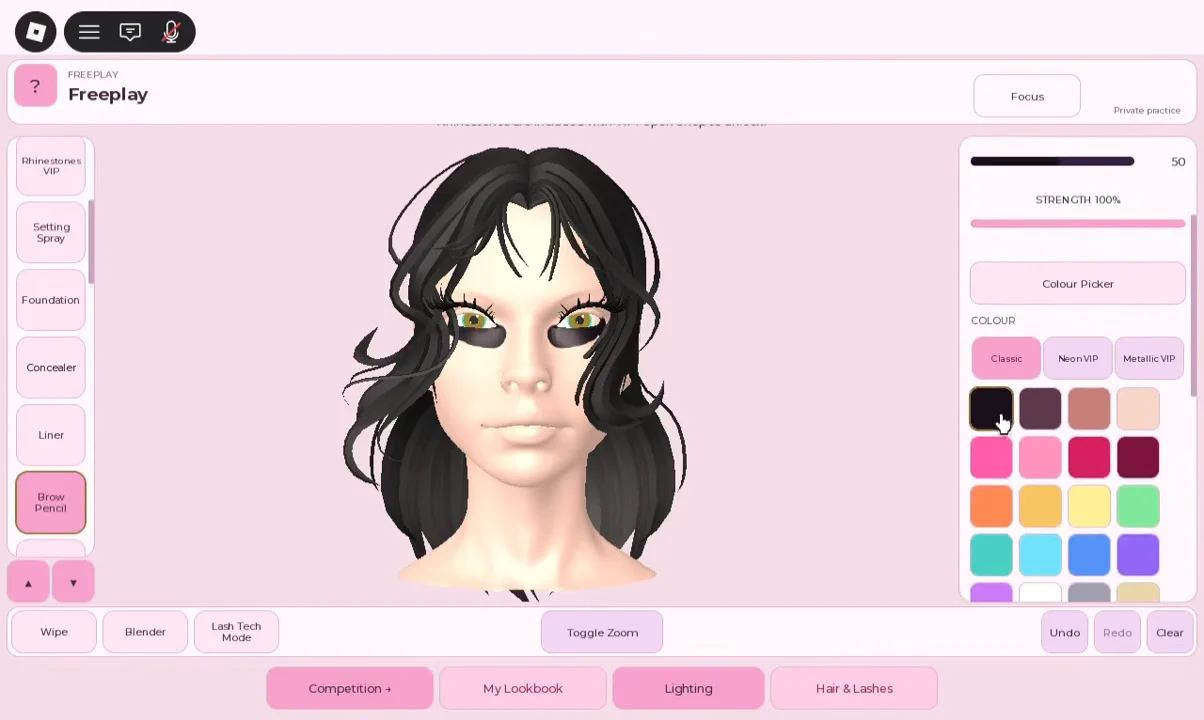
100% the pencil lays down solid color, and lowering it toward 42% or below produces lighter, buildable strokes that look closer to real brow hairs.You will know the tool is working when strokes appear on the avatar at the opacity your slider is set to. If a line goes wrong, use Undo rather than painting over it, since repainting tends to create muddy edges.
Brush size and strength settings
Brush size sets how wide a single stroke paints, and strength sets how strongly the color lands. For brows, a medium size shapes the body, and a small size handles the fine hair lines. The table below lists practical starting points.
| Task | Brush size | Strength |
|---|---|---|
| Brow body shape | Medium (around 20–22) | Normal / around 40% |
| Edge and outline | Small | Same as body |
| Hair flicks | Smallest | Low, raise slightly if not visible |
If thin hair lines disappear, nudge the strength up a little. If they turn into solid blobs, drop it back down.
Keep both brows even with Mirror Mode
With Mirror Mode active, every stroke is instantly reflected across the face so the brows stay even. Enable it before making your first pencil mark, and you can work on just one side. Turn it off when placing a detail on only one side, like a single beauty mark.
For cleaner lines, zoom in on the face before starting. The zoom toggle sits in the bottom toolbar, and working up close gives much finer control than the default wide view. If a stroke comes out too hard, the Blender tool softens its edges instead of removing it.
More color and panel options
Scrolling down the right-hand panel while the Brow Pencil is active reveals extra settings beyond the standard swatches.
Custom colour +andMy Saved Palette +for mixing and storing your own shades.Drawing Assist: OFF, which keeps products inside their intended areas when turned on, and allows free face paint when off.Neon VIPandMetallic VIPpalettes, plus VIP cosmetic items such as Rhinestones and Duo Glow Highlight.
Because the base face starts bare, well-drawn brows do a lot to pull a look together. Set a color and strength you like, keep Mirror Mode on, and use Undo freely while you find the shape that fits the round.