In Steal an Anime Pack, getting around the map comes down to one number: your movement speed. Speed decides how quickly you can grab a pack from another player’s plot and get it back to your own base. The main screen shows that stat at all times, next to your cash and your hotbar, so it is the first place to look before you go out on a run.
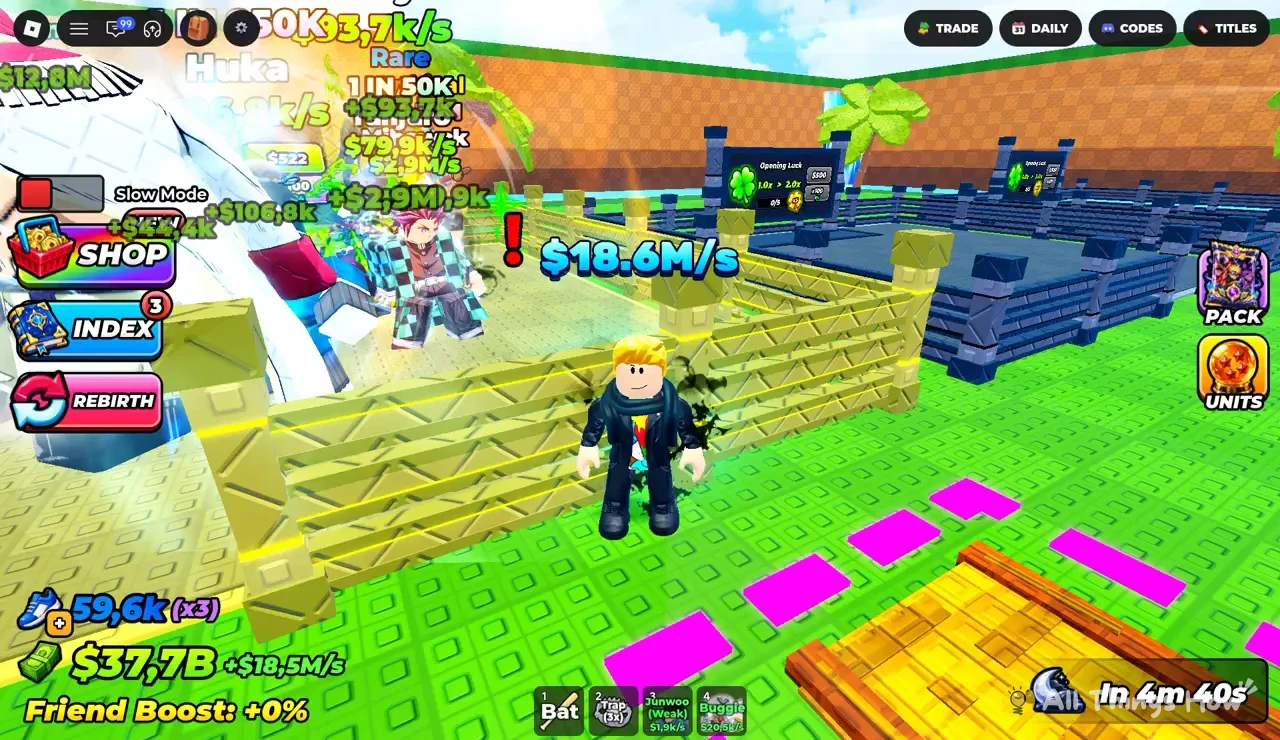
Quick answer: Check movement speed on the shoe-icon counter at the bottom of the screen, for example “59,6K (x3)”. Train to raise it. The main menu buttons do not include one labeled Trails.
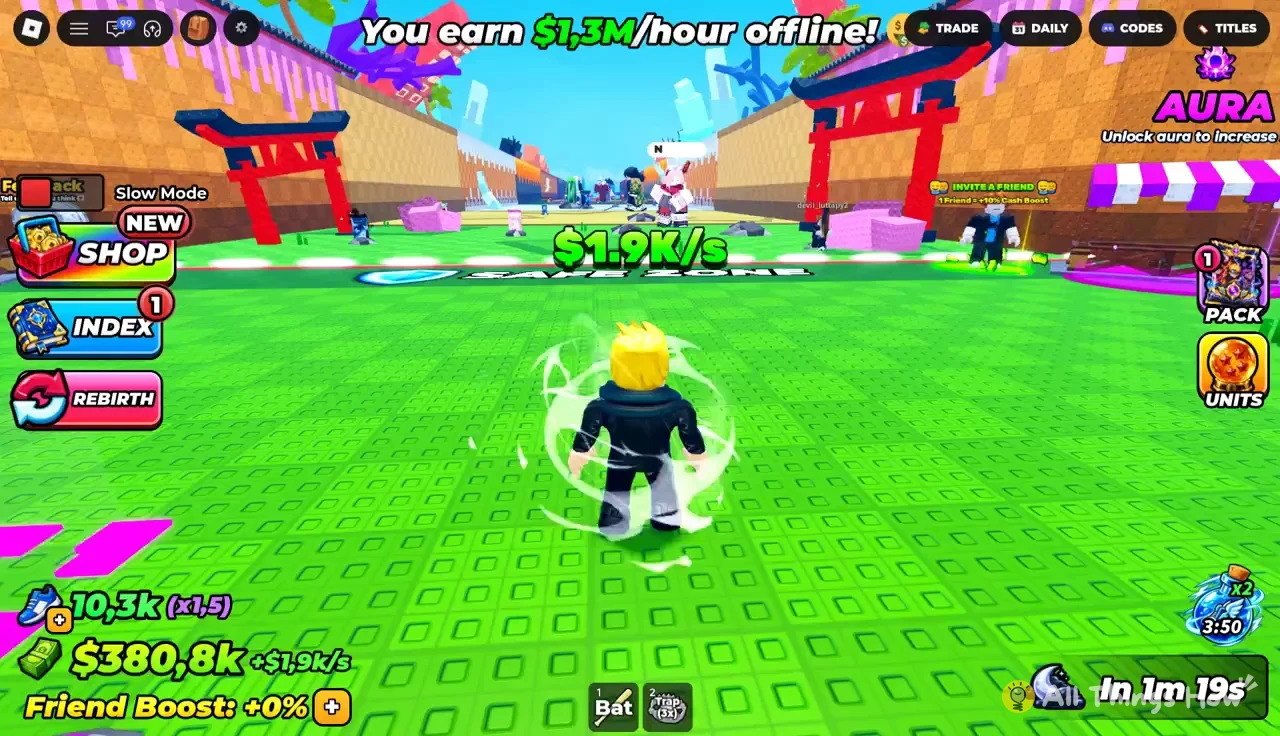
Steal an Anime Pack menu buttons and where speed is shown
Every menu in the game opens from a button on the main screen. There is no separate trails menu among them. Movement is handled by the speed stat, not by a cosmetic picker. These are the buttons on the main screen:
- SHOP, INDEX and REBIRTH, grouped together on one side of the screen
- TRADE, DAILY, CODES and TITLES, grouped in a second cluster
- PACK and UNITS, which cover your packs and your character collection
- Slow Mode, a separate toggle that appears on screen
Your speed, cash and income readouts sit along the bottom edge, above the hotbar. Behind your avatar is your fenced plot, where your anime units stand and earn money.
Reading the speed counter
The speed stat is the number marked with a shoe icon. A late-game account reads 59,6K (x3). The first figure is your current movement speed. The tag in brackets is a multiplier applied to that speed.
The game writes large numbers in short form, so “59,6K” means roughly 59,600. The cash counter works the same way. “$37,7B” is about 37.7 billion, and “+$18.5M/s” is the income your units add every second. Watch the speed number after you train. If it climbs, the training counted.
How to raise movement speed
Training is how you get faster. The game’s loop ties speed to the rest of your progress. You open and merge anime packs to unlock characters. Those characters earn cash, even while you are offline, and the cash pays for base upgrades. Stealing packs from other players is part of the same loop, and a faster character crosses the map and gets home before rivals can react.
Train first, then go after packs on other players’ plots. Your speed carries over between runs, so time spent training adds up. A plot that is worth raiding is easy to spot. A red “!” floats above its income figure, such as “! $18.6M/s”.
Hotbar items to carry on a run
The hotbar sits at the bottom of the screen. Each slot has a number, and that number is the key that selects the item. A typical loadout looks like this:
| Slot | Item | Shown value |
|---|---|---|
| 1 | Bat | None |
| 2 | Trap | 5x |
| 3 | Jinwoo (Weak) | $1.9k/s |
| 4 | Buggie | $20.9k/s |
The Bat and Trap are tools, and the “5x” beside the Trap is how many you are holding. Units in the hotbar show their own income per second. Jinwoo (Weak) and Buggie are units you are carrying rather than units placed on your plot.
Other HUD readouts near your base
A few more readouts sit around the speed counter and on your plot. They are useful to check before you leave your base:
| Readout | Where | Example value |
|---|---|---|
| Friend Boost | Bottom left | +0% |
| Moon timer | Beside a moon icon | In 4m 40s |
| Opening Luck board | On your plot, clover icon | 1.0x > 2.0x, 0/8, $500 |
| Unit card | Above a unit | Huka, Rare, 1 IN 50K |
The Opening Luck board offers your first luck upgrade, from 1.0x to 2.0x, for $500. The “0/8” counter tracks your progress on it. The moon timer counts down to the next timed change in the world. Unit cards show a character’s name, rarity and pull odds. The Huka card, for example, lists a cost of 650K and an income of 33.7k/s.
Watch the shoe-icon counter while you play. Train until that number rises, keep the Trap stocked in slot 2, and make your raids when the speed figure is high enough to get you back to your plot ahead of the other players.