Mistfall Hunter ties the servers you can reach to the game build your Steam store account downloads, not to where you are sitting. A North American build only connects to the United States server, and an International build only shows its own set of regions. There is a community-discovered way to switch between those two builds directly inside Steam using private access codes, which lets some players cross over to servers they normally cannot see.
Quick answer: In Steam, open Mistfall Hunter Properties → Game Versions & Betas → Private Participation, enter i18ntest123456 to move from NA to International or natest123456 to move from International to NA, click Check Code, then pick the unlocked branch from the dropdown and let it download.
What controls which servers you see
Bellring Games deploys battlefield servers across five countries: China, the United States, Germany, Singapore, and Brazil. The server list you get is decided by your installed build, which is tied to the country registered on your Steam store account. Store accounts in the United States, Canada, Mexico, Puerto Rico, and the U.S. Virgin Islands download the North American build and can only reach the US server. Accounts elsewhere get the International build.
Because this is an account-and-download restriction, a plain VPN or a language change does not move you. The block lives in the Steam depot files your account is entitled to, so only swapping the build actually changes the servers on offer.
| Region group | Server location | Access code to switch to it |
|---|---|---|
| North America | United States | natest123456 |
| International | Germany, Singapore, Brazil, China | i18ntest123456 |
Switch your build in Steam using an access code
Close the game before you start so Steam can swap the files cleanly. The whole process happens inside the game’s Steam properties, and you will need to wait for a download between switching and playing.
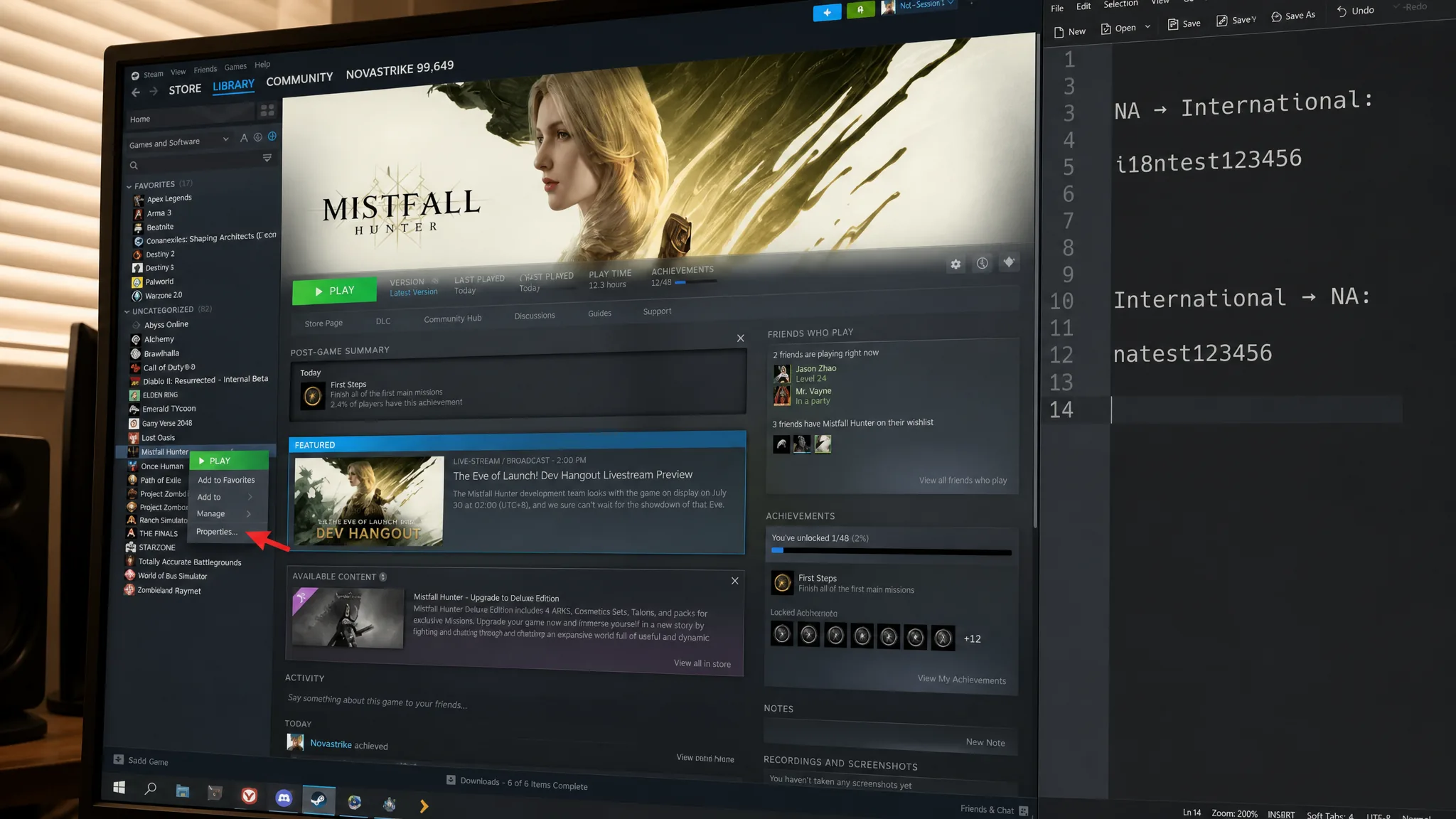
i18ntest123456 to go from NA to International, or natest123456 to go from International to NA. Then click Check Code.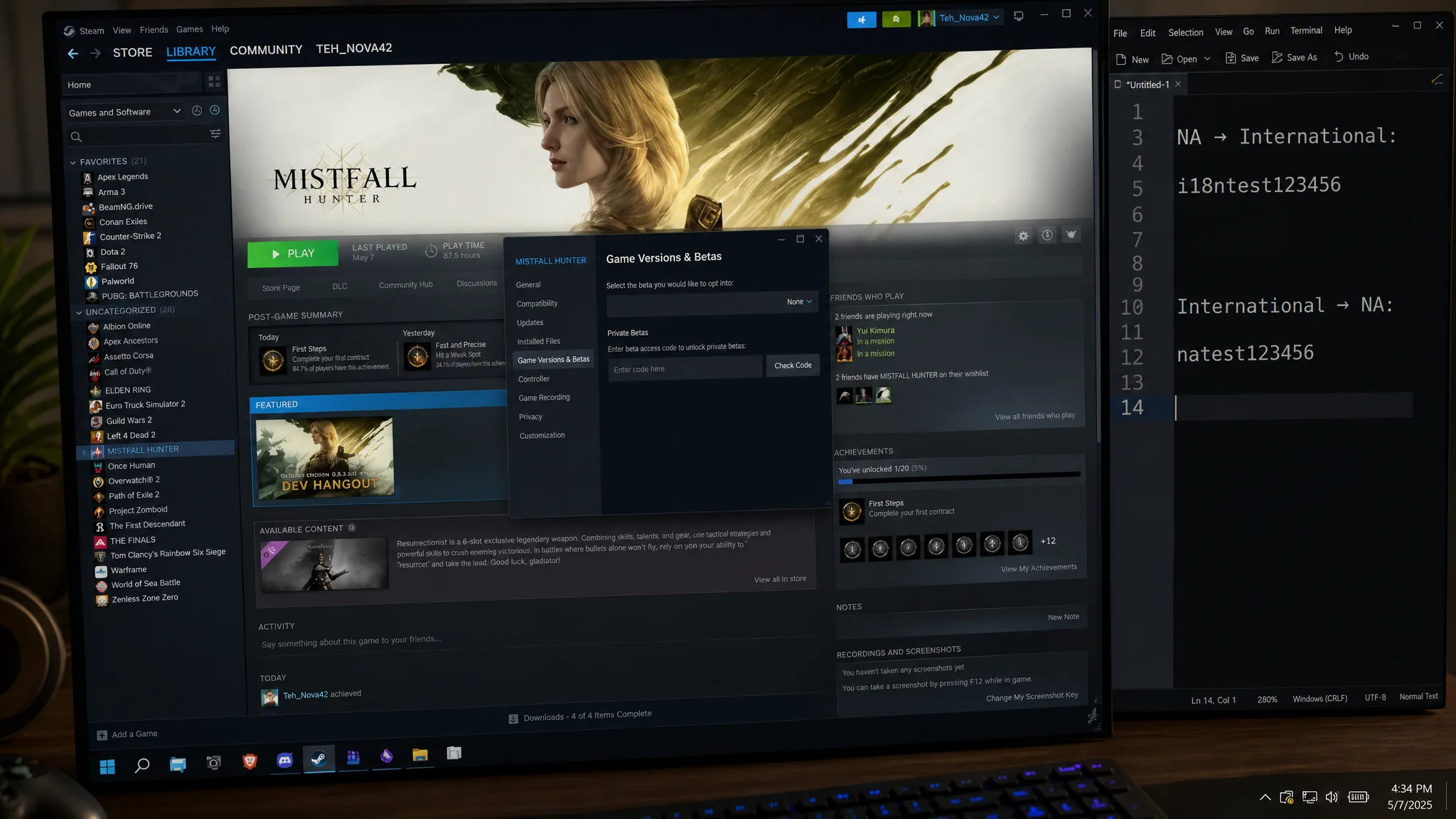
You know it worked when the server indicator at the bottom of the main menu lists the region tied to your new build, and you can queue into it. Several players confirmed they reached the NA servers, chat, and expeditions this way after the swap completed.
Return to the default game version
If you want to go back to the standard version your account normally runs, the reset lives in the same menu.
Fix crashes after switching branches
Changing builds can leave mismatched files behind, which sometimes causes the game to crash on launch. Verifying the files forces Steam to repair anything that did not download correctly.
Character progress does not carry between regions
Progress is tied to the server where the character was created. Switching build branches puts you into a different server group, so your gear, level, and unlocks do not travel with you. Expect to build a separate character on the new region, and expect your original one to be waiting when you switch back.
Note: Confirm everyone in your group can reach the same region before anyone invests hours into a character, since cross-region parties are not officially supported and a mismatched build blocks the invite entirely.
Why the code method sometimes fails
This branch swap is a community method, and it is not endorsed by the developers. It works for many players but not for everyone, and the same steps that let one person into the NA servers have failed outright for others. Because it relies on private beta branches, it can change or stop working at any time without warning.
A few things to keep in mind before relying on it:
- A VPN alone will not unlock a different region, because the restriction is tied to your Steam entitlement and depot files rather than your IP address.
- The game uses kernel-level anti-cheat, so layering unofficial tools on top carries added risk.
- Crossplay across PC, PS5, and Xbox is region-bound. Sharing a platform does not override the build-level region separation.
If you have genuinely moved countries and your account is stuck on the wrong region, the safest route is to confirm your Steam store country is correct, verify your game files, and open a support ticket through the official Mistfall Hunter Discord for a one-on-one review rather than repeatedly reinstalling.