Catching the heavier fish in Fishing Master depends on your skill setup as much as your rod, and skins carry real bonuses rather than looks alone. Both run through separate shops to obtain and a single Equip menu to assign. Here is exactly where to get each one and how to put it on your character.
Quick answer: Roll skills at the Skill Master (20,000 Coins or 9 Robux per spin) or buy them with Gems at the Skill Market; claim the free Lotus Fan skin from the glowing circle in town. Equip both from the left-side Equip menu under the Skills and Skins tabs.
The Equip menu handles every item type
Everything you own is assigned from one place. Click the Equip icon on the left-side HUD to open the Equipments window. Along the left of that window are six tabs: Rods, Skins, Skills, Auras, Titles, and Units. Each tab holds its own storage, and skins sit in their own list separate from the rod itself.
To put an item on, open the tab you want, click the item card in storage, then press the green Equip button under the card. A green checkmark appears on the icon to confirm it is active. If you see “You cannot equip more than you own,” you are trying to equip a slot you have not filled yet.
How to get skills
Skills come from two routes. The first is the skill gacha at the Skill Master on Starter Island, where each spin hands you a random skill book. The second is the Skill Market, where you buy specific named skills outright with Gems.
Roll at the Skill Master
Talk to the Skill Master to open the roll panel. A single spin costs 20,000 Coins or 9 Robux, and ten spins cost 425,000 Coins or 99 Robux. The Coin price resets after your first roll, and it climbs with each spin before resetting on a timer.
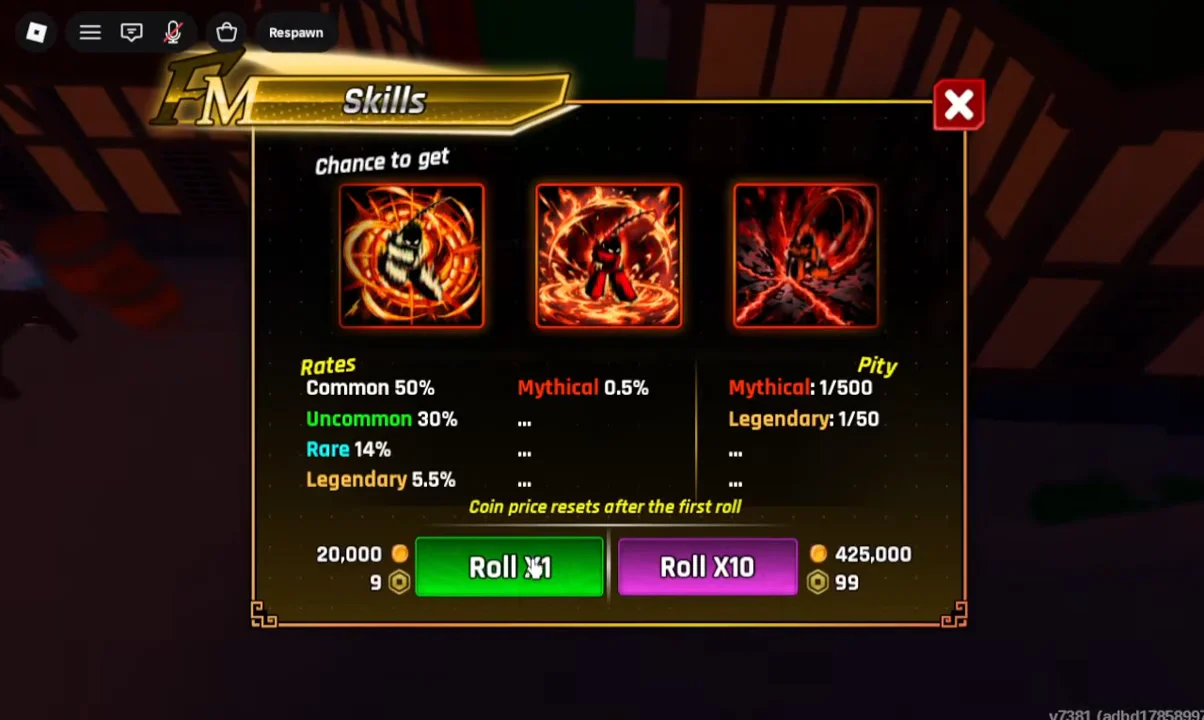
The panel pulls against six rarities. The odds and the two pity guarantees are below.
| Rarity | Drop rate | Pity |
|---|---|---|
| Common | 50% | — |
| Uncommon | 30% | — |
| Rare | 14% | — |
| Legendary | 5.5% | 1 every 50 spins |
| Mythical | 0.5% | 1 every 500 spins |
The pity counters guarantee a rarity, not a specific named skill. Hitting 500 spins gives you a Mythical, but which Mythical is still random.
Buy from the Skill Market
The same Skill Master NPC also sells individual skills for Gems, which lets you target an exact skill instead of gambling. Stock is limited and refreshes on a timer shown on screen.
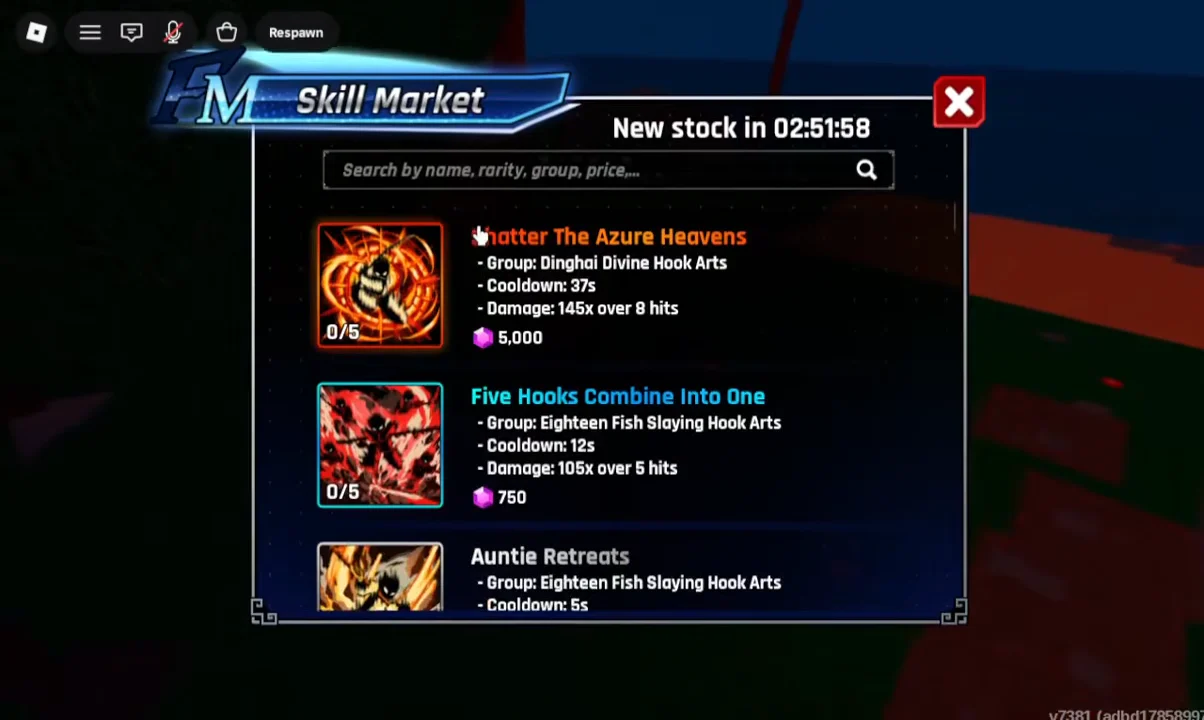
| Skill | Price | Damage | Cooldown |
|---|---|---|---|
| Shatter the Azure Heavens | 5,000 Gems | 145x over 8 hits | 97s |
| Five Hooks Combine Into One | 750 Gems | 105x over 5 hits | 12s |
| Auntie Retreats | — | 100x over 5 hits | 5s |
Each market skill shows a stock of 0/5, so purchases are capped until the next restock window ticks over.
Equip a skill to your rod
Skills attach to the rod you are holding, and they fire on the Z, X, C, and V keys. Fresh rods open with only the first slot available; the rest unlock as the rod gains levels. Open the Equip menu, switch to the Skills tab, pick a skill you own, and assign it to an open slot.
Detaching a learned skill book to move it to another rod can destroy the book permanently. The game shows a warning before you confirm, so read it before removing anything.
How to get skins
Skins are a separate item from the rod and sit in their own tab. They are not purely cosmetic. A skin card can carry stats, so read each one before assuming it only changes your look. The Lotus Fan, for example, is a Mythical skin that grants +5% Fish Value and +20% Movement Speed.
Claim the free Lotus Fan
A free Lotus Fan skin is available from the glowing magenta circle in town. Stand in the ring and complete three requirements to claim it.
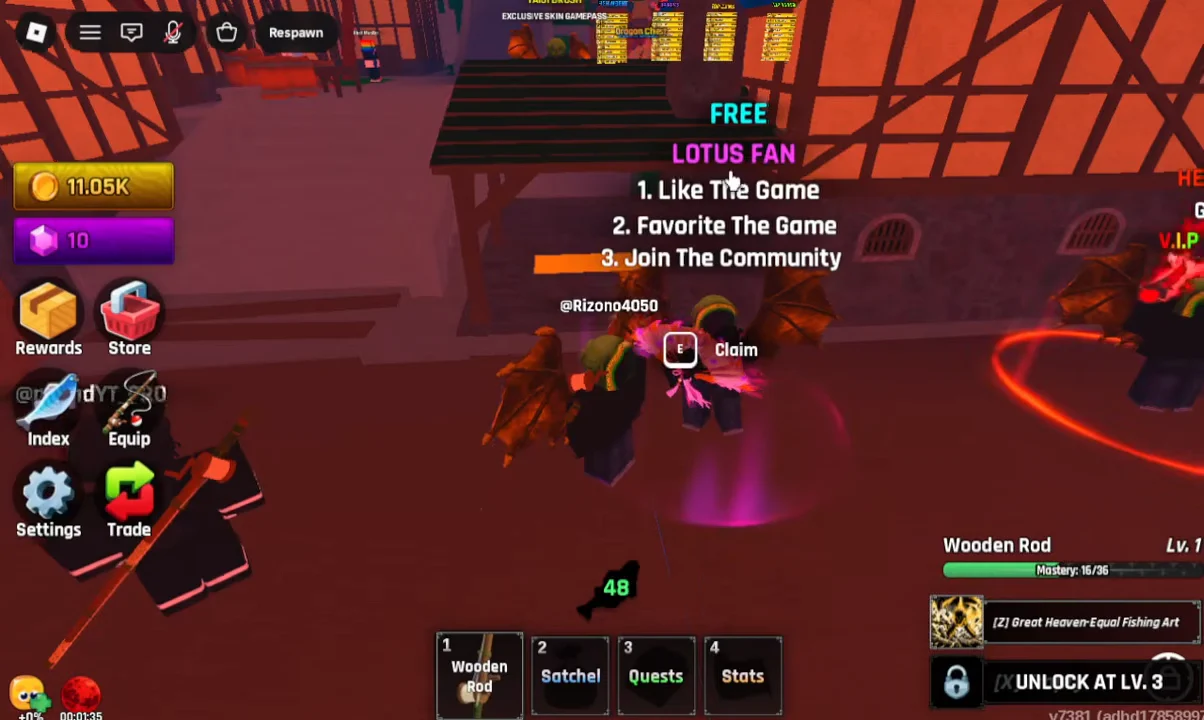
- Like the game.
- Favorite the game.
- Join the game community.
Codes are a second source of skins. Entering UPD1FM rewards a Celestial Bow rod skin, and LOVE10KCCU rewards the Blossom Guitar. Redeem these through the Settings button on the left HUD, typing the code into the field and pressing Redeem.
Equip a skin
Open the Equip menu, switch to the Skins tab, and select the skin you own. Read its printed bonus on the card, then press Equip. The checkmark confirms it is on. Keep the rod and skill the same when you first equip a skin so you can tell what the skin itself changed.
Where rods come from
Since skills live on your rod, it helps to know where new rods come from. Two chests stand in the central village hub, each rolling a different pool of rods and weapons.
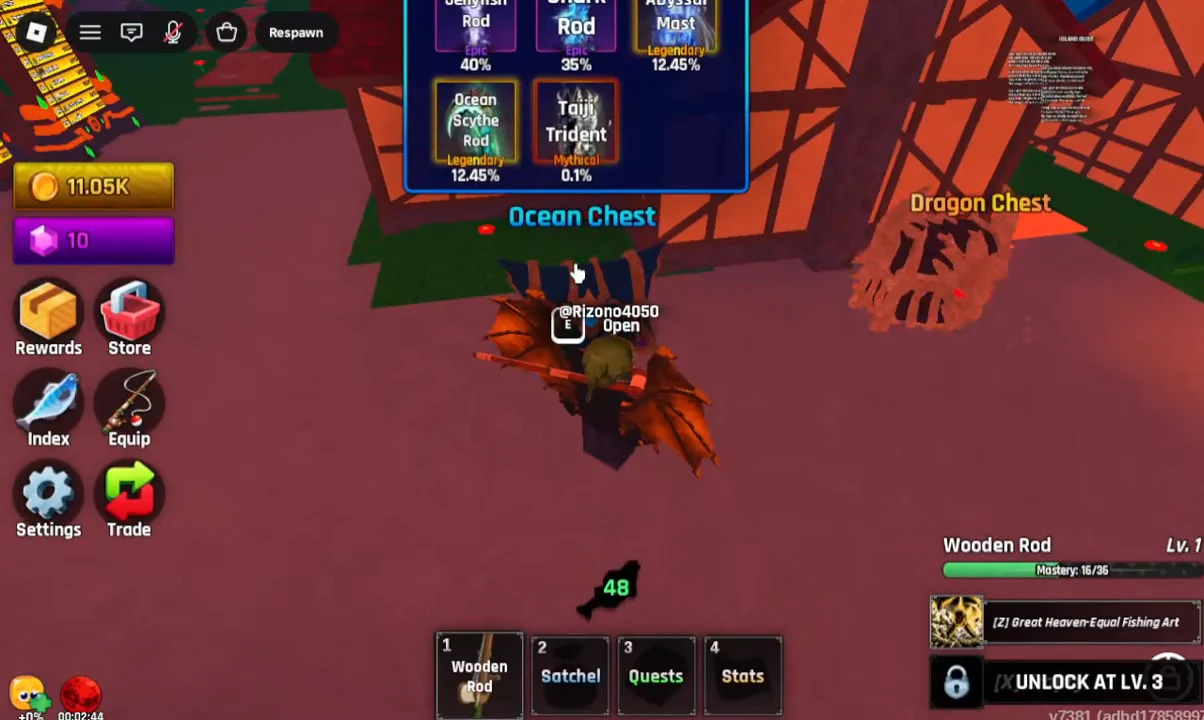
Interact with a chest to see its drop rates and roll options before spending.
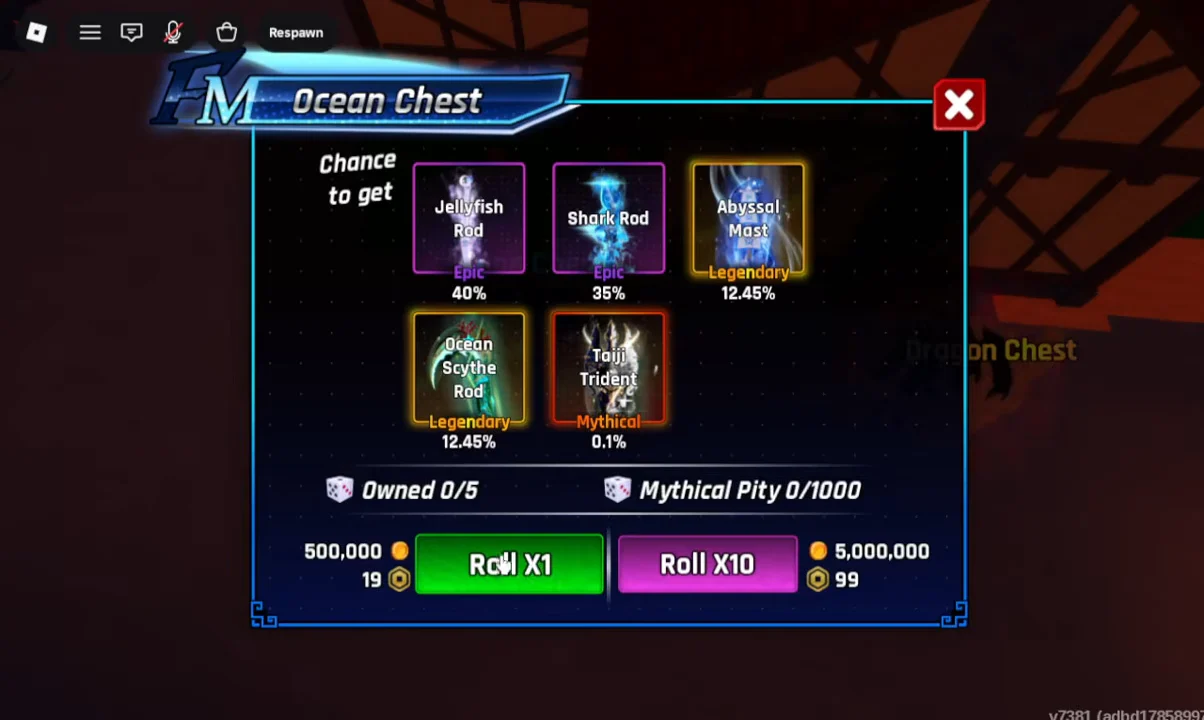
| Chest | 1 roll | 10 rolls | Mythical pity |
|---|---|---|---|
| Ocean Chest | 500,000 Coins / 19 Robux | 5,000,000 Coins / 99 Robux | 1,000 rolls |
| Dragon Chest | 200 Coins / 99 Robux | 2,000 Coins / 499 Robux | 150 rolls |
The Ocean Chest’s top prize is the Taiji Trident at 0.1%, while the Dragon Chest’s Mythical rods, the Dragon Claw Rod and Dragon Rod, each sit at 1%. Equip a new rod from the Rods tab in the Equip menu the same way you equip anything else.
Confirming an item is active
You know a skill or skin is equipped when its storage icon shows a green checkmark and the Equip button on the card flips to Unequip. For skills, the assigned slot on the right action bar fills with the skill name instead of showing “Empty,” and the Z, X, C, or V key will fire it in a fish fight. A skin’s printed bonus takes effect as soon as it is equipped, which you can verify by reopening the Skins tab and seeing it marked as worn.