Gaming How-To

Fishing Master Roblox: How to Get and Equip Auras at the Aura Master

Roll at the Aura Master NPC for 10 Gems, then equip your aura from the Auras tab to gain its stat buff.

Roll at the Aura Master NPC for 10 Gems, then equip your aura from the Auras tab to gain its stat buff.

Image: Fishing Master Community

Auras in Fishing Master are stat buffs you roll for at a gacha NPC and then slot onto your character. A Common aura, for example, grants +8.44% Jump Power, while rarer pulls carry stronger effects. The whole process happens at the Aura Master, a vendor tucked just above the starting village.

Quick answer: Talk to the Aura Master by the well above the village, roll once for 10 Gems, then open Equip, go to the Auras tab, select your aura, and press the green Equip button.


Where to find the Aura Master in Fishing Master

The Aura Master is beside a stone well fitted with a wooden roof and bucket, at the summit of the hillside stairway behind the main village. Starting at spawn, climb the stairs, passing the Dragon Chest and Skill Master, and continue to the well.
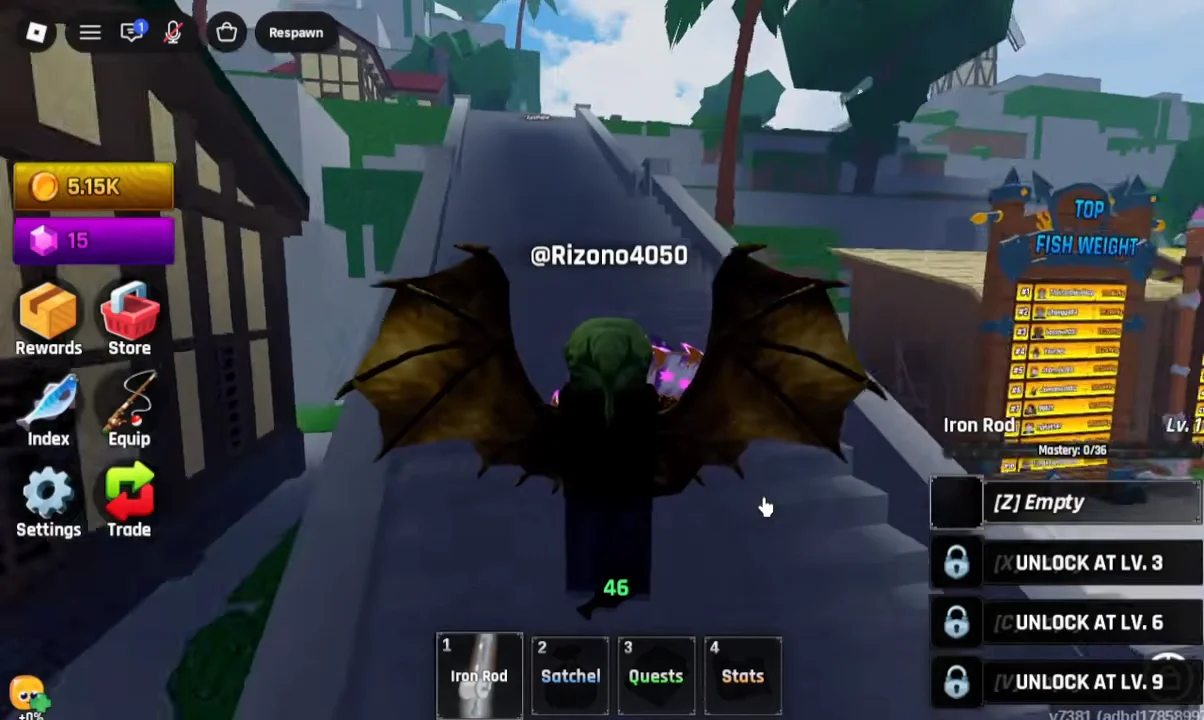
Navigating to Aura Master00:11Navigating to Aura Master
Climb the stone staircase behind the village to reach the well where the Aura Master waits. Shown at 00:11 in VendoPlus’s video. Image: Fishing Master Community

Walk up to the NPC and an “E Talk” prompt appears above its head. Interacting opens the Auras gacha shop, where you can inspect drop rates and roll.


Roll for an aura at the Aura Master
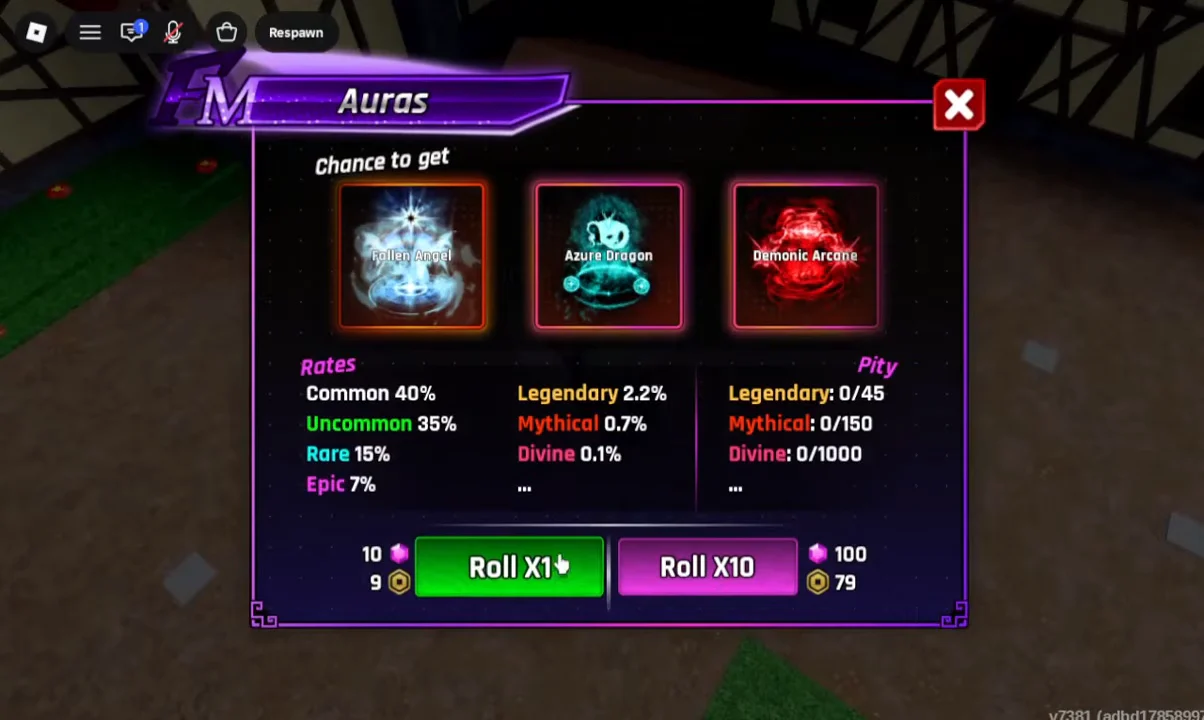
Talk to the Aura Master to open the Auras interface. The menu lists every rarity and its chance to appear, along with pity counters for the top three tiers.
Rolling for an Aura00:47Rolling for an Aura
The Auras menu lists every rarity's drop rate and the Roll X1 option that costs 10 Gems. Shown at 00:47 in VendoPlus’s video. Image: Fishing Master Community
Pick a roll option. A single pull is 10 Gems (or 9 Robux), and a ten-pull is 100 Gems (or 79 Robux). If you only have a small Gem balance, one roll is enough to land an aura.
Confirm the roll in the pop-up. A short cutscene drops your character down the well and then reveals your result, marked “New!” if it is an aura you did not own before. Click anywhere to continue past the reward screen.

Spending 10 Gems on a single roll drops your Gem count by 10 right away, so the roll confirms it worked the moment your currency drops and the aura appears on screen.


Aura drop rates and pity

Every roll pulls from seven rarities. Three of them carry a pity system, which guarantees that tier after a set number of rolls without one.

RarityChancePity
Common40%—
Uncommon35%—
Rare15%—
Epic7%—
Legendary2.2%45 rolls
Mythical0.7%150 rolls
Divine0.1%1000 rolls

Equip an aura from the Equipments menu

Rolling an aura does not apply its buff on its own. You still have to equip it from your storage.
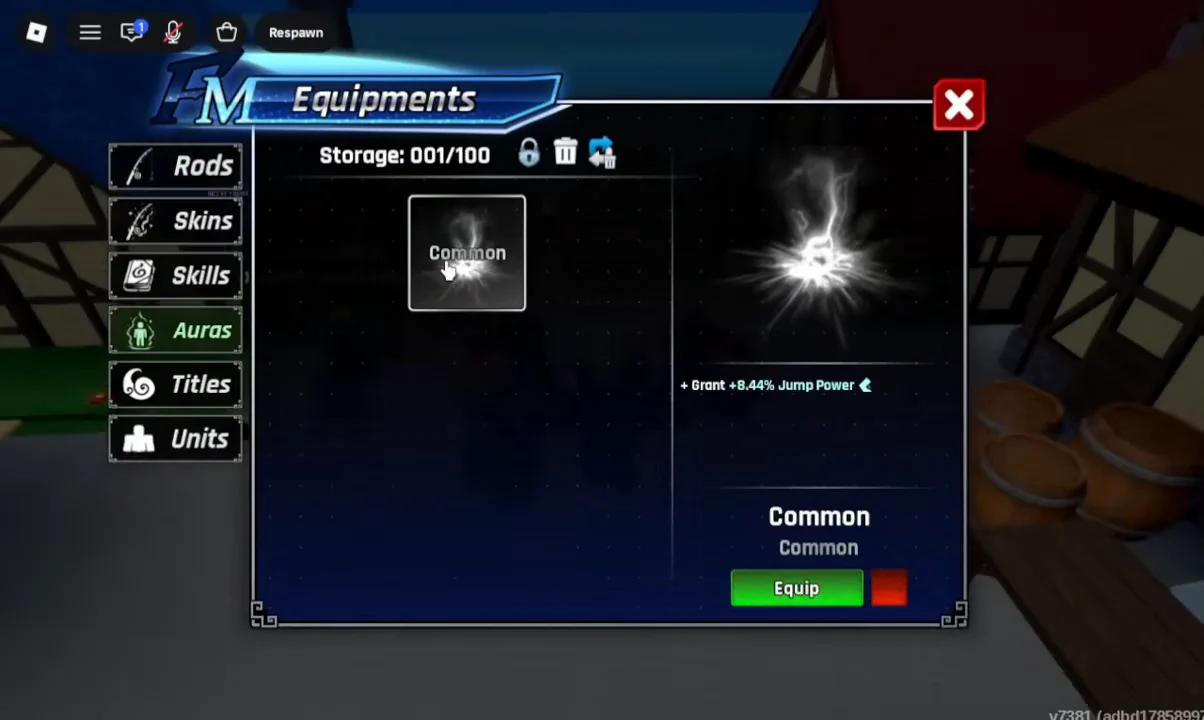
From the HUD menu along the screen’s left edge, choose Equip. The Equipments window that appears contains tabs for Rods, Skins, Skills, Auras, Titles, and Units.
Switch to the Auras tab. Your rolled auras sit here in storage, each shown as a card with its rarity and stat.
Click the aura you want, such as the Common aura with +8.44% Jump Power, then press the green Equip button beneath its card. A green checkmark appears on the icon to confirm it is active.
Equipping the Aura01:07Equipping the Aura
The Auras tab shows the Common aura's +8.44% Jump Power stat and the green Equip button that applies it. Shown at 01:07 in VendoPlus’s video. Image: Fishing Master Community

Once the checkmark shows and the button reads Unequip, the aura’s buff is live. Swapping to a different aura follows the same steps, picking a new card and pressing Equip.