
Gaming How-To

Melodic and Harmonic Scrooms in SCROOMS: How to Get the Harmonic Ear Badge

Catch any Scroom that spawns with a variant word in front of its name to unlock the Harmonic Ear badge.

Catch any Scroom that spawns with a variant word in front of its name to unlock the Harmonic Ear badge.

Image: DoniDevs

In SCROOMS, some mushroom creatures spawn as special variants, marked by an extra word placed before their species name. Melodic and Harmonic are two of these. They are caught like ordinary Scrooms, but catching a Harmonic one hands you a Roblox badge.

Quick answer: Catch any Scroom whose name begins with Harmonic (for example, a Harmonic Toastbud) and the Harmonic Ear badge is awarded.


A Harmonic Scroom catch in SCROOMS

What Melodic and Harmonic Scrooms are

A variant is a Scroom caught with a descriptive word attached to the front of its name. The catch screen prints the full variant name along with the frequency you tuned to reach it.

A Melodic Burlcap registers at 100 Hz. A Harmonic Toastbud registers at 23.1 Hz, with the catch screen reading “You caught: Harmonic Toastbud! Frequency: 23.1 Hz.”

Catch screen showing New Index Entry Burlcap after capturing a Melodic Burlcap
The “New Index Entry: Burlcap” screen appears after a Melodic Burlcap is caught.

Variants are caught with the same three-step method as any Scroom.


What to bring and where to go

The hotbar holds the instrument, the Equipment Bag, the Index, and the Quest Log, with the Ocarina joining as slot 5 once you unlock it. You can launch SCROOMS from its Roblox experience page.

Tamer's Guitar selected in hotbar slot 1 with a prompt to open the backpack
Play an instrument to a Scroom to tame it.

Songkeeper’s Grove is the starting area, and a path winds out of it toward Bluestone Approach and the caverns beyond.
Avatar moving forward through the game world with the central hotbar icon highlighted
Moving through Songkeeper’s Grove, where ordinary Scrooms and their variants both spawn.

How to catch a Harmonic or Melodic Scroom

Use the tuning gauge, find the frequency, and keep the Scroom in the catch zone. The only difference is the word in front of the creature’s name once it is yours.


Equip your instrument and play it near Scrooms to draw one in. A circular gauge with a moving marker appears; tap (mobile) or click (PC) while the marker is inside the coloured wedge. A hit is rated “Good!” or “Perfect!”.
Tune the frequency. Hold and slide the marker until the jagged red waveform settles into a smooth wave. The prompt reads “Hold to find the correct frequency!” and “Find the right frequency to speed up tuning.”
Targeting a mushroom with its icon selected and the progress bar partly filled
Locking onto a Scroom while the capture meter begins to fill.
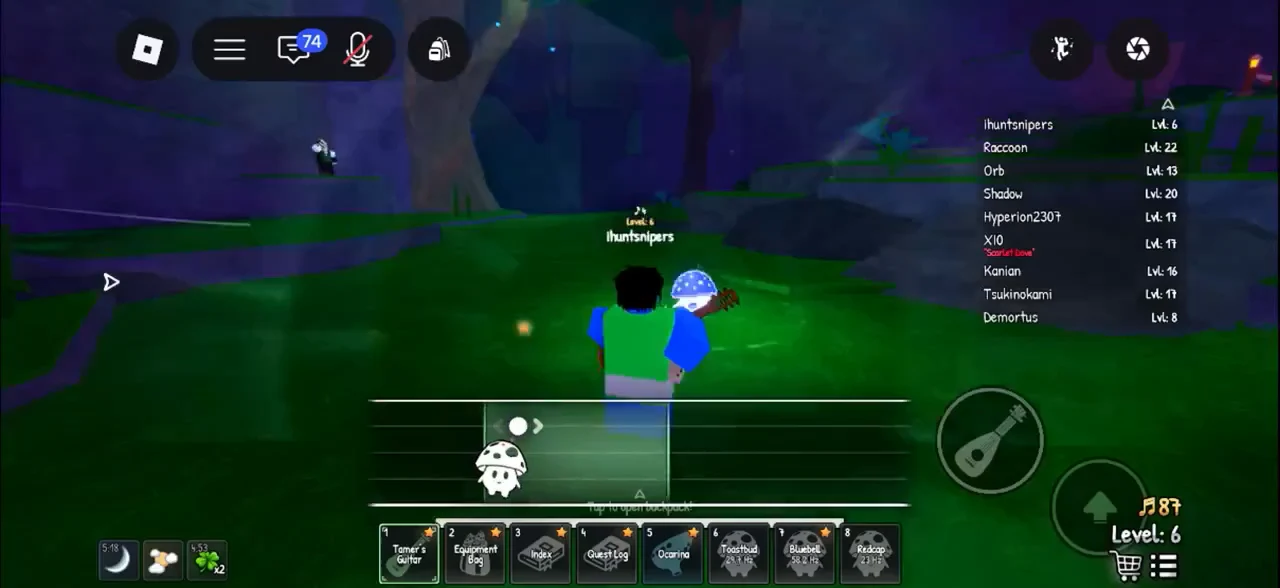
Catch the Scroom. After a 3-second countdown, the Scroom icon sits on a horizontal bar with a moving catch zone. Hold to drag the Scroom left and right and keep it inside the zone, and the progress bar at the bottom fills. Outside it, the zone turns red and progress drains; if it drains away, the message is “Your Scroom got away…” and you can try again. Catches can be a “Perfect Catch”.
Avatar playing the guitar at a creature as the mushroom progress meter fills
Playing the directional rhythm sequence to charm a Scroom into a capture.
The bottom item-selection panel highlights a spotted mushroom as the player aims toward a nearby creature

When the creature you charm happens to be a Harmonic one, this exact sequence is all it takes. A Harmonic Toastbud, for example, is caught the same way as a plain Toastbud.

Central hotbar creature icon highlighted while the avatar moves toward a glowing Scroom
Lining up a Harmonic Toastbud, which uses the same catch steps as any Scroom.

Confirming the Harmonic Ear badge unlocked

The moment you catch any Harmonic variant, the game fires the badge. The catch confirms with “You caught: Harmonic Toastbud! Frequency: 23.1 Hz,” and a notification reading Harmonic Ear appears with the description “Catch a Harmonic scroom.”

If you see those messages, the badge is yours. Any Harmonic Scroom you catch counts, and a single catch is enough.