The preload for Wuthering Waves 3.5 is live ahead of the update going live on July 10, 2026. Pulling the files early lets you jump straight into the new Mengzhou region and the two new resonators, Yangyang: Xuanling and Suisui, the moment maintenance ends instead of waiting on a launch-day download.
Quick answer: Free up about 76GB on PC (roughly a 52GB download) and 29GB on mobile before you start. On PC, open the launcher and click the pre-download arrow next to Start. Steam users cannot preload and must wait for July 10.
Wuthering Waves 3.5 preload size by platform
The 3.5 download is unusually large this time. On PC the actual download is around 52GB, but you should keep at least 76GB free so the game has room to decompress the files after maintenance. Mobile is a single 29GB download on both Android and iOS.
| Platform | Download size | Free space to keep |
|---|---|---|
| PC | ~52GB | 76GB |
| Android | 29GB | 13GB (decompression) |
| iOS | 29GB | 13GB (decompression) |
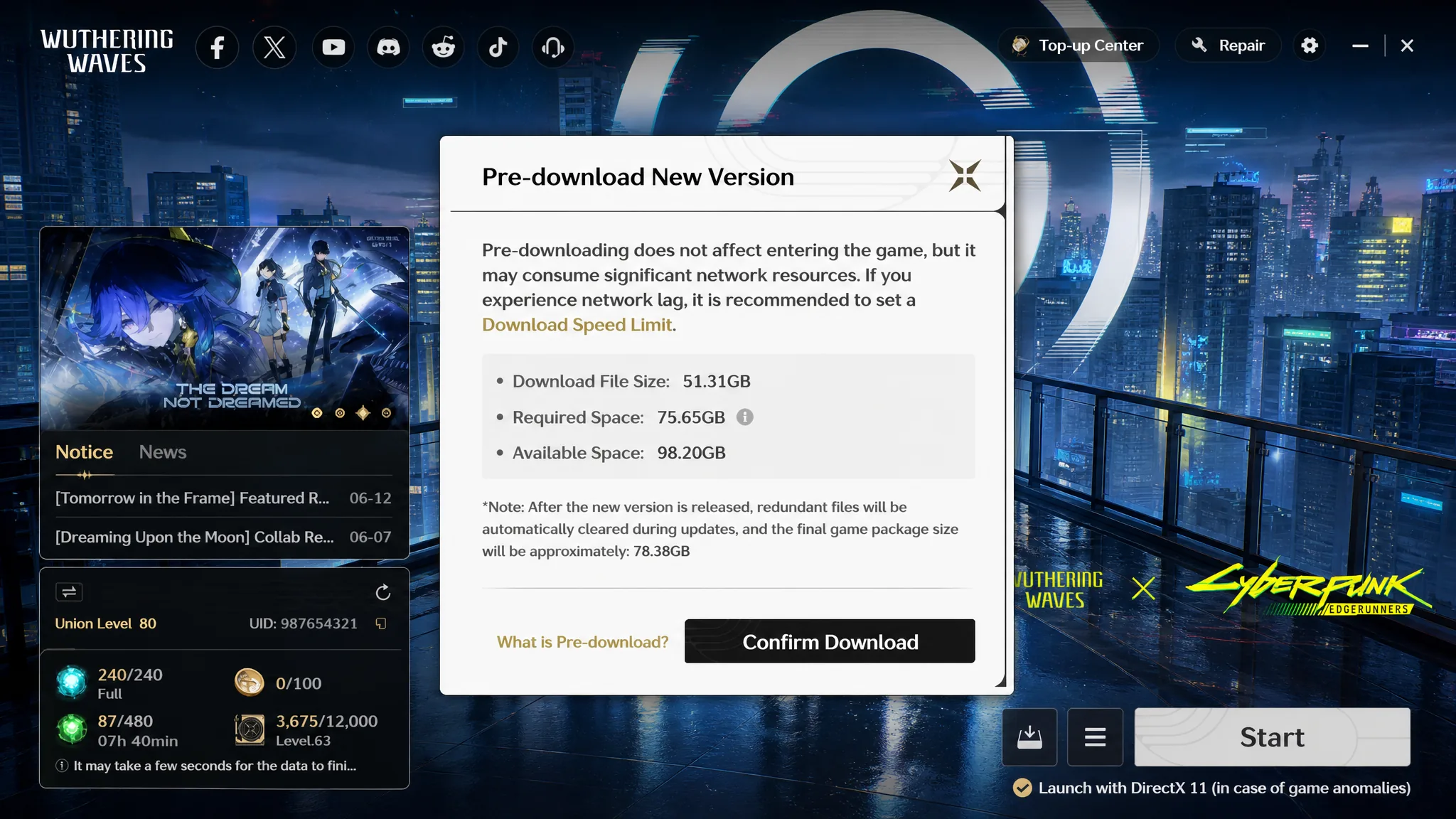
The gap between the download and the space you need exists because the game unpacks and rewrites files during installation. That temporary overhead clears once the patch finishes installing, and your final on-disk size settles below the peak.
Why the 3.5 download is so much bigger
A 76GB PC preload is well above recent patches, and it is deliberate. Kuro Games is switching to a newer compression method that shrinks the overall game footprint going forward. This inflated download is a one-time adjustment, and once 3.5 is installed your existing install size drops noticeably.
You may also be prompted to update the launcher itself. Future patches are expected to return to the smaller sizes seen in earlier versions.
| Version | PC preload | Mobile preload |
|---|---|---|
| 3.5 | 76GB | 29GB |
| 3.4 | 17GB | 21GB |
| 3.3 | 29GB | 19GB |
| 3.2 | 19GB | N/A |
| 3.1 | 35GB | 18GB |
| 3.0 | 36GB | 18GB |
How to preload 3.5 on PC
How to preload 3.5 on mobile and PS5
On PlayStation 5, highlight Wuthering Waves on the home screen, press the Options button, and select Check for Updates to begin downloading the version files.
Preload window, Steam, and release timing
The 3.5 preload opened on July 8, 2026 at 10:00 AM (UTC+8), roughly two days ahead of launch, and stays open until the update releases on July 10, 2026. That gives you the full window to finish the download at your own pace before servers come back up.
Steam is the exception. There is no pre-install on the Steam version, so those players download 3.5 only once the update goes live on July 10 after maintenance ends.
Confirming the preload worked
On PC the launcher marks the pre-download as complete, and the Start button becomes an install-and-launch action once maintenance ends. If you have less than the recommended free space, the launcher checks your disk first and the process will not begin, so clear space before you start rather than mid-download.
After maintenance, the game decompresses the preloaded files automatically in the background. Do not close the launcher during this step. If decompression fails, it is almost always a space problem, so free up more storage and restart the launcher to let it finish. Once complete, you will land in version 3.5 with Mengzhou and its new content ready to explore.