My Hero Academia United Survival drops a wall of tiny buttons on you the second you load in, and the game rarely stops to explain any of them. The Home Screen alone packs more than twenty symbols across the top bar, the side menu, and the tab row, and each one leads somewhere different. Here is what every icon means, grouped by where it lives and what it actually does.
Main navigation tabs on the Home Screen
These are the big destinations you will bounce between constantly. Learn these four first, because almost everything else branches off from them.
| Icon | What it opens |
|---|---|
| House with a star | Home Screen. Your hub for special events, Marketing rewards, chat, and the Pass tab. |
| Rabbit with two stars | Team. Manage characters here, including leveling, Rarity Up, Costume upgrades, Training, Equipment, and Collections. |
| Building with three stars | Agency. Your guild hub for chatting, checking members, and enhancing daily Trophies (up to level 30) for buffs like attack speed, HP recovery, and login bonuses. |
| Crystal ball with three balls inside | Enlist. Pull on Future, Equipment, or Permanent banners. Pity sits at 150 points, roughly 37,500 Hero Stones. |
Currency and resource icons
The counters running along the top of the screen track what you can spend. Hero Stones are the one you will care about most, since they fuel upgrades and pulls.
| Icon | Meaning |
|---|---|
| Rainbow inverted triangle | Hero Stones. The main premium currency for upgrading Costumes, Collections, and other character enhancements. |
| Gold coin | A currency counter whose exact use is not yet confirmed in-game. |
| Arm with muscle | A resource indicator whose exact function is not yet confirmed in-game. |
Progression and reward systems
A big chunk of the Home Screen is dedicated to earning things. These icons feed the reward tracks, shops, and character growth loops that keep your roster climbing.
| Icon | What it does |
|---|---|
| Two arrows pointing in different directions | Rarity Up / Swap. Upgrades a character’s rarity (SR → SR+ → UR → LR) using shards. |
| Two hands shaking | Trust. Raise Trust with individual characters for Hero Stones and stat rewards. Total Trust Level climbs to 870 with buffs across your whole roster. |
| Orange circle with a green upward arrow | Marketing. Rewards tied to raising your Player Level, which climbs fastest through Patrols. |
| Gold paper with a checkmark | Special Missions. A time-limited event tab. Clear it to earn a Selectable SR Character Shard Box. |
| Green ticket labeled Mission Pass | Mission Pass. A reward track tied to completing missions. |
| White ticket labeled Pass | Pass Shop. Buy passes here, including the Silver Age All Might Pass (gold, shards, stones) and the Training Pass (daily stones and dumbbells). |
| House with two arrows in a circle | Exchange. Event currency shops where you spend points earned from events on various rewards. |
| Shopping cart | Shops. Access every in-game store, including the Select Shop, Shard Shop, Collection Shop, Premium Shop, Hero Stones Shop, and Value Packs. |
Menu and utility icons
The remaining symbols handle your account, inbox, inventory, and everything filed inside the side menu. The plus-with-checkmark badge is worth watching, since it flags anything new waiting to be claimed.
| Icon | Meaning |
|---|---|
| Avatar | Your Profile. View your personal profile, player level, and account info. |
| Chat bubble with three dots | Chat From the Agency. Talk with up to 16 agency members in real time. |
| Plus with a white checkmark | A “new content” badge. Signals fresh items, rewards, or content sitting inside that menu. |
| Three lines in a white box | Settings / Menu. Game settings, navigation, and extra menu features. |
| Envelope in a white box | Mail. Your in-game inbox for system messages, event notices, and developer gifts. |
| Book in a white box | Compendium. Houses the Album (collectibles), Synchro (passive stat boosts), and upcoming Side Stories and Original Story content. |
| Black box in a white box | Items. Your full inventory. Open Selectable and Random boxes, view tickets, and manage collected materials. |
| Gift box in a white box | Presents. Claim daily login bonuses and pre-registration rewards. |
| Black note with a checkmark | Missions. Track Daily (100 Hero Stones plus 3 Heroics textbooks), Weekly, Main, and Guide missions. |
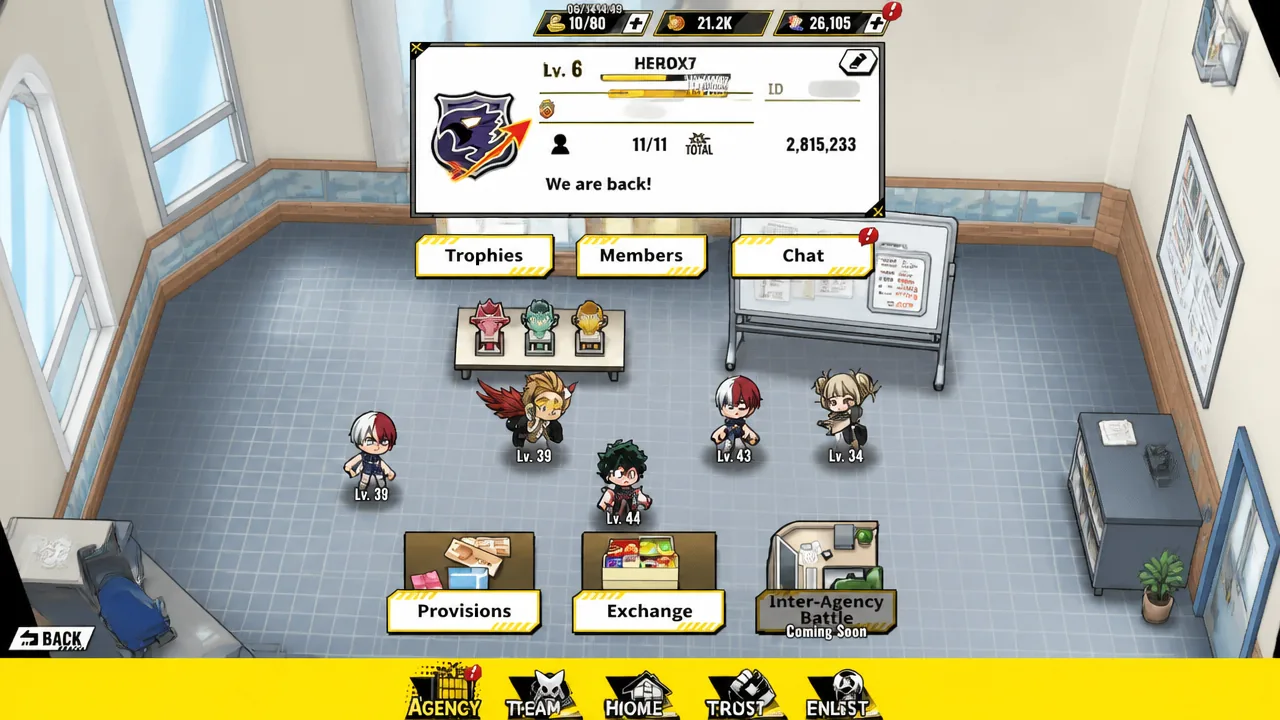
Agency tab icons
Joining an Agency early is one of the smartest moves you can make, and the tab has its own layer of symbols. The header row tells you how strong and active your guild is at a glance.
| Icon | Meaning |
|---|---|
| Yellow gauge bar | Agency Level Progress. Shows XP toward the next level. Leveling up unlocks more member slots (up to 16) and extra perks. |
| Gold star medal | Your Profile Name. Displays your name and rank within the agency. |
| Person | Total Members. Current member count against the cap, which reaches 16 at max agency level. |
| Bomb blast | Overall Team Power. Combined power of every member, handy for judging how strong the agency is. |
| Pencil | Edit Your Information. Update your agency profile or personal details shown to others. |
The chat controls sit lower on the screen and manage how you communicate with members.
| Icon | Meaning |
|---|---|
| Speaker | Mute or Unmute. Toggle sound notifications for the agency chat. |
| White box with a pencil | Write a Chat Message. Opens the text input to post in the group chat. |
| Person in a circle with a red slash | Blocked Player. Marks someone you have blocked so their messages stay out of your feed. |
The Trophy enhancement system is where the real agency payoff lives. Spend your daily enhancement points to push the trophy higher, and every level unlocks passive buffs shared by all members.
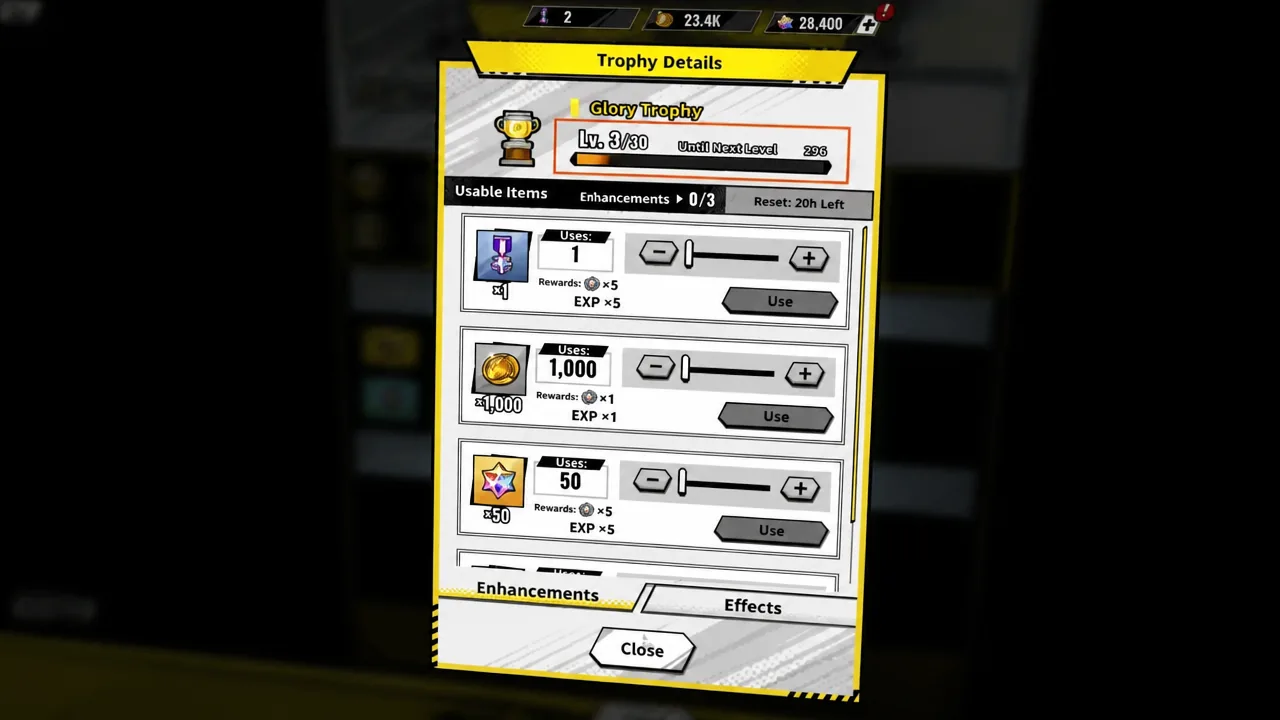
| Icon | Meaning |
|---|---|
| Black gauge bar | Trophy Enhancement Progress. Shows the points still needed to reach the next trophy level. |
| Minus and plus with a line between | Enhance Trophy. Spend daily enhancement points to level up the trophy and unlock buffs like faster attack speed, HP recovery, and login bonuses for everyone. |
Special Missions tab icons
The Special Missions tab is a launch event with a hard deadline, so its icons are all about tracking daily progress. Clear every tier before the window closes to collect the Selectable SR Character Shard Box at the end.
| Icon | Meaning |
|---|---|
| Yellow checkmark | Tier Completed. You have finished every task in that tier and can claim the reward. |
| Yellow lock | Days Locked. That mission day is locked and not yet available. |
| Yellow gauge bar | Tasks Remaining. Your progress within the active tier and how many tasks are left before the next one opens. |
That covers the symbols scattered across the Home Screen, Agency tab, and Special Missions event. A couple of counters still keep their functions quiet, but once you know which button leads to Team, Enlist, Trust, and the Agency Trophy, the interface stops feeling like a guessing game. And if you have not opened that SR box yet, Deku is a solid early pick.