Manually updating Google Chrome ensures you have the latest features and security improvements, especially if automatic updates aren’t functioning properly.
Click on the three vertical dots icon
(⋮) at the top-right corner of the browser window to open the menu, then hover over Help.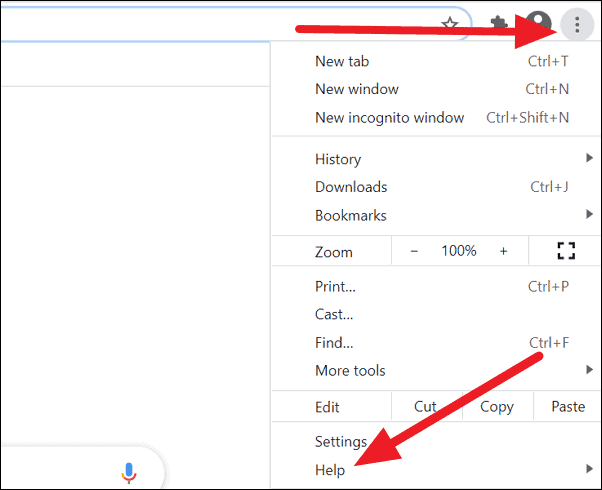
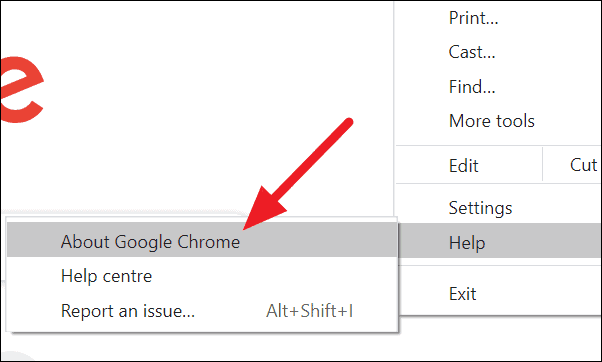
Alternatively, you can go directly to the About Chrome page by entering the following address in the browser’s address bar:
chrome://settings/helpOn the About Chrome page, Chrome will automatically check for updates. If an update is available, it will start downloading immediately.
Once the update is downloaded, click the Relaunch button to restart Chrome and complete the update process.
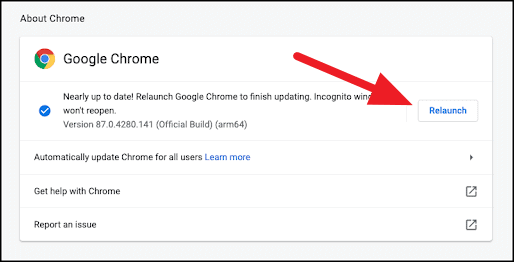
Your Chrome browser should now be updated to the latest version. To verify, revisit the About Chrome page, which should display the current version and confirm that Chrome is up to date.