On Linux systems, installing applications has become more straightforward with universal package managers like Flatpak and Snap. These tools allow developers to distribute applications across various Linux distributions using a single package format. In this guide, we’ll focus on installing Flatpak on Ubuntu 20.04, adding the Flathub repository, and installing applications using Flatpak.
Installing Flatpak on Ubuntu 20.04
Flatpak is supported on numerous Linux distributions, including Ubuntu. The package is available in the Ubuntu 20.04 repositories, making the installation process simple.
sudo apt install flatpakThis command will install Flatpak and any necessary dependencies on your system.
sudo apt install gnome-software-plugin-flatpakWith this plugin, you can install Flatpak applications without using the command line, directly from the graphical interface.
Adding the Flathub Repository
Ubuntu doesn’t include a Flatpak repository by default. Flathub is the most widely used repository for Flatpak applications, offering a vast selection of software.
flatpak remote-add --if-not-exists flathub https://flathub.org/repo/flathub.flatpakrepoThis command adds Flathub as a source for Flatpak applications.
After adding the repository, you’ll need to restart your session to recognize the new repository.
Installing Flatpak Applications
With Flatpak and Flathub set up, you can now search for and install applications.
flatpak search command followed by a keyword. For example, to search for the music player “Lollypop,” run:flatpak search lollypop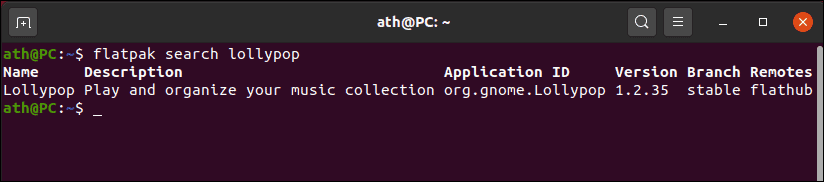
This command will display a list of applications related to your search term, including their names, descriptions, application IDs, versions, branches, and remotes.
flatpak install command followed by the application name or ID. To install “Lollypop,” execute:flatpak install lollypop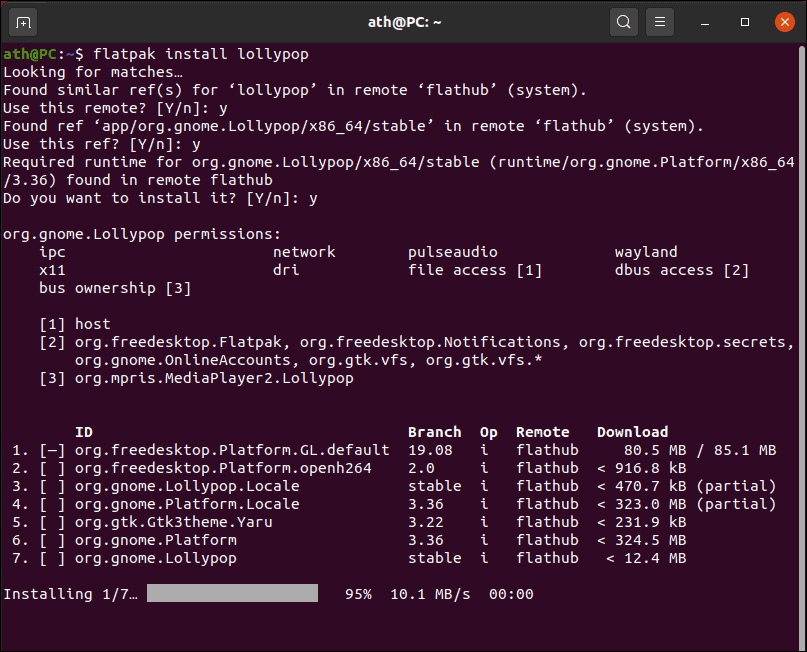
Flatpak will find the application in the repositories and prompt you to confirm the installation, including any required runtimes. Type y and press Enter to proceed.
Keep in mind that the first time you install a Flatpak application, it may need to download additional runtimes, which can be large and take some time to download.
Once the installation is complete, you can launch the application from your applications menu or by using Flatpak commands.
With Flatpak and the Flathub repository configured on your Ubuntu 20.04 system, you have access to a wide range of applications beyond those available in the standard repositories. Enjoy exploring new software with ease.