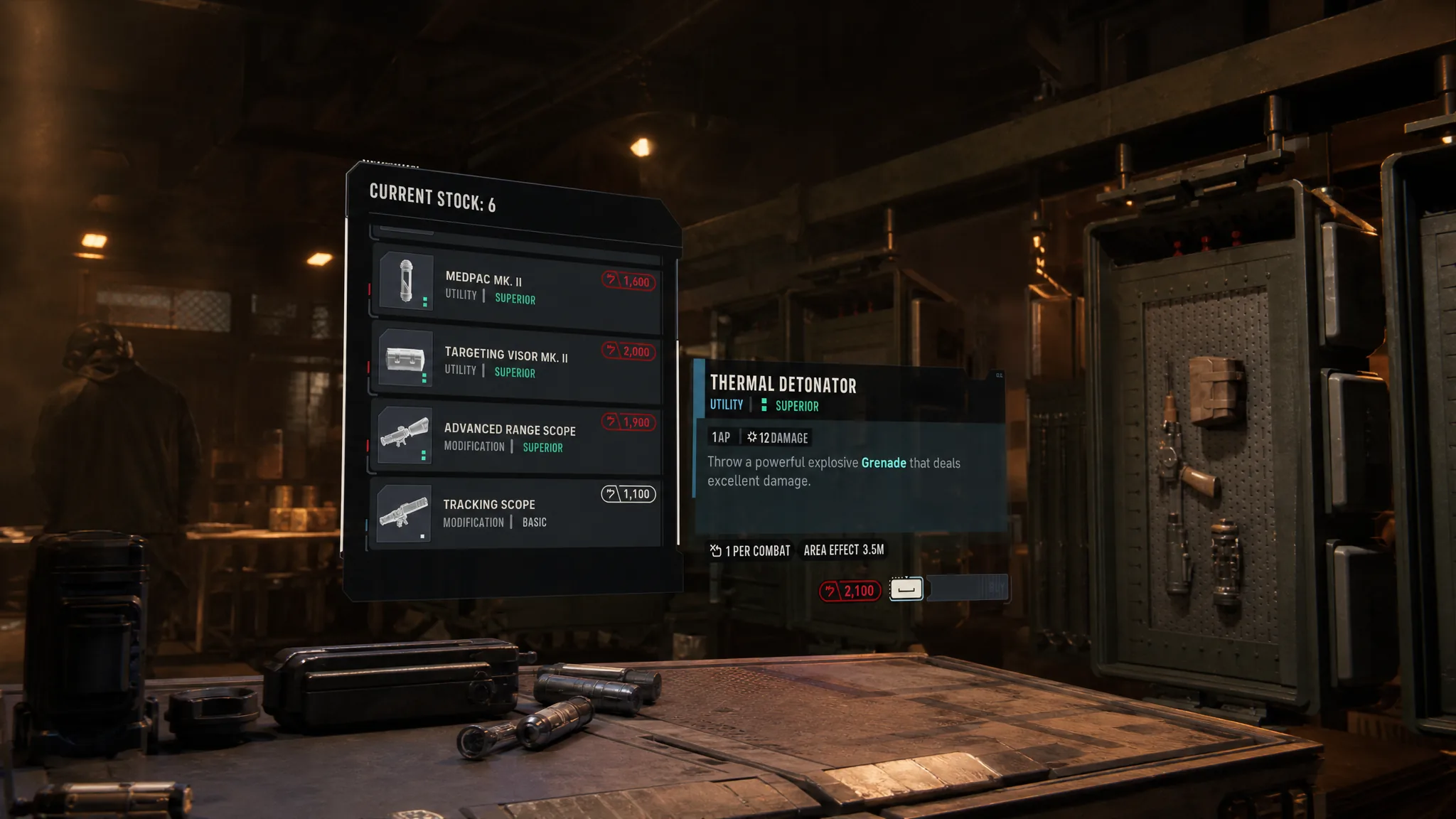
The Black Market in Star Wars Zero Company is a ship-based vendor that sells utilities, weapon modifications, and other gear upgrades your squad needs to keep pace with tougher missions. It runs entirely on Credits, and its stock changes as your campaign moves forward, so it rewards regular check-ins rather than a single shopping trip.
Quick answer: Unlock the Black Market at Den Level 1 and Black Market Quality at Den Level 2 under the Facilities tab, then open the Den menu, Armory, Black Market tab. Skip Basic items and buy Superior ones with Credits earned from missions and operations.
Unlock the Black Market through Den Level upgrades
The Black Market does not appear on its own. You have to build it by spending Den Level upgrades, which you manage under the Facilities tab. Two separate entries control it. The first sets up the station itself, and the second improves the quality of what it stocks.
| Upgrade | Den Level required | What it does |
|---|---|---|
| Black Market | Level 1 | Builds the vendor station on your ship |
| Black Market Quality | Level 2 (and above) | Improves the grade of available stock as Den Level rises |
Open and browse the Black Market
Once the station is built, reaching it takes a short path through the Den interface. Open your Den’s menu, select Armory, then choose the Black Market tab on the right. The available stock sits on the left side of the screen, and each item shows its price in Credits.
Credits are the only currency the Black Market accepts. You earn them by running Missions and Operations from the Holo Table, so keep a healthy balance before committing to any big purchase. Weapon modifications in particular can cost several thousand Credits each.
Stock rotates every campaign cycle
The Black Market does not hold a fixed inventory. The items on sale change every cycle in your campaign, which means the shelf you saw last time may look completely different now. Because a strong item can appear and then disappear, check the vendor after finishing each cycle so you do not miss something worth the Credits.

What to buy and what to skip
Items carry one of two tags, Basic or Superior. Since Credits drain fast, spending them on the right tier matters over a full campaign. As a beginner, avoid the Basic listings and put your Credits toward Superior items, which hold their value far better as missions scale up.
| Tag | Recommendation |
|---|---|
| Basic | Skip early on to preserve Credits |
| Superior | Prioritize for lasting value |
After you have fully unlocked every tier of Black Market Quality through Den Level upgrades, the selection opens up considerably. At that point you can buy high-quality weapon mods for your main unit, support utilities, healing items, and Exotic mods. These are the purchases that justify saving a large pool of Credits.

Treat the Black Market as a long-term investment rather than an impulse stop. Keep your Den Level climbing to raise stock quality, bank Credits from the Holo Table, and revisit the vendor each cycle so you can grab a Superior mod or Exotic upgrade the moment it shows up.