The Holy Corpse is the centerpiece of Trail of the Saint, a limited-time mode (LTM) in the Roblox tower defense game Anime Vanguards. Its pieces come from one place: the Dinosaur Hunt stage, a snowy Western town where the Holy Corpse’s vocal and orchestral theme plays for the whole run. Collecting pieces means clearing waves there, then checking the drop tracker to confirm they were counted.
Quick answer: Queue the LTM Trail of the Saint – Dinosaur Hunt stage, survive all 15 waves without losing your stocks, and watch the corpse counter on the right-side drop tracker increase.
Where Holy Corpse pieces drop in Anime Vanguards
Corpse pieces drop only in the LTM stage, not in the regular story or other game modes. The stage label at the top of the screen reads LTM Trail of the Saint - Dinosaur Hunt Normal, so you can tell at a glance whether you loaded the right mode and difficulty. The map is a frozen frontier street, and the Holy Corpse theme loops in the background from start to finish. That music is a quick way to know you’re on the event stage and not a lookalike map.
If you aren’t already in the game, launch it from its Roblox listing and join a server from the lobby.
The official Trail of the Saint trailer shows off the event that the Holy Corpse belongs to:
Dinosaur Hunt stage rules and HUD
Before you load in, know how the run is tracked. The Dinosaur Hunt HUD tells you how far along you are and how much room for error you have left.
| HUD element | Where it sits | What it tracks |
|---|---|---|
| Wave | Top of screen | Current wave out of 15 |
| Stocks | Top of screen | Remaining stocks, max 3 |
| Wave Timer | Top of screen | Time spent in the run |
| Drop tracker | Right side | Event items collected |
| Cash (¥) | Bottom center | Yen for placing units |
| Hotbar | Bottom | Six unit slots with costs |
Stocks are your safety margin. Every stock you drop brings you closer to failing the stage, and a failed run won’t take you to wave 15. The Unit Manager and Stage Details buttons on the right let you review your placed units and the stage setup mid-run. You can also hold P to pause.
How to run Dinosaur Hunt for Holy Corpse pieces
Skip button and a short countdown, such as 8 seconds. Turn on Auto to skip automatically on every run, but only if your defense can handle back-to-back waves.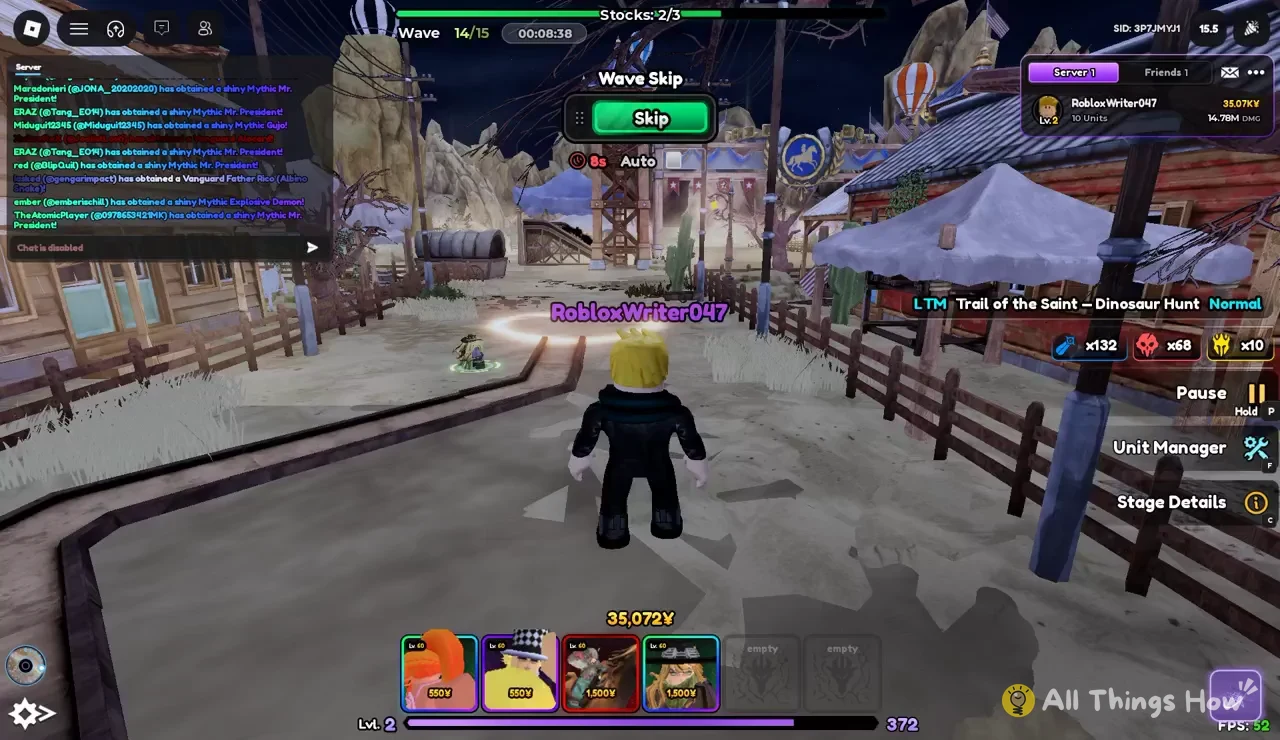
Checking your Holy Corpse count on the drop tracker
The right-side tracker shows three event drop counters while you’re in the stage. Each counter has an icon and a running total:
- Saint skull / corpse icon — the Holy Corpse pieces you’ve collected
- Red skull icon — a separate event drop
- Gold bag icon — an event token drop
Corpse pieces drop at a much higher rate than the other two. A save with 132 corpse pieces, for example, has 68 red skulls and 10 gold bags. The corpse total climbs fastest of the three, and the gold bags are the rarest.
To confirm a run counted, check the number next to the saint skull icon before and after you clear the stage. If it went up, the pieces were added. If it didn’t move, check the stage label at the top of the screen. Anything other than LTM Trail of the Saint - Dinosaur Hunt Normal means you’re on the wrong stage.
Collecting Holy Corpse pieces comes down to clearing Dinosaur Hunt repeatedly with a dependable level 60 lineup and enough stocks to finish. Use Auto skip once your defense is steady, and check the saint skull counter after each clear to see how close you are.