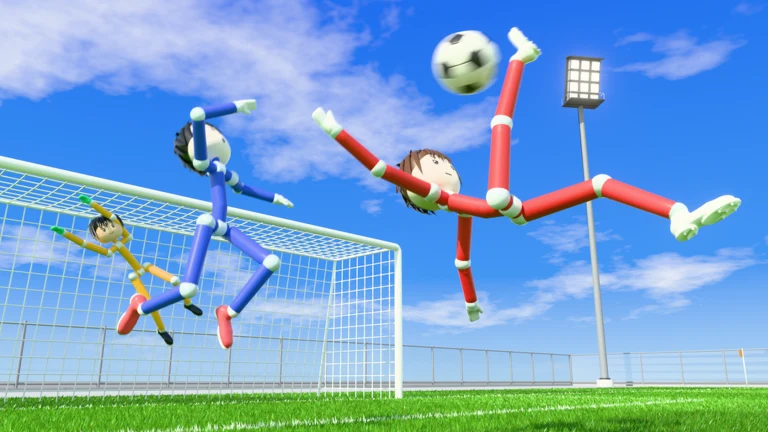
Every player in Ragdoll Soccer is a jointed mannequin with a round head and ball-joint limbs, and the game runs everything through its own soccer physics engine. That means a shot doesn’t always leave your foot the way you planned. Bodies tumble into each other, the ball bounces off limbs, and the goalkeeper (the yellow figure in goal) will throw itself sideways to stop you. Scoring is mostly about getting the ball into a clean spot before you shoot, then knowing what the game does once it goes in.
Quick answer: Practice shooting in Practice mode, take your chances in 4v4 quickplay or 8v8 pro servers, and after a goal watch the replay or vote to skip it. Your button changes to VOTED once your vote counts.
Ragdoll Soccer modes for scoring goals
Ragdoll Athletics, the group behind the game, lists four ways to play. Each one gives you a different kind of chance to score, so it’s worth picking the mode that fits what you’re trying to work on.
| Mode | Team size | Why it matters for scoring |
|---|---|---|
| Practice mode | Solo | Shoot without anyone pressuring you |
| 4v4 quickplay | 4v4 | Open play, lots of shots |
| Clubs mode | 4v4 with friends | Queue with people you can pass to |
| 8v8 pro servers | 8v8 | Referees, penalties and free kicks |
Practice mode is where you learn how hard and how high the ball goes off your kick before anyone is trying to tackle you. Once a low, controlled shot feels repeatable, 4v4 quickplay gives you a smaller pitch and fewer bodies in the way, which makes it easier to find space in front of goal. Clubs mode is the same 4v4 format, but you queue with friends, so you’ve got teammates who’ll actually look for you when you’re open.
How to get a shot past the goalkeeper
The goalkeeper in Ragdoll Soccer dives, and it can cover a lot of the goal when it does. A shot hit straight at the middle from far out gives the keeper time to get across, while a shot from closer in, placed away from where the keeper is standing, leaves it much less time to react. Because the physics decide where every touch ends up, it helps to settle the ball first instead of shooting the moment it rolls near you. A ball still bouncing off another player’s leg is much harder to place.
Crowds around the box are the other problem. In a ragdoll game, standing right on top of the ball tends to tangle your player up with defenders, and a collision can knock you over mid-shot. Staying a step away from the scrum, then moving onto a loose ball when it pops out, usually gives you a cleaner strike than fighting through bodies. If a defender or the keeper is directly in your path, a softer, lifted shot over them often works better than a hard one into their legs.
When you’re training in Practice mode, change only one thing between shots, like your aim or how hard you kick, so you can tell which one caused a miss.
Scoring from set pieces in 8v8 pro servers
The 8v8 pro servers stick more closely to real soccer rules. They use VAR and offsides, plus referees, throw-ins, free kicks and penalties. A foul stops play, which then restarts with a dead ball. A penalty or free kick near the box gives you a shot without a defender closing in—an unusual chance in open play with so many ragdolls on the pitch.
Offsides work against attackers here, too. If you like hanging near the goal waiting for a pass, that habit can get a move whistled down in pro servers, so keep an eye on where the last defender is before you make your run. Those rules, along with VAR, are listed for 8v8 pro servers rather than for 4v4 quickplay, which is why quickplay is the easier place to start racking up goals.
What happens after you score: The replay screen
When the ball goes in, the game cuts to a replay of the goal. The screen is labeled REPLAY, with framing brackets in the corners, and the scorer’s nametag floats above their player so everyone can see who finished it. The scoreboard stays at the top of the screen, showing BLUE and RED with each team’s goal count and the current match minute, written like 85′. Scorelines can climb high in this game, and a match sitting at Blue 17, Red 13 by the 85th minute isn’t unusual.
- REPLAY label: tells you the clip is a playback of the goal, not live play.
- Scorer’s nametag: shows above the player who scored.
- SAVE REPLAY: a green button that keeps a copy of the goal.
- VOTES TO SKIP: a tally of how many players want to skip, shown like 3/5.
- VOTED: what your button reads after you’ve cast your skip vote.
How to save or skip a goal replay
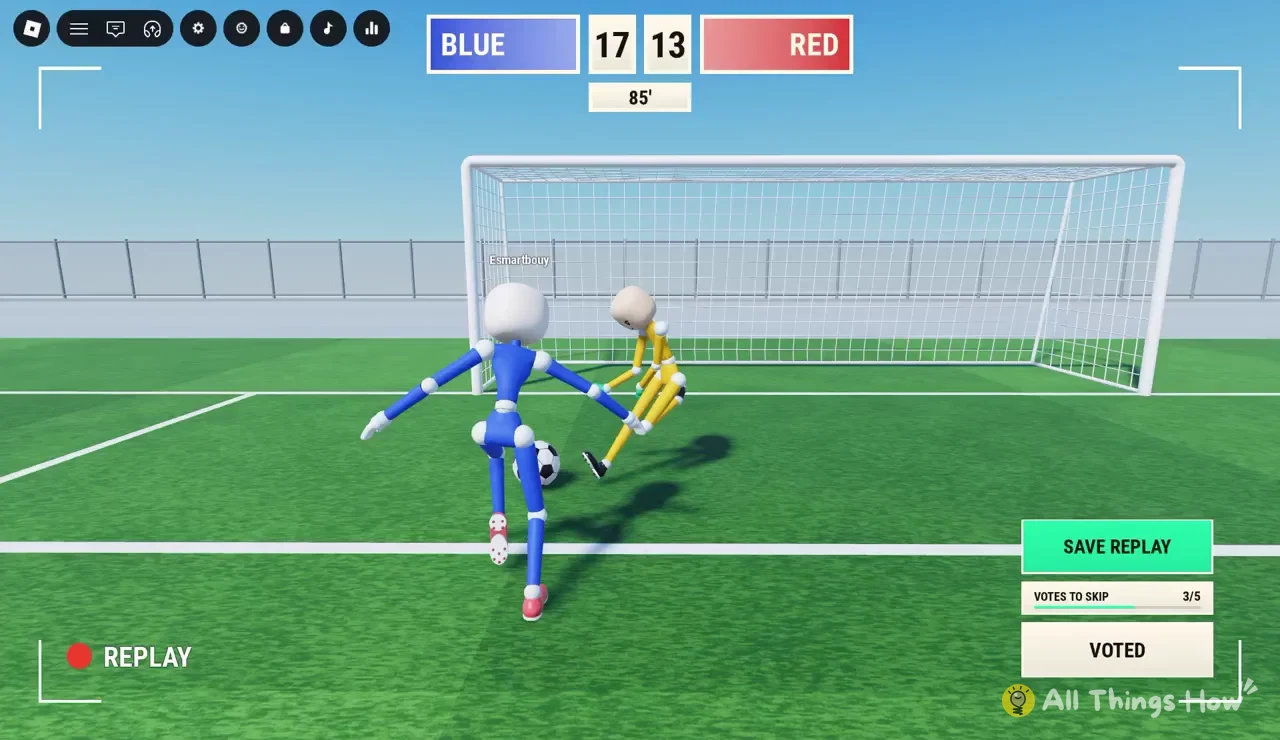
Your vote is one of several, so the replay keeps going until enough of the lobby agrees. Saving a replay doesn’t stop anyone else from voting to skip, which means it’s worth hitting SAVE REPLAY first if a goal is one you want to keep and then casting your vote.