In Net a Fish, the Megalodon is one of the Wave Rush events, and the game tells you when it’s coming. It shows up in the same countdown panel as the other Wave Rush types, and it follows Rare fish waves. If you know that order, you can be on your dock with your net emptied and your Spear Gun running when the Megalodon starts.
Quick answer: Watch the NEXT WAVE RUSH panel. When the 2-minute Rare fish waves event ends, the panel switches to Megalodon and starts an 8-minute countdown.
Where the Megalodon timer shows in Net a Fish
The timer lives in the HUD panel labeled NEXT WAVE RUSH. The panel names the next Wave Rush type, such as “Rare fish waves” or “Megalodon”, and shows a countdown under it. You don’t have to open a menu to check it. The panel stays on screen while you fish, so you can glance at it between catches.
There’s also a “Start now!” button next to the countdown. If you don’t press it, the event starts by itself when the timer reaches zero. Waiting it out costs nothing.
Megalodon countdown after Rare fish waves
The Megalodon countdown doesn’t start from nothing. It starts right after Rare fish waves finishes. When Rare fish waves begins, schools of fish spawn and your net fills faster for two minutes. When that ends, the NEXT WAVE RUSH panel switches to Megalodon and the 8-minute countdown begins.
| Phase | What the panel shows | Length |
|---|---|---|
| Waiting | Countdown to Rare fish waves | Until timer ends |
| Rare fish waves | Event active, fish schools spawn | 2 minutes |
| Megalodon countdown | Megalodon with a timer | 8 minutes |
| Megalodon | Wave Rush begins | Starts at zero |
In practice, once you see Rare fish waves start, you have about ten minutes before the Megalodon: the two minutes of Rare fish waves plus the eight-minute countdown after it. You can keep fishing during that time. The net keeps collecting and the Spear Gun keeps firing while the timer runs down.
Setting up your dock before the Megalodon starts
The Megalodon is a server-wide boss, and you fight it with the Spear Gun on your dock, so most of the prep is about that gun and your net. Use the eight minutes to do the following, in this order.
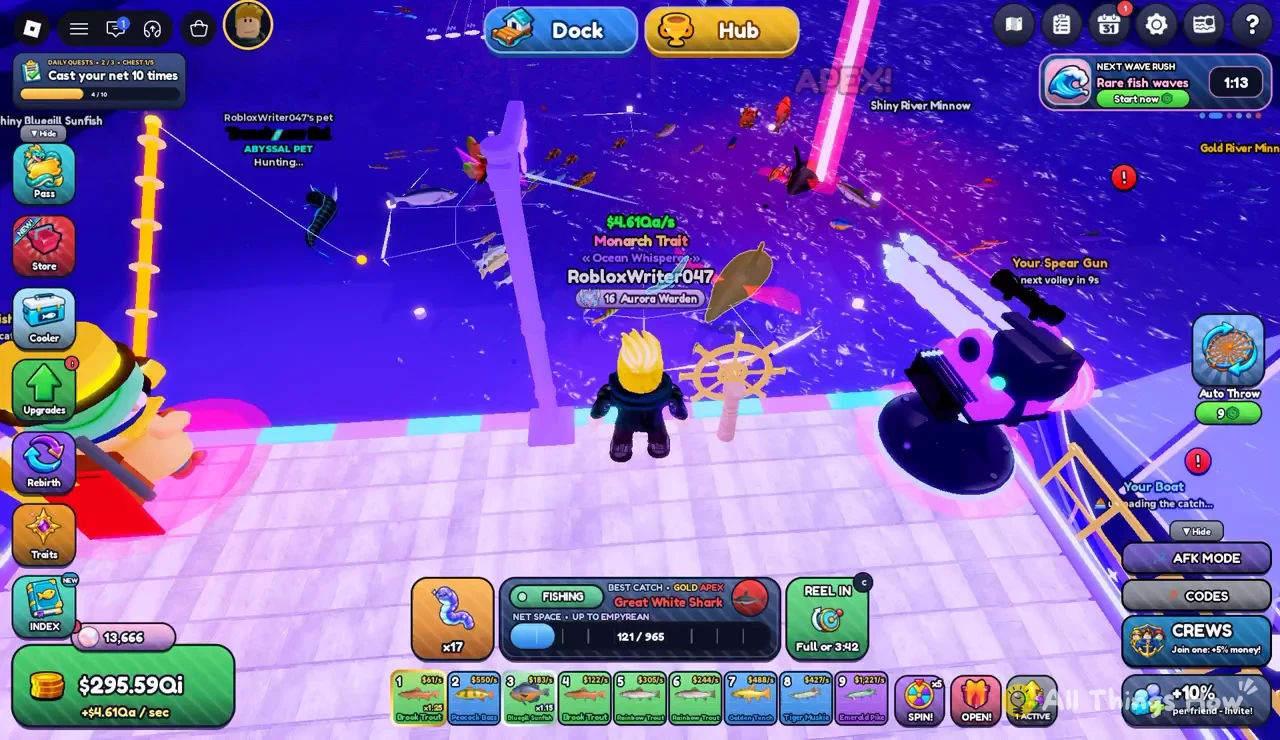
The Fishing panel also shows how high a rarity your net can hold, for example “NET SPACE : UP TO EMPYREAN”. It isn’t tied to the Megalodon timer, but it’s worth checking while you’re already looking at the panel.
How to tell the Megalodon Wave Rush is close
The NEXT WAVE RUSH panel is the only thing you need to watch. While it reads “Megalodon” with a timer under it, the event hasn’t started yet. The timer counts down second by second. At about three minutes left you still have time to reel in and check that Auto Throw is on, so that’s a good point to stop doing anything else on the Hub or in the Store and head back to your boat.
When the countdown runs out, the Megalodon Wave Rush starts on the server. If you’d rather not wait the full eight minutes, the “Start now!” button next to the timer is the other way to start it early. Otherwise, staying on the Dock with Auto Throw running and an empty net means you’re already in position when the timer hits zero.