Yen is the currency that runs everyday life in Gakuran, and if you want to buy items, keep up your lifestyle, and progress your character, you need a steady income. The good news is the game gives you a straightforward, real-world-style loop for earning and moving money around, all handled through your in-game phone. This guide covers exactly how to make yen, how the job system works, and how to send money to other players.
The fastest way to earn yen: get a job
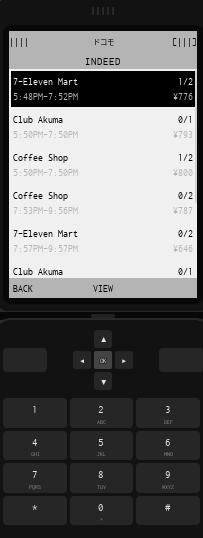
Working jobs is one of the primary ways to make money in Gakuran, and every job is found through the Indeed app on your phone. It works like a real-world job search platform: you browse listings, apply, and then work scheduled shifts to get paid.
How to get a job (step by step)
- Open your phone.
- Select the Indeed app.
- Browse the available job listings.
- Apply for a job that interests you.
- Once hired, attend your scheduled shifts to earn yen.
Different jobs offer different wages and schedules, so it is worth comparing listings before you commit. After you accept a position, travel to your workplace and complete your shifts to collect your earnings. Whether you want a quick part-time side job or a longer-term career, Indeed is your one-stop shop for finding work directly from your phone.
What to do with your yen
Earning money is only half the picture. Yen lets you pay for expenses, purchase items and drinks around the city, and generally build up your character lifestyle. The more consistently you work, the more freedom you have to spend on the things that make your character stand out.
Sending & receiving money: the Yen app
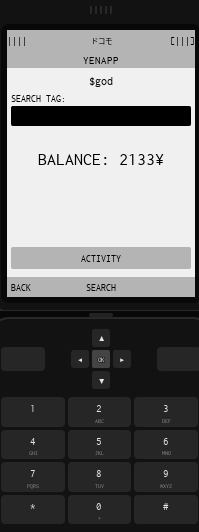
Gakuran also includes a digital payment app simply called Yen, which works like a modern mobile payment service. It lets you send and receive money instantly through your phone, so you never have to meet up in person to exchange cash.
When you set up the app, you choose a unique Yen Tag that acts as your personal payment username. Other players search for that tag to find you and send money.
How to send yen to another player
- Open your phone.
- Select the Yen app.
- Search for a player Yen Tag, or select a saved contact.
- Enter the amount you want to send.
- Confirm the payment.
Key features of the Yen app include:
- Yen Tag: a unique username used to identify your account.
- Send payments: transfer yen directly to other players.
- Receive payments: others can send yen to your Yen Tag.
- Transaction history: view previous payments, transfers, and receipts.
- Tag search: look up other players by their Yen Tag to quickly send money.
Yen-earning tips
To keep your income steady, treat jobs as your main source and compare wages before applying, since pay and schedules vary between listings. Show up for your shifts consistently, keep an eye on your transaction history in the Yen app so you always know your balance, and set your Yen Tag early so friends can pay you back for anything you split. With a reliable job and the Yen app set up, you will always have money on hand to spend around Nishikata.