A huge part of Gakuran is the social side, meeting other players, adding them as friends, staying in touch, and sharing what you are up to. All of this runs through your in-game phone. This guide walks through how to add friends with Social Link, manage your Contacts, send messages from anywhere, and post on the Mixi social feed.
How to add friends: Social Link
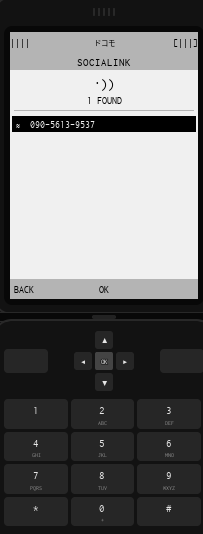
Social Link is the primary way to meet new people and build your network. It works like the contact-sharing feature on modern smartphones: when two characters are near each other, they hold their phones close together to instantly exchange contact info, no manual name entry required.
- Open your phone.
- Select Social Link.
- Have the other player open Social Link too.
- Hold your phones close together.
- Confirm the connection request.
After a successful exchange, both characters are added to each other Contacts list, and from there you can message and use any future phone features that need a saved contact.
Managing your Contacts
The Contacts app works like a regular phone contact list. Anyone you add through Social Link is saved here, and their entry stays in your Contacts so you never have to search for them again.
- Open your phone.
- Select Contacts.
- Browse your saved contacts or pick a specific person.
- Open their contact page to view the available actions.
From a contact page you can view their profile, send messages, and interact through supported phone features, making it your hub for staying connected with friends you meet.
Sending messages
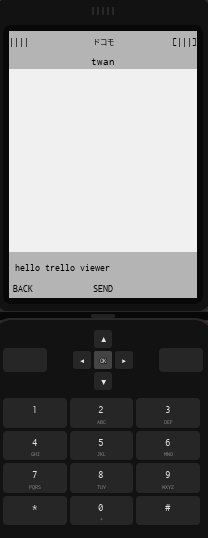
Once you are connected to someone, you can message them from anywhere in the world, you do not need to be physically near each other. The only requirement is that you have added them through Social Link first so they appear in your Contacts.
- Open your phone.
- Go to Contacts.
- Select the person you want to message.
- Press Message to open the conversation.
- Type and send your text.
The recipient gets your message and can reply from their own phone, and every conversation is saved in your message history so you can revisit it anytime.
Sharing updates on Mixi
Mixi is the game social media platform, a public feed where you share thoughts and updates and interact with the wider community, similar to a real social networking app.
- Open your phone.
- Select Mixi.
- Create a post or browse the feed.
- Interact with posts by liking or replying to them.
Mixi features let you create posts to share thoughts, updates, and status messages, like posts from other players, reply to join discussions beneath a post, and browse the feed to keep up with what is happening. It is great for roleplay moments and general community updates, and acts as a digital social hub where you can express yourself and follow other players activity.
Putting it together
The social loop is straightforward: use Social Link to add people, keep them organized in Contacts, message them privately from anywhere, and post publicly on Mixi. Start by Social Linking with a few players, and your network will grow quickly from there.