Progress in Flat the Mountain is measured by one number: how many cubic meters of terrain you’ve broken. The tracker at the top center of the screen sets a run of 12 goals, each asking for a bigger total of broken rock, and the game moves you to the next goal as soon as your count passes the current target. Next to that, a separate objective at the top right asks you to save up Coins and buy the Dynamite.
Quick answer: Keep digging until the m³ counter passes each target. Goal 2 needs 40,000 m³, Goal 3 needs 100,000 m³, and Goal 4 needs 250,000 m³. The Dynamite costs 150K Coins.
Flat the Mountain goal targets (m³ broken)
The goal tracker shows one goal at a time, written as Goal X/12 with the target underneath it and a live counter such as 31,365 / 40,000 m³. These are the early targets in order:
| Goal | Tracker text | Total needed | Gap from last goal |
|---|---|---|---|
| Goal 2/12 | Break 40,000 m³ | 40,000 m³ | — |
| Goal 3/12 | Break 100,000 m³ | 100,000 m³ | 60,000 m³ |
| Goal 4/12 | Break 250,000 m³ | 250,000 m³ | 150,000 m³ |
The counter is a running total for the whole run, and it doesn’t reset when a goal finishes. After Goal 3 clears at 100,000 m³, Goal 4 picks up from that same number, so a counter reading 120,447 / 250,000 m³ means you’ve broken about 20,000 m³ since the last goal and still have just under 130,000 m³ to go. Each new target is a total to reach, not a fresh amount to dig from zero.
The gaps grow fast. Going from Goal 2 to Goal 3 means breaking 60,000 m³, and Goal 3 to Goal 4 asks for 150,000 m³, more than twice as much. The tracker only reveals the next target once the current one is done, so the numbers for Goals 5 through 12 show up as you reach them.
How to push the m³ counter with the excavator
The yellow excavator, the tracked digger with the hydraulic arm, is how you move big chunks of terrain through the early goals. While you’re in it, the control prompt at the bottom of the screen reads WASD Drive · Click Dig · F Exit.
W, A, S and D keys. The camera sits behind the machine in third person, so line the arm up with the wall you want to break before you start digging.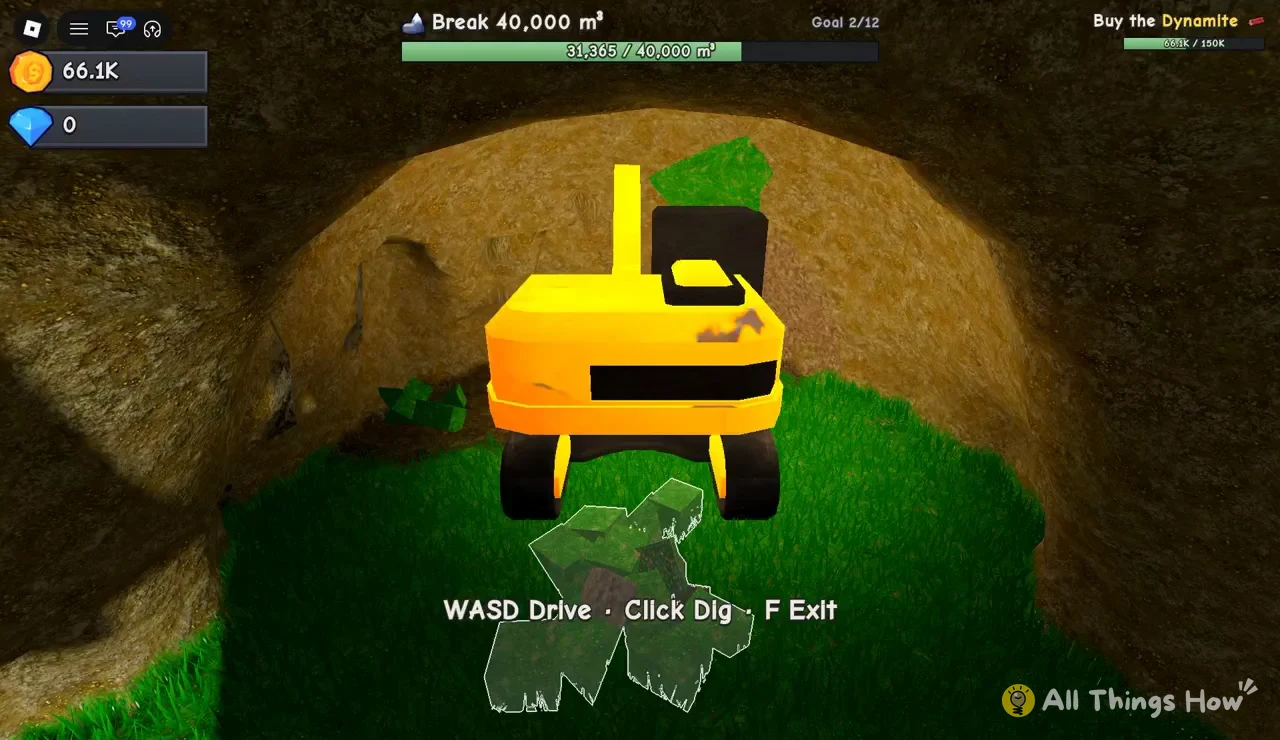
F when you want to get out of the excavator. You’ll need to be on foot for things you’d do outside the machine, but the m³ total you’ve built up stays on the tracker.Bright green ore veins sit inside the cave walls as you tunnel deeper. Breaking them works just like any other rock and adds to the volume count, and the game plays a separate musical chime when one is dug out, so you’ll hear it even if you’re watching the counter instead of the wall.
How you know a goal is complete
When the counter passes the target, a completion chime plays and the tracker switches right away to the next goal. Clearing 40,000 m³ changes the text from Goal 2/12 and Break 40,000 m³ to Goal 3/12 and Break 100,000 m³. Passing 100,000 m³ moves it on to Goal 4/12 and Break 250,000 m³. There’s nothing to claim and no menu to open, so the new goal number on the tracker is your confirmation.
Buy the Dynamite objective (150K Coins)
The tracker at the top right of the screen runs alongside the m³ goals and stays there the whole time. It reads Buy the Dynamite with a Coins counter under it, and the price is 150K Coins. With 66.1K Coins, for example, it shows 66.1K / 150K, which leaves you about 84K short.
Your Coins total is also shown on the HUD next to your Gems, so you can check both numbers without leaving the excavator. The Dynamite objective is separate from the 12 volume goals, and finishing a volume goal doesn’t fill it. You get there by building up Coins while you dig, and the top-right counter fills as your balance grows.
- Top center: the current volume goal, shown as
Goal X/12with its m³ target and live counter. - Top right:
Buy the Dynamitewith your Coins against the 150K price. - Currency display: your Coins and Gems totals.
- Bottom prompt:
WASD Drive · Click Dig · F Exitwhile you’re in the excavator.
Once Goal 4 is on the tracker, you’re aiming for a 250,000 m³ total, and the excavator keeps working for that stretch too. Any Coins you pick up along the way go toward the 150K Dynamite on the right side of the screen.