The Brand Wars Event splits GTA Online players between Team Sprunk and Team eCola, and the Twitch Drops tied to it are the fastest free payout on offer right now. Watch the right streamers with your accounts connected and you walk away with up to GTA$2,000,000, the Sprunk Sweatsuit, and the eCola Tracksuit. The catch is that the rewards are split between the two teams, so you have to watch a streamer from each side to collect everything.
Quick answer: Link your Rockstar Games and Twitch accounts, then watch one Team Sprunk streamer and one Team eCola streamer with Drops Enabled until each progress bar fills. Claim every reward from your Twitch Drops Inventory before the event ends on August 26, 2026. Items arrive in game within 72 hours.
Brand Wars Twitch Drops rewards and window
The Twitch Drops campaign runs from August 13 to August 26, 2026. Each team hands out its own cash and clothing, and because you can back both sides, the totals stack. Rewards land in your GTA Online account within 72 hours of completing the required watch time.
| Team | Rewards |
|---|---|
| Team Sprunk | Sprunk Sweatsuit and up to GTA$1,000,000 |
| Team eCola | eCola Tracksuit and up to GTA$1,000,000 |
| Both combined | Both outfits and up to GTA$2,000,000 |
Twitch Drops rewards from Rockstar are typically exclusive and do not tend to return later, so the two-week window is the only reliable chance to grab these specific outfits.
Link your Rockstar Games and Twitch accounts
This is the step people skip, and skipping it costs you everything. Without a connected account, your watch time still counts on Twitch but the rewards never reach GTA Online. Get this done before you start watching.
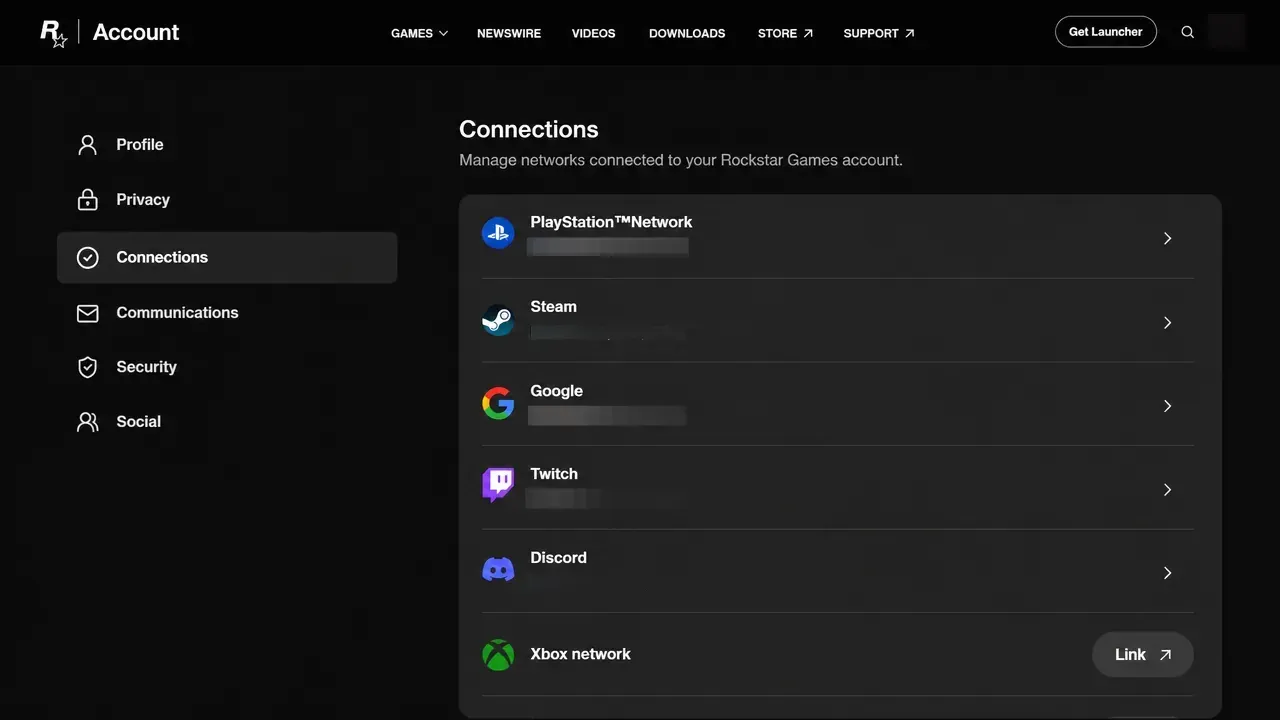
You confirm it worked when Twitch shows as connected under the Connections list. You will also need a GTA Online character that has finished the online tutorial, so a brand-new account may need a little setup first.
Watch one streamer from each team
The rewards are divided across both teams, so pick a streamer from Team Sprunk and a streamer from Team eCola and accumulate watch time on each. You do not have to actively watch. Leaving the streams playing in the background is fine, as long as they keep running.
Look for the Drops Enabled tag, which appears at the top of a streamer’s Twitch chat when their channel is part of the campaign. If a channel does not have it, that stream will not count. Some creators who frequently stream GTA Online for each side are listed below.
| Team Sprunk | Team eCola |
|---|---|
| TGG | GTA Series Videos |
| Sonny Evans | Heideltraut |
| DavyJones | Swiftor |
| Bstaaard | RetroMaggie |
| Vinewood Motors | — |
If none of your picks have Drops enabled at the moment, open the Twitch Drops campaigns page, scroll to the GTA Online section, and use the participating live channels list to find an eligible stream.
Track progress and claim each drop
Rewards are not delivered automatically the moment you hit a milestone. You have to claim them by hand, and unclaimed drops expire once the campaign ends.
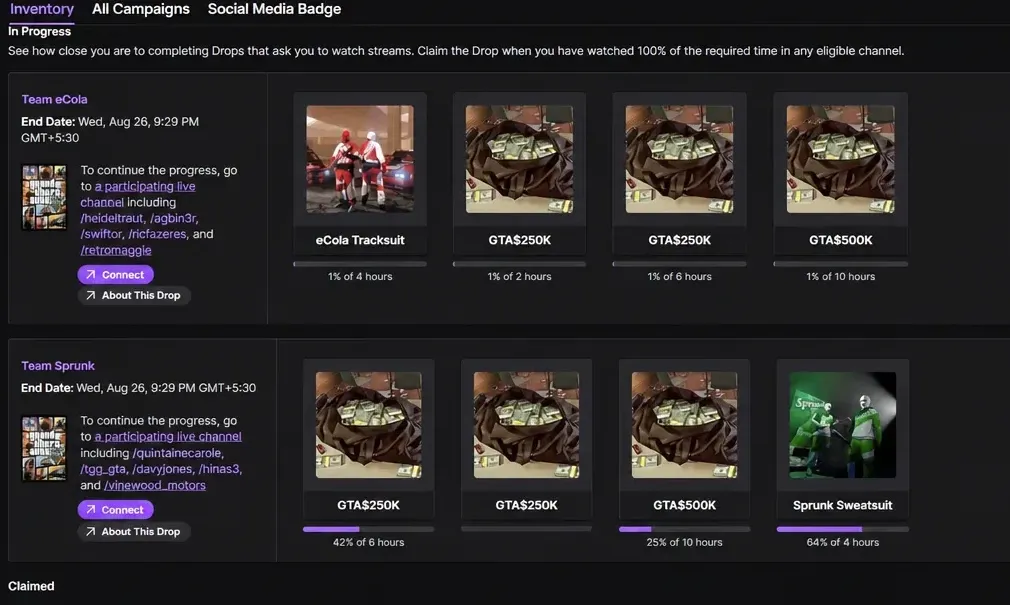
If nothing shows up, the usual causes are a Twitch account that was never linked to Rockstar, watch time spent on a stream without the Drops Enabled tag, or a reward that was never manually claimed before the deadline. Fix the link, switch to a participating channel, and claim from the inventory to resolve each of those.
With the campaign closing on August 26, there is still room to bank the full haul from both teams. Keep a Sprunk stream and an eCola stream running across a few sessions, check your inventory as the bars fill, and make sure every drop is claimed before the window shuts.