Marvel Tokon: Fighting Souls lets PlayStation 5 and PC players fight each other directly, and turning that on takes one setting inside the matchmaking menu. Arc System Works confirmed full crossplay for the game, so you can queue with friends no matter which of the two supported platforms they own.
Quick answer: Open Battle mode, start a Casual or Ranked match, then in Matching Settings set Match Platform (fourth row) to All. That puts you in the shared PS5 and PC pool.
Which platforms can play together
Crossplay is limited to the platforms the game actually ships on. Marvel Tokon launches on PlayStation 5 and PC through Steam and the Epic Games Store, with Sony Interactive Entertainment as publisher. There is no Xbox or Nintendo Switch 2 version, so those systems are out of the crossplay pool entirely.
| Platform | Crossplay with PS5 | Crossplay with PC |
|---|---|---|
| PlayStation 5 | Yes | Yes |
| PC (Steam / Epic Games) | Yes | Yes |
| Xbox | Not available | Not available |
| Nintendo Switch 2 | Not available | Not available |
Because only PS5 and PC are supported, crossplay here is simply the ability for those two groups to meet in the same matches. If Arc System Works brings the game to Xbox or Switch 2 later, crossplay support for those systems would need a separate confirmation.
How to enable crossplay in Marvel Tokon
The toggle lives in the matchmaking settings, not in a global options menu, so you set it each time you look for an online match. The same steps worked during the open beta, which already featured PS5 and PC crossplay.
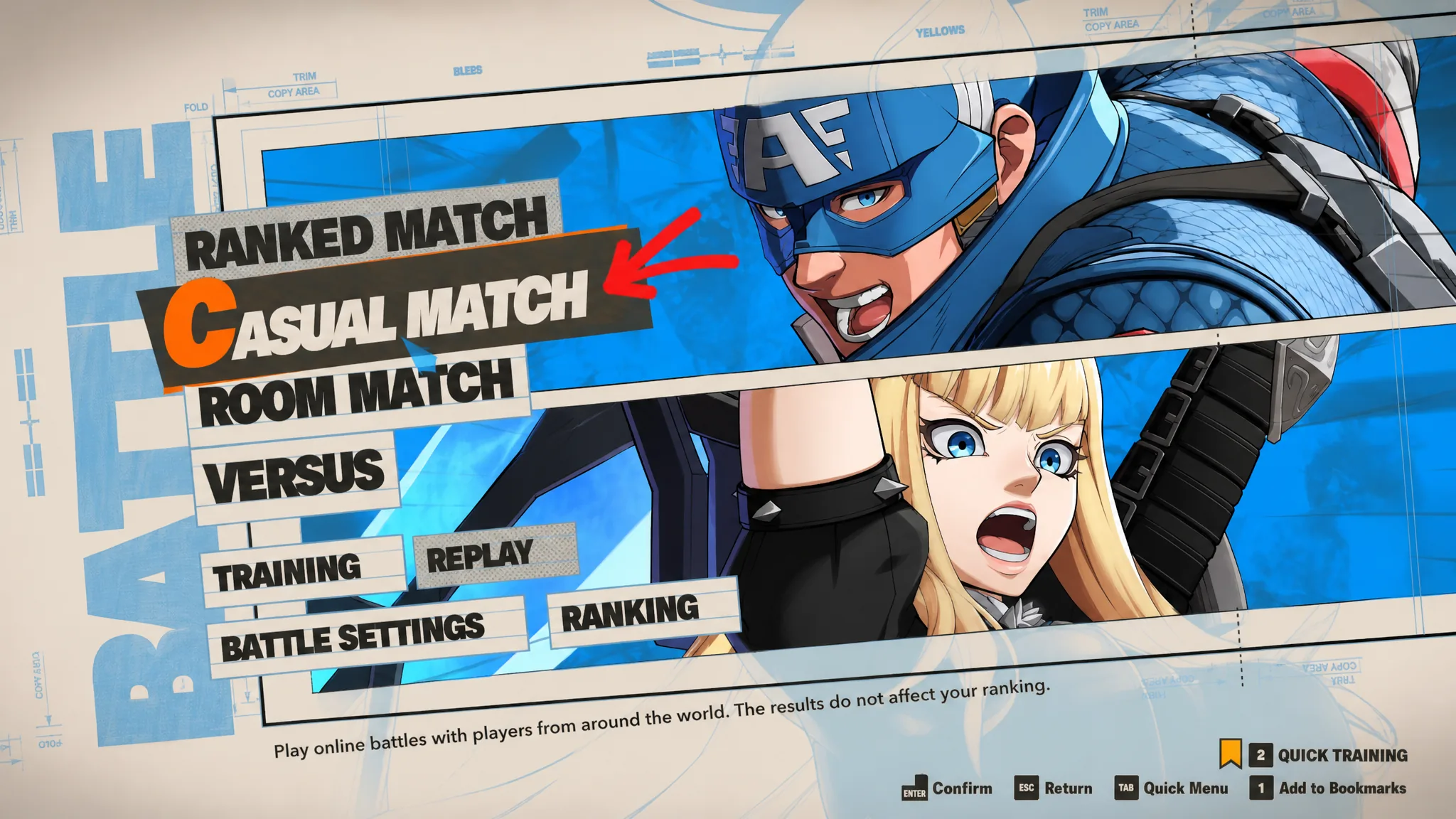
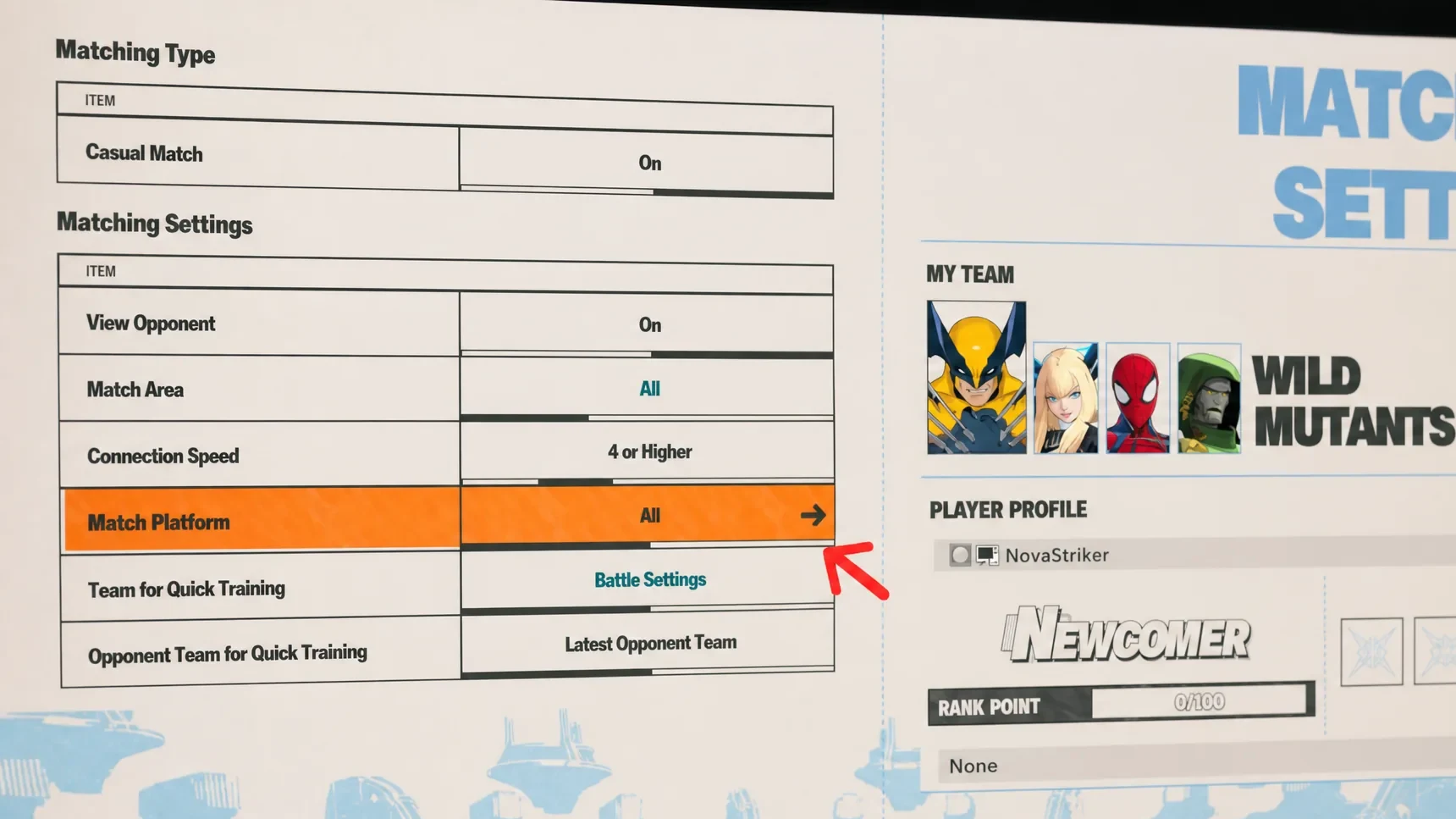
If you would rather stay off crossplay and only meet players on your own system, set Match Platform to Same Platform Only instead. That keeps PC players against PC players and PS5 players against PS5 players.
Note: Match Platform set to All applies to both Casual and Ranked queues, so there is no separate ranked lockout between PS5 and PC in this game.
Does Marvel Tokon support cross-progression?
Cross-progression is not confirmed. Arc System Works has not said whether progress will carry between PS5 and PC at launch or arrive in a later update. Until there is an official word, treat your account, unlocks, and progress as tied to the single platform you play on.
The practical takeaway is to pick the platform you plan to stick with before investing time. If you split play between a PS5 and a PC, anything you unlock on one may not appear on the other. That decision matters more here than the crossplay toggle, since crossplay only affects who you match against, not where your data lives.
Shared progress is a common request from players who want to move between a console and a Steam Deck or PC. It remains one of the most-asked questions in the community ahead of launch.
There is precedent for this kind of feature arriving after release. Marvel Rivals added cross-progression through account linking in a later season rather than at launch, so it is possible Arc System Works follows a similar path. For now, though, no such system exists in Marvel Tokon, and adding it would depend on platform-specific rules between Sony and any future partners.
Crossplay is the confirmed, ready-to-use feature here, and enabling it is as simple as setting Match Platform to All before you queue. Cross-progression is the piece still missing, so choose your platform with the expectation that your progress stays there unless Arc System Works announces otherwise.