Boomboxes and radios in Roblox let you punch in a numeric sound ID and blast whatever audio clip matches it, and a handful of these IDs are built specifically to be loud. Below is a working set of loud sound ID codes you can paste into any boombox that supports custom audio.
Working loud music codes
Each entry below is a sound ID paired with what it plays. Two entries are freshly added and marked accordingly.
126267754440216— Backrooms Monster (loud, viewer discretion advised) NEW139668725303708— Metal Pipe Falling (extremely loud/earrape-style clip) NEW125417221326880— “silence is loud.” audio clip117492777052206— “What Up Son!” loud meme clip6073491164— Android notification sound at loud volume4769589095— “Can You Hear Me?” loud clip9043274176— “Live It Loud” track7111183238— “What the Dog Doin” loud meme clip366983090— Generic “LOUD AUDIO” clip
How to redeem a sound ID in a Roblox boombox
Sound ID codes only work inside experiences that actually include a boombox or radio object, so the first step is picking a game that supports one.
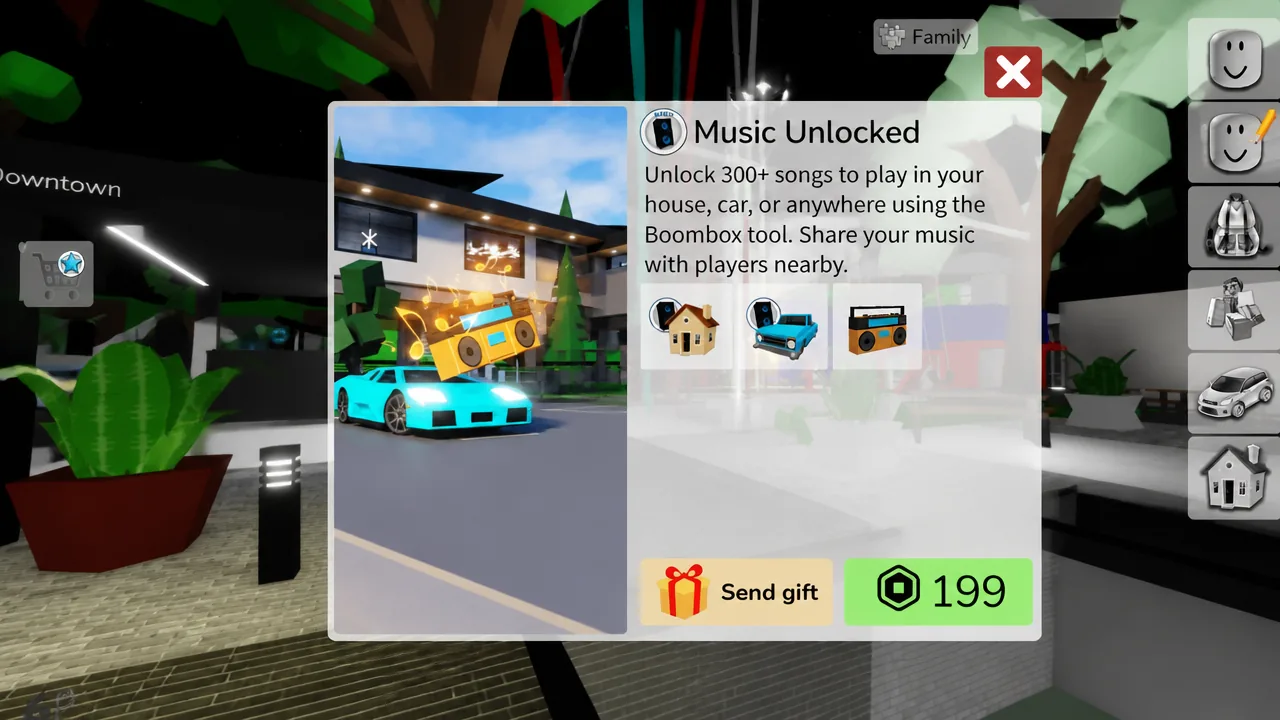
In some experiences, playing custom audio requires owning the boombox’s audio permissions first. If the code entry box instead opens a purchase window, it’s typically for a pass such as “Music Unlocked,” priced at 199 Robux, with a “Send gift” option to buy it for another player. Owning that pass, or already having it in the experience you’re playing, is what unlocks the ability to type in and play custom sound IDs like the ones above.
If a code doesn’t play
If pasting an ID produces no sound, try a different experience that supports custom audio, since not every boombox or radio accepts every code. It’s also worth confirming the experience you’re in actually grants audio playback permissions, since some boomboxes stay silent without the right pass equipped.
Loud sound IDs get removed from Roblox’s audio library from time to time, so an ID that plays today isn’t guaranteed to keep working indefinitely. Checking back for freshly added codes, like the Backrooms Monster and Metal Pipe Falling clips above, is the simplest way to keep a working set on hand for your boombox.